TL;DR
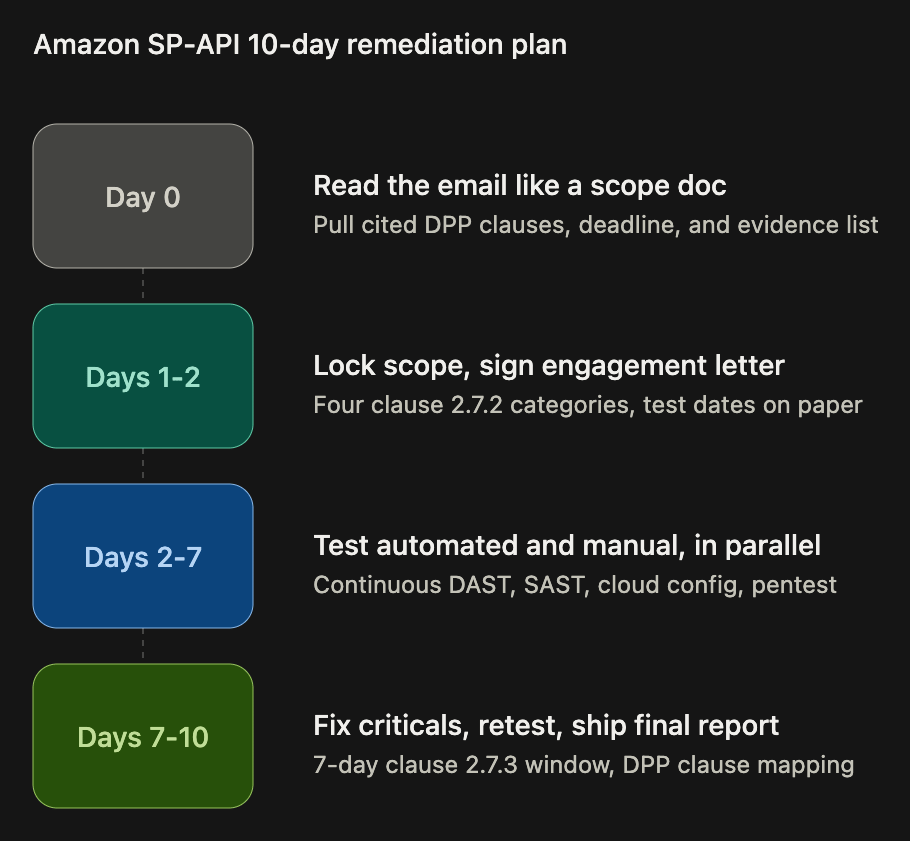
- Day 0: pull the cited DPP clauses, the deadline, and the evidence list out of the email. Don’t open a scope doc until you have them.
- Days 1-2: lock scope and sign the engagement letter.
- Days 2-7: automated and manual testing run in parallel, with a parallel fix track for anything critical found in the first half of the window.
- Days 7-10: fix criticals within the 7-day window in clause 2.7.3, retest, and send the final report.
If you’re here because you received the Amazon SP-API access deactivated email, we’ve got you. Based on our experience in the field and conversations with teams who have been through it, we’ve put together this 10-day plan. Run it yourself, or ask us to run it with you from Day 0.
It’s doable, but it has to start the day you received the email. The sequencing below assumes a compressed 10-day runway and scales cleanly to 30 if the deadline on your case thread is long.
Day 0: Read the email like a scope doc
The Amazon SP-API access-deactivation email carries three things you need to extract before anything else:
- The DPP clauses it cites
- The deadline
- The evidence list it wants back
Then deal with the one constraint that doesn’t care how long your testing takes. Amazon closes a case thread 5 days after it asks a clarifying question and you don’t respond, and the public developer guide confirms that a closed case leaves SP-API access unchanged. So even if the pentest runs longer, the thread needs a reply inside that window.
Before you do anything else:
- Screenshot the email and log the case ID.
- Save a dated copy of the live DPP page. It has no version number, and clause 3 (Audit and Assessment) requires you to maintain books and records to verify compliance during the period of this agreement and for 12 months thereafter. If the policy text shifts mid-remediation, your dated capture is the reference point.
Deactivated vs. restricted role rejected vs. reassessment
Map the notice to the right lane before scoping anything, because scope for a tokens-only restricted role case is narrower than scope for a full deactivation.
Deactivated: Your registered client flips to inactive. Calls to /orders/v0/orders and the Tokens API return 403 Forbidden, and LWA reauthorization fails on the first redirect. Sellers see your app shown as Disabled on their Manage Your Apps page in Seller Central, and the seller can reactivate from there once you’re reinstated. The DPP preamble is blunt that non-compliance “may result in suspension or termination of Amazon Services API access.” This one hits revenue the same day.
Restricted role rejected: General SP-API access keeps working, but the Restricted Data Token path is closed, so any endpoint that returns buyer PII returns a 403. Amazon’s standard rejection wording is: “We have reviewed the information you provided and determined that you will not be given access to Restricted SP-API roles based on your application. Your SP-API access remains unchanged at this time.” The blast radius is smaller, but the reporting requirement is the same as a deactivation.
Reassessment required: Access stays live. Clause 2.7.2 runs a 365-day window, and the reviewer wants your next report. Miss the Amazon data security assessment deadline and the deactivation email follows on a separate thread a few weeks later.
Note: If you’re a private developer using SP-API only for your own seller account, you’re in the same review queue, but your scope is narrower.
Days 1-2: Lock scope, sign the engagement letter
Assessors want test dates on paper before testing starts, and they want scope named in the same language the clause uses. Clause 2.7.2 lists 4 categories:
- Network infrastructure, including public-facing and internal network boundaries, firewalls, routers, and switches
- Cloud environments, including cloud platforms and associated services and configurations
- Application-layer assets, including web applications, APIs, databases and storage systems (file/object)
- Other in-scope systems, as applicable, such as desktop or mobile applications
The August 25, 2026 DPP revision tightened 2.7.2 with expanded requirements “including for APIs,” made clear that every API has to be tested, and listed the four scope categories and the five areas to assess (external-facing components, application functionality, access controls, system configurations, and interfaces) explicitly. A scope that names only the web app and folds APIs into it fails the Amazon data security assessment deadline even if the test itself passes.
Pin these down in 48 hours:
- Environment: Name production or a production-equivalent explicitly. Staging-only tests fail 2.7.2 if staging diverges from prod in auth, data stores, or IAM.
- Methodology: OWASP WSTG, PTES, and NIST SP 800-115 all fit Amazon’s “industry-recognized methodology” wording.
- Test window dates: The reviewer will compare them against the deadline on your case thread.
- An interim-report clause: A signed executive summary is pre-authorized if the final report runs past the deadline.
Send the engagement letter to the reviewer on day 2. The case thread now shows movement, and the 5-day silent-close clock resets.
Days 2-7: Test
On day 2, if everything moves smoothly, run automated and manual testing side by side and prepare a draft report. Manual testing usually kicks off on Day 3 or 4 in practice (credentials, scoped environments, and a kickoff call rarely land on the same day as the engagement letter), so build that into your internal schedule.
The automated layer should be programmed to run:
- Continuous DAST on the web and API layers.
- SAST or SCA on pre-release code paths.
- A cloud config scan: encryption at rest, TLS 1.2+ on every internet-facing endpoint, IAM scope, MFA enforcement, WAF presence.
The scanner output doubles as a scheduled deliverable in your response. SP-API Guard, Amazon’s own AWS-side serverless scanner, stores findings in a read-only S3 bucket within 24 hours. Use it as a supplement to the pentest, but it doesn’t satisfy 2.7.2 on its own.
By day 5, criticals and highs land in a shared ticket channel between the pentest team and your engineers. Critically, do not wait for testing to finish before you start fixing. Anything marked critical on Day 3 has a 7-day clock from discovery under 2.7.3, so the fix has to begin alongside the test.
Within day 7, a signed interim executive summary goes to the reviewer if the case deadline lands before the final report does.
Days 7-10: Fix criticals, retest, ship
Days 7-10 is the tough stretch, because clause 2.7.3 asks for criticals within 7 days of discovery and highs within 30. The DPP has no extension clause for either deadline, and the window starts at discovery (not the report date), so findings surfaced on Day 3 of testing hit their 7-day deadline exactly as engineering picks them up. If you sequence the next two days the way below, the window closes cleanly.
Day 7-8: Fix criticals
During days 7-8, deal with all the critical vulnerabilities identified during the pentest. Triage them by the clause 2.7.3 clock first, with anything marked critical getting closed before the 7-day window on its discovery date runs out, and high-risk findings queued inside the 30-day window behind them.
Day 9: Retest every critical and high against the original PoCs
The retest is run by the same assessor so the final report carries one authorship line and one set of findings numbers from the original test through to the fix verification. Use the same request bodies and session fixtures as the first run. A new 403 or 404 against the original PoC is the fix verification the reviewer wants attached. Book the retest slot during Day 1 scoping — if your assessor is on another engagement, Day 9 slips to Day 11 and the whole timeline collapses.
Day 10: Ship the final report
Every finding carries its original ID, the fix verification result, the commit or ticket that closed it, and the clause it maps back to.
Your reply on the case thread attaches:
- The final report and the interim summary already on file
- 30-day scan evidence under 2.7.1
- Cloud config evidence: KMS key policies, S3 bucket policies, SQS queue policies
- The remediation log
- A data flow diagram showing PII paths
- A short plan of action for mediums
Reply/appeal template
Keep it tight. A clean structure beats a long cover letter, whether it’s an amazon sp-api access deactivated case or a sp-api restricted role rejected one.
- Subject: Case ID, application name, “DPP remediation evidence attached.”
- Para 1: Acknowledge the clauses cited and restate the deadline.
- Para 2: Pentest firm, methodology, test window, and the four scope categories tested.
- Para 3: Criticals and highs found, fixed, and retested. Cite the clause 2.7.3 remediation windows explicitly.
- Evidence list: Final pentest report with retest verification, interim executive summary (if filed), 30-day scan report under 2.7.1, cloud config evidence, remediation log, data flow diagram, credential management and incident response policies.
- Close: One line requesting reinstatement under the clauses cited, with the case ID.
For a restricted-role case, keep the same structure but narrow the scope to the restricted-role data path. Attach the Data Security Assessment items: data flow architecture for restricted operations, PII protection controls, data storage and handling, and incident response procedures.
Prevent a repeat
So to prevent the next deactivation, map your existing security program to the DPP’s named artifacts. Most mature teams already run the controls. They just need to produce evidence the reviewer recognizes.
Assign one engineer as the compliance owner, with commit access to a versioned evidence repo. The repo holds three living artifacts: the annual pentest report under 2.7.2, the 30-day scan report under 2.7.1 generated out of CI, and a quarterly diff of the Key Security Control Guidance page as a markdown changelog.
Set up this way, the next Amazon SP-API access deactivated email never reaches your inbox, and if it does, you close it from the evidence repo in a single reply.
Amazon deadline? Get an expedited SP-API pentest
If the deactivation email landed today, or your Amazon data security assessment deadline is within 14 days, Astra’s expedited SP-API pentest kicks off within 24 hours. Scanning goes live the same day, and manual testing is scoped against the four categories clause 2.7.2 lists.
You get a signed interim executive summary to file against the case, a final report with retest verification, and a DPP clause mapping for every finding.
Bring the case ID and the clauses cited. On a 30-minute call, we’ll walk them through how to get it done quickly.