Shopify phishing has evolved from the laughable “Dear Shopify Merchant” email into one of the most reliable account-takeover vectors in ecommerce. On the same pattern, Shopify shops have recently been hit with a checkout hijack campaign running through HulkApps, Swym, and Selleasy extensions, where shoppers on legitimate stores were redirected to a fake payment page on biliing[.]top that captured their card details before forwarding them to the real Shopify checkout.
German developer Roman Zipp documented the HulkApps path in detail on October 10, 2026, and developer Dan Sutherland surfaced the parallel Swym case on LinkedIn in the same week.
In this blog, we cover how an attack like this works, why it matters more in 2026 than earlier variants, and how to defend against the specific techniques in active rotation right now.
How it Happens
Storefront supply-chain attacks like the HulkApps hijack follow a common pattern. A legitimate Shopify app ships a storefront script that Shopify reviews, versions, and serves from its CDN, and the merchant installs it and forgets about it.
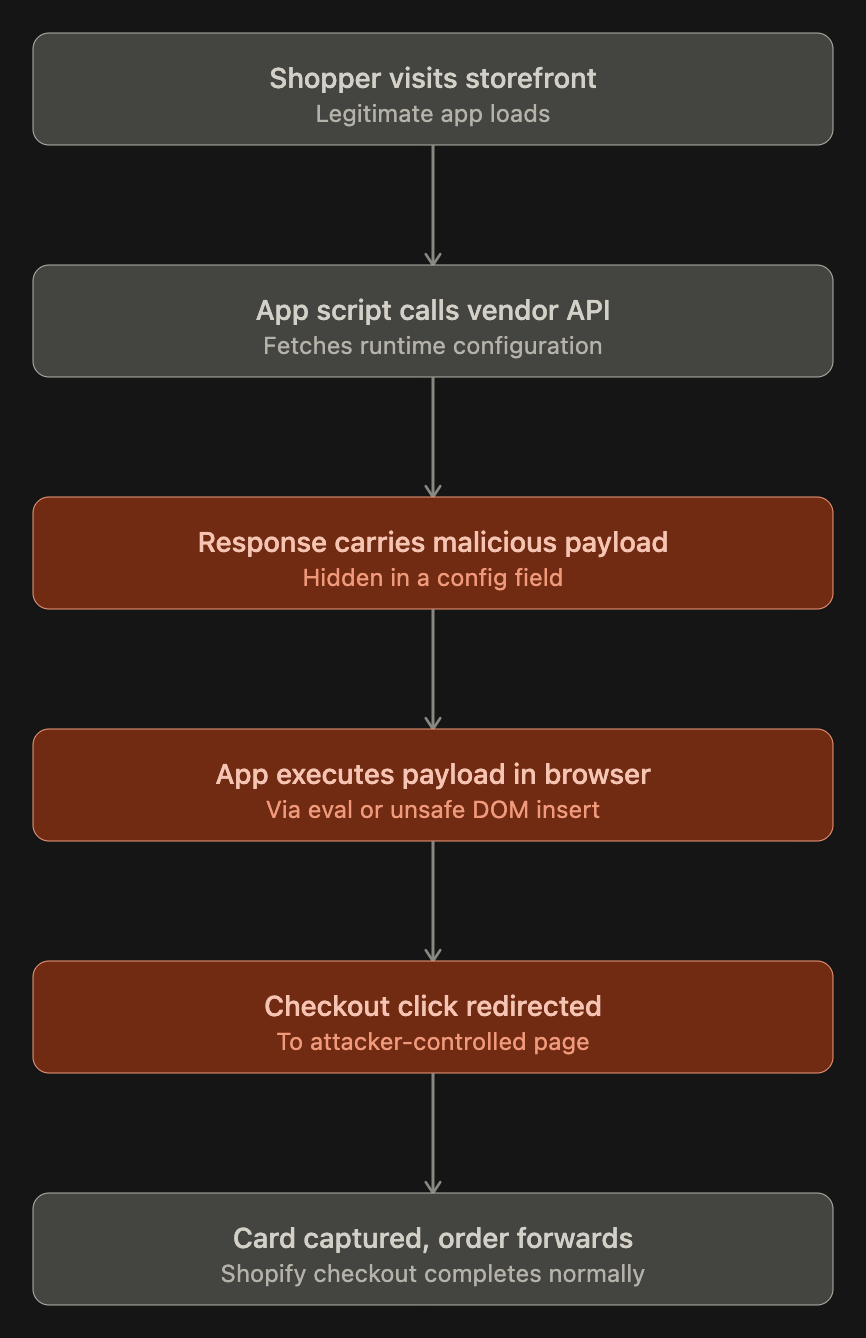
On every page load, that script calls back to the vendor’s own API for its configuration, and the configuration is treated as trusted input.
If an attacker gets write access to the vendor’s configuration (through a compromised merchant account on the vendor dashboard, a compromised vendor employee, or the vendor’s own infrastructure), they can push code into every store running that app without accessing the merchant’s theme or Shopify’s checkout.
The HulkApps Case, in detail
Zipp’s investigation began when his checkout on mechanicalkeyboards.com redirected him to biliing[.]top. He checked the URL, confirmed it was not Shopify, and opened Chrome DevTools. The Checkout button had no suspicious listeners attached directly, which told him the hijack was listening higher up in the DOM (document object model, i.e., the browser’s live representation of the page) on window or document. In simpler terms, the malicious script was eavesdropping on the whole page rather than hooking the button alone.
Using Chrome’s event listener breakpoints, he paused on every click listener and found a function literally named hijack, labelled by Chrome as VM142 (its convention for a script injected at runtime). To find the source, he overrode addEventListener with a short shim that paused execution whenever a listener’s code contained the word “hijack”. The call stack pointed at hulkcode.js, served from cdn.shopify.com, authored by HulkApps.
Monitoring the extension’s traffic revealed the delivery mechanism. On every page load, hulkcode.js sent one POST to productoption.hulkapps.com/api/v2/store/get_all_relationships, and the response carried an advanced_users.custom_js field holding roughly 22.7 kilobytes of unobfuscated JavaScript.
The storefront script executed that string in the shopper’s browser. A session storage key called __ctf_shim_handoff_done_v1 ensured each browser was redirected only once per session, which is why merchants testing from their own laptops kept seeing clean checkouts even while the hijack fired for every new visitor.
Dan Sutherland’s Swym Wishlist Plus case followed the same architectural shape through a different field. A configuration value meant to hold the “Add to Wishlist” button label instead carried HTML with an onerror event handler, which fired at checkout and triggered the same redirect behavior. Swym shipped a fix on October 14 (version 7.0.18) that introduced an escapeHtml() helper across twelve places where configuration had been written straight into the page.
Why it Matters
The HulkApps hijack is a repeatable attack pattern aimed at a platform that powers roughly 2.83 million live stores worldwide. A single compromised app pushes its payload to every store that has it installed, so attacker effort scales once while damage scales linearly across the install base.
HulkApps and Swym Wishlist Plus each sit on tens of thousands of stores, which is why serious payment-skimming groups are now moving upstream to the app layer. Shoppers pay the downstream cost, often without noticing, because the attack forwards them to the real Shopify checkout afterward and the order completes normally.
The compliance exposure is very costly for Shopify merchants. All 50 US states plus Canada’s PIPEDA impose breach notification obligations once personal information is exposed, with state-level timelines ranging from 30 to 90 days and California’s CCPA/CPRA adding a private right of action worth $100 to $750 per affected consumer in statutory damages.
On top of this, Visa and Mastercard treat a confirmed account data compromise as a trigger for mandatory PCI Forensic Investigator (PFI) engagement at the merchant’s cost, which routinely runs $50,000 to $200,000 before any card brand fines (typically $5,000 to $100,000 per month until remediation) or chargebacks are counted. For mid-size SMBs, the compliance tail on a confirmed HulkApps-class incident can comfortably exceed the direct fraud losses by an order of magnitude.
What Merchants Should Do Right Now?
The defenses fall into two buckets: things a merchant can act on in Shopify Admin this week, and a standing cadence that catches the next variant.
1. Audit installed apps today
Open Settings → Apps and sales channels, remove anything unused, and for apps that remain, note whether they inject a storefront script, what scopes they hold, and whether their vendor dashboard has a “Custom JavaScript” or “Custom HTML” field. Those fields are the specific attack surface the HulkApps case exploited.
2. Rotate credentials and enable phishing-resistant authentication
Rotate your Shopify admin password and enable passkeys or an authenticator app on every account with admin access. Do the same on every connected app vendor dashboard (HulkApps, Swym, Selleasy, Privy, Hextom, Qikify, and any other third-party vendor you have an account with), because a compromised merchant account on the vendor side is one of the possible entry points for this attack class.
3. Run the incognito checkout test weekly
Open a fresh private browsing window, add any item to the cart, press Checkout, and verify the destination is your custom domain or checkout.shopify.com. Because the HulkApps payload fired only once per session per browser, test from multiple devices and clear browser storage between runs.
4. Monitor outbound network traffic monthly
Record a full checkout in Chrome DevTools Network tab and diff the hostnames against last month’s list. Any new domain, especially lookalikes of Shopify, checkout, billing, or account, or sketchy TLDs like .top, .xyz, or .icu, needs investigation the same day.
5. Audit staff and collaborator permissions quarterly
Shopify’s staff permissions are granular. Remove ex-employees, ex-contractors, and anyone whose role no longer needs admin access, and scope what remains to the minimum the role actually requires. Over-permissioned accounts increase the blast radius, i.e., how far a single compromised login can reach.
6. Enforce a Content Security Policy on the storefront
A Content Security Policy (CSP) is a browser-enforced allowlist of script sources, i.e., the browser refuses to load scripts from any domain not on your pre-approved list.
For higher-volume stores and Shopify Plus merchants, a tight CSP would have blocked the fake checkout redirect at the browser level even if the compromised app continued to execute. Document your allowlist and review it every time you install or update an app.
7. Document a kill switch and an incident playbook
Decide now, in writing, who has authority to turn off apps, pull the storefront offline, and rotate credentials, and make sure that person has standing access without needing to escalate.
Your playbook should include turning off the suspected app, clearing browser storage during testing (the Swym case showed that disabling the app did not immediately stop the behavior because the config was cached in localStorage), notifying your payment processor, and preparing customer communications.
Where Astra’s Autonomous Penetration Testing Fits in
Shopify’s shared responsibility model leaves the storefront, custom apps, Admin API integrations, and any custom backend in your lap. Those are the layers Astra’s autonomous pentest helps you harden against cyberattacks.
For a Shopify store, that means Astra’s autonomous pentest attempts to exploit every finding it surfaces against the internet-exposed storefront and custom-built code, reporting back only what is reachable and exploitable, with full PoC and remediation path.
Moreover, our autonomous pentest agents can also surface the storefront’s third-party script inventory, flag newly appearing scripts against the known baseline, test the Admin API surface for authentication and authorisation flaws, and continuously validate the controls that PCI DSS 4.0.1 requirements 6.4.3 and 11.6.1 are written to enforce.
Not sure whether you need a Shopify penetration test? Take this questionnaire to find out.
- Has your storefront been pentested in the last twelve months?
- Do you have a current inventory of every third-party script running on your checkout page?
- Are your Admin API tokens stored in a secrets manager, scoped, and rotated?
- Do you have Content Security Policy headers configured on your storefront?
- Would you detect a new script appearing on your checkout within 24 hours?
- Do you have a tested incident playbook for a checkout-hijack scenario?
- For Plus merchants: have you mapped every script on the payment page for PCI DSS 4.0.1 compliance?
If three or more of those are a “no” or a “not sure,” a Shopify security assessment with Astra is worth a conversation.
Book a demo today here.
Final Thoughts
The HulkApps hijack is the kind of incident that becomes a reference point, because it demonstrated that the economic structure of the Shopify app ecosystem creates a reliable supply-chain attack path. Any app that fetches runtime configuration from the vendor’s own servers and treats fields in that response as code or as HTML inserted into the DOM carries the same risk profile, whether the attacker has noticed yet or not.
The practical lesson for merchants is that app review at install time is only the first checkpoint. The app’s behavior at runtime, every day it stays installed, is the surface that actually matters. Zipp’s investigation is the model for how to watch that surface, and the discipline of running those checks weekly, paired with periodic third-party testing of the stack as a whole, is what will keep your Shopify store safe.