You might not run PHP yourself. That doesn’t mean you’re safe from PHP2Shell, which is why we created the PHP2Shell Security Checklist.
Your SaaS provider might use PHP. Your hosting provider might manage PHP runtimes on your behalf. A third-party application could bundle PHP inside a container or software package you didn’t know existed.
This is what makes PHP2Shell a supply-chain security concern. The vulnerability sits in the PHP runtime itself, so an application can inherit the risk even when its own code is secure.
CISA’s October 21 alert calls for immediate patching. If a vendor manages the affected infrastructure, you need to know whether it has applied the fix and whether your data or systems could have been exposed before remediation.
Here’s what I’d ask every relevant vendor.
1. Do you use an affected PHP runtime?
Start with exposure. Don’t assume a vendor is unaffected because PHP isn’t mentioned in its product documentation.
Ask your vendors:
- Do any of your applications, servers, containers, or bundled components use PHP?
- Have you assessed your exposure to CVE-2026-109618 and CVE-2026-109619?
- Did you check production, staging, legacy systems, and infrastructure managed by third parties?
- If you rely on a hosting provider or another vendor to manage PHP, have they confirmed that the affected runtime has been patched?
- If you believe you’re unaffected, what did you check to reach that conclusion?
This matters particularly for vendors that process sensitive data, hold your API keys, connect to your production environment, or provide business-critical services.
What to look for: A clear statement of the systems assessed, the affected components identified, and the evidence behind the vendor’s conclusion.
A simple “we don’t use PHP” isn’t enough if the vendor hasn’t checked its dependencies and managed infrastructure.
2. Have you patched the actual PHP runtime?
Updating WordPress, Drupal, Joomla, a plugin, or application code does not fix a vulnerability in the PHP runtime underneath it.
Ask your vendors:
- Have you installed the appropriate PHP2Shell security fix across all affected environments?
- Which PHP version or vendor-maintained package are you running now?
- Have you checked the applicable security advisory if your operating system or hosting provider backports fixes?
- Have you restarted the relevant PHP processes and verified that the patched runtime is running?
- Are any production systems, containers, or legacy applications still awaiting remediation?
- If you cannot patch immediately, what temporary protections are in place, and when will the update be completed?
The fixed releases published for the supported PHP branches are PHP 8.2.35, 8.3.36, 8.4.27, and 8.5.12. Older branches need special attention: some distributions and long-term-support vendors provide backported fixes, while unsupported installations may require an upgrade or another supported remediation path.
What to look for: The deployed runtime version or applicable vendor advisory, evidence of the update, confirmation that the relevant processes were restarted, and verification that the fix is active.
Don’t accept a patching claim at face value. The objective is to establish that the vulnerable runtime is no longer running—not simply that a change was scheduled or an application was updated.
3. Could your data or credentials have been exposed?
Patching closes the vulnerability. It doesn’t tell you what happened before the patch was applied.
PHP2Shell can allow unauthenticated remote code execution, and a related exploitation path can expose sensitive information from PHP process memory, including credentials, tokens, and API keys.
Ask your vendors:
- Did you identify any attempts to exploit either vulnerability?
- Have you investigated whether any affected systems were compromised before patching?
- Could those systems access our customer data, source code, API keys, database credentials, or cloud secrets?
- Did you find evidence of unauthorized access, unexpected processes, modified files, or suspicious outbound connections?
- Have potentially exposed credentials been revoked or rotated?
- Could an attacker have used access to the affected system to reach connected applications or services?
- If the investigation is incomplete, what remains unknown, and when will you provide an update?
What to look for: A written impact assessment that separates confirmed findings from suspected exposure and inconclusive results.
A vendor saying it has found no evidence of exploitation is useful, but the scope of its investigation matters. Ask what logs and systems it reviewed, how far back the investigation goes, and whether any gaps limit its conclusions.
4. What are you doing to detect suspicious activity?
A patched system can still require investigation if it was exposed before remediation.
Ask your vendors whether they have reviewed web server and application logs for unusual requests, unexpected PHP worker errors, unexplained process activity, and suspicious outbound connections. They should also explain whether relevant logs were available for the period under investigation.
If the vendor identifies suspicious activity, ask how it is containing the incident, preserving evidence, investigating possible persistence, and assessing access to connected systems.
These signals do not prove that exploitation occurred. They help guide an investigation.
5. When can you consider the issue resolved?
Before closing the assessment, ask the vendor to confirm that:
- All identified affected runtimes have been patched or otherwise addressed using supported remediation guidance.
- The fix has been verified in the running environment.
- Potential exploitation before patching has been investigated to an appropriate level.
- Potentially exposed credentials have been rotated where necessary, and dependent services have been updated.
- Outstanding risks and investigation gaps have been documented.
- Your organization will be notified if new findings change the impact assessment.
If the vendor hasn’t finished patching or cannot determine whether your data was affected, keep the assessment open and assign a follow-up date.
Note: A PHP2Shell response shouldn’t end when the affected PHP version is patched. Security leaders in Astra’s recent discussion emphasized the need to distinguish between exposure and confirmed compromise, while also accounting for third-party systems that may remain vulnerable.
Use this checklist to assess your immediate exposure, then read Beyond the PHP Patch: How Security Leaders Are Responding to a Week of Critical Incidents for wider incident-response considerations.
How Astra Security can help
At Astra, our focus is not just finding vulnerabilities. It’s helping security teams understand where they’re exposed, validate the risk, and prioritize what needs to be fixed.
Astra’s DAST and Autonomous Pentest capabilities can help identify exposed applications and validate relevant application-level weaknesses within an authorized testing scope.
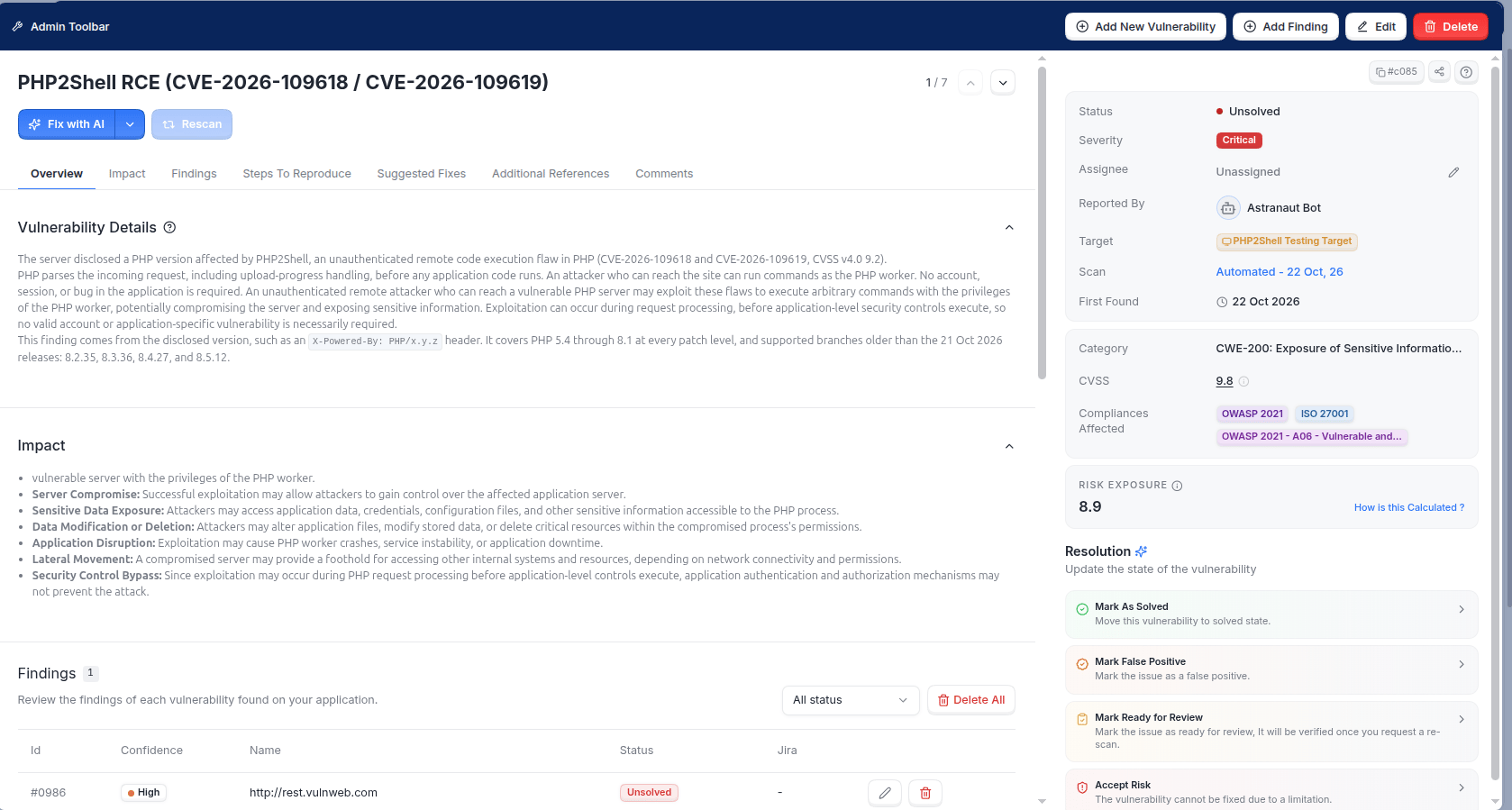
That can help answer an important question: is the application exposed to an exploitable weakness, or has remediation addressed the issue?
But application testing is only one part of the picture. Confirming that every vendor-managed PHP runtime is patched requires deployment evidence from the vendor. Determining whether an attacker accessed sensitive information may also require log analysis and incident-response investigation.
The goal is to combine technical validation with evidence from the teams responsible for the affected systems.

The PHP2Shell Security Checklist: The bottom line
PHP2Shell is a reminder that your security posture extends beyond the applications you build and operate yourself.
A third-party service can introduce risk through its runtime, dependencies, or infrastructure. You need to know whether the vendor has assessed its exposure, applied the appropriate fix, and investigated what might have happened before remediation.
Don’t stop at asking whether a vendor has patched PHP. Ask how it verified the fix, whether your data or credentials could have been exposed, and what evidence supports its answer.