TLDR
- A GitHub code search for the AWS access key pattern /
AKIA[0-9A-Z]{16}/returns almost 500,000 results from an authenticated session. If even 1% are live, that is roughly 5,000 working keys. - GitGuardian’s 2026 State of Secrets Sprawl report counted 28.65 million new hardcoded secrets added to public GitHub in 2025, a 34% year-over-year jump. AI-assisted commits leak at twice the baseline.
- Deleting the commit does not delete the secret. Truffle Security’s CFOR research showed 4-character SHA-1 brute-force is enough to recover secrets from deleted forks and private repos.
- 64% of credentials flagged as exposed in 2022 were still valid in early 2026. The leak is not the end of the problem. The decision not to rotate is.
Every engineer reading this has at least once committed a secret by accident, noticed within the hour, force-pushed the fix, and gone back to work slightly embarrassed. The dangerous part is that the “fix” we all learned from the first Stack Overflow answer we googled does almost nothing.
The next 1,500 words are about why deleting a leaked secret is theatre, how easily attackers find the ones we did not catch, and what posture actually bounds the damage when a credential do
Okay, just one search
GitHub’s code search accepts regex if you are signed in. So I tried a single query against the AWS access key format:
/AKIA[0-9A-Z]{16}/
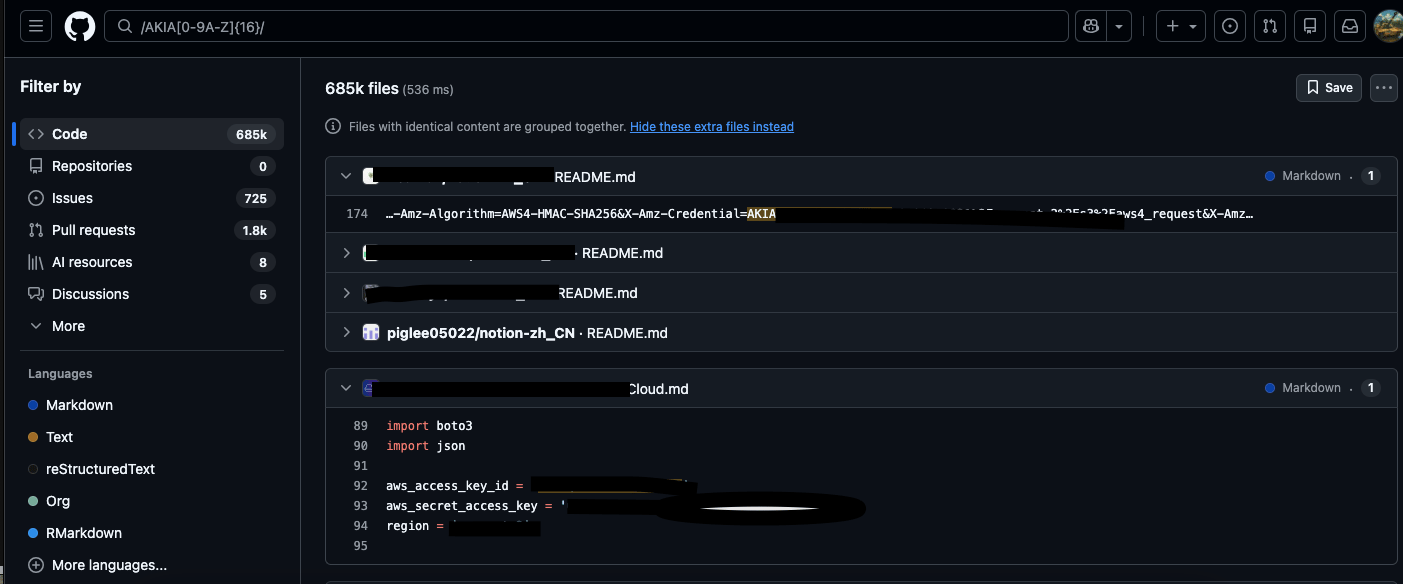
Almost 500,000 results. Half a million. Lol.
Let’s assume only 1% are live, and the rest are honeytokens, test fixtures, documentation examples, or keys already revoked by GitHub’s or vendors’ scanning pipelines. That is still roughly five thousand working AWS keys, publicly addressable through two clicks and a regex, by anyone with a free GitHub account.
As a threat actor, the damage I could do with one of these is generous. I could disable GuardDuty findings before the SOC sees them, or spin up crypto mining rigs on someone else’s bill.
The economics have never been this favourable for the attacker side, and this is before I talk about Stripe (sk_live_), OpenAI (sk-proj-), Anthropic (sk-ant-api03-), Slack (xoxb-), GCP service accounts (JSON with a private_key field), and GitHub’s own personal access tokens (ghp_), which are, somewhat embarrassingly for GitHub, also sitting in the result list.
So can you delete it?
Yes, but it does not save you.
Devs who notice a leaked secret usually remove it in the next commit and move on. That removes the file from the working tree. It does not remove the commit from the git object graph. The old commit still exists in the repo’s .git/objects/pack store, reachable by its SHA-1, until a git gc pass eventually prunes dangling objects. On a public repo, that window is days to weeks. Any crawler that captured the commit before the garbage-collection sweep still has it. GitHub’s documentation now explicitly treats a pushed secret as compromised the moment it hits a public repo. Rotating is the actual defence. Deleting the commit is theatre.
Forks make deletion worse. GitHub stores all forks of a repository in a shared object network. Every fork sees every commit’s object, regardless of which branch references it or whether the branch still exists. Truffle Security published the attack in 2024 and coined the term Cross Fork Object Reference (CFOR).
Then there is everything outside the code. 28% of secret leak incidents in 2025 originated outside source control entirely, in Slack, Jira, Confluence, internal wikis, and the collaboration surface that now includes AI assistant chat logs. A credential screenshotted into a Jira ticket at 2 a.m. carries the same blast radius as one committed to main. The screenshot is arguably worse, because most secret scanners do not OCR images by default.
Best of all, none of it rotates. Of the credentials GitGuardian originally flagged as exposed in 2022, 64% were still valid and exploitable as of early 2026. Secrets have grown 152% since 2021 while the active dev base grew only 98%. Much like most security problems today, this one is also accelerating faster than the people available to fix it.
So how do you actually delete it properly?
“You revoke it.” Period. Treat “deletion” as a wrapper around rotation, not an alternative to it. The order of operations that actually works:
- Revoke the credential at the source first.
- Issue a replacement credential with the narrowest scope the app actually needs.
- Rotate every downstream system that consumed the old credential.
- Only then, clean the git history.
git filter-repoorBFG Repo-Cleaner to rewrite the history. Ask GitHub Support to purge the cached views. Contact fork owners if the repo has any. (Note: None of this makes the credential safe. It only makes the repo cleaner.) - Monitor for use of the old credential for 90 days.
Need a scanner first? Before the rotation runbook and the blast-radius posture, your detection layer has to actually work. Start here: the secret scanning tools worth evaluating in 2026.
Final Thoughts
Assume secrets will leak, and design the response for the day one does.
Detection is the baseline, and our secret scanning covers it across repos, CI, IaC, and the collaboration tools where more than a quarter of incidents originate. But detection alone does not stop a leaked key from becoming an incident. Continuous pentesting does.
Continuous pentesting combined with periodic red teaming shrinks the space an attacker can operate in if they exploit a leaked key or try to move laterally from it.
At Astra, we offer red teaming, plus continuous DAST and autonomous pentesting. Together, they match your deployment cadence rather than your fiscal year.
Book a demo. Do not wait for the leak to be yours.