When a new PHP vulnerability is disclosed, the first question is simple: Is your PHP runtime affected, and what should you do?
To help simplify the process, Astra has launched a free PHP2Shell Checker that lets you enter a public URL, check the PHP version it exposes against the listed fixed releases, and understand what to investigate next.
Check your PHP exposure for free →
What Is Astra’s PHP2Shell Checker?
Astra’s PHP2Shell Checker helps developers, security teams, and website owners assess whether the PHP version associated with a public endpoint falls below the fixed-version thresholds listed in the PHP2Shell advisory.
The tool checks publicly available response headers, including X-Powered-By and Server, for PHP version information. Keep in mind that a hidden PHP version does not mean the system is secure. When the version is unavailable, verify the actual runtime with your hosting provider or server administrator.
How to Use the PHP2Shell Checker
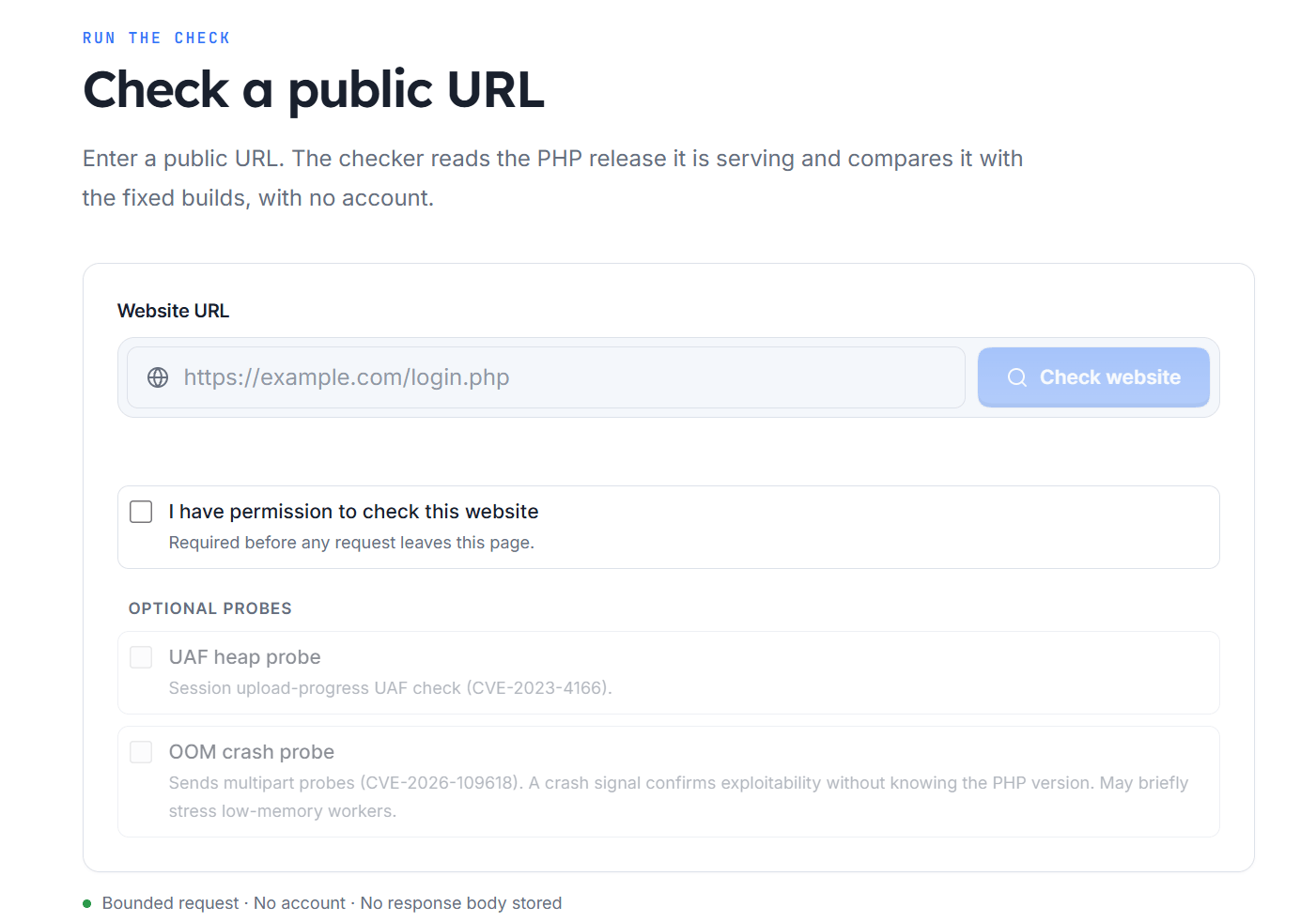
1. Enter Your Website URL
Open the PHP2Shell Checker and enter the public URL you want to assess.
Note: Only test websites and systems you own or have permission to assess.
2. Check the PHP Version
The checker examines the available response headers and compares the detected PHP version against the listed fixed releases. If the version is hidden, confirm it directly from the PHP runtime serving your application. The command-line PHP version may differ from the version used by PHP-FPM, Apache, or another web server configuration.
3. Review the Results and Take Action
Use the result to determine your next step.
| Finding | Recommended action |
| Version is below the listed fixed release | Confirm the installed build and prioritize remediation. |
| Version meets the listed fixed threshold | Verify that the patched runtime is deployed across all relevant instances. |
| PHP version cannot be identified | Check the runtime directly or contact your hosting provider. |
| Vendor supplies backported fixes | Consult the vendor’s security advisory and package changelog. |
Optional Security Probes
Beyond version detection, the checker includes optional probes for additional PHP vulnerabilities:
- CVE-2023-4166: A session upload-progress use-after-free vulnerability..
- CVE-2026-109618: An out-of-memory crash probe.
These checks are separate from the initial version assessment. The out-of-memory probe may temporarily place additional stress on PHP workers, particularly in low-memory environments.
Review each probe’s description and potential operational impact before running it. Avoid enabling disruptive checks on production systems unless you understand and have approved the associated risk.
What to Do If Your PHP Version Is Vulnerable?
Identifying a potentially vulnerable version is only the first step. Follow these measures to reduce exposure:
• Update PHP: Upgrade to the appropriate fixed release or apply a verified security patch supplied by your operating system or hosting provider.
• Restart or redeploy services: Ensure PHP-FPM, Apache, containers, and other relevant processes use the updated runtime.
• Check every deployment: Review production servers, containers, background workers, staging environments, and other application instances.
• Investigate suspicious activity: Review server logs and look for unusual requests, unexpected errors, suspicious processes, or unauthorized file changes.
• Rotate exposed credentials: If exploitation is suspected, identify secrets accessible to the affected process and rotate potentially compromised credentials.
Patching prevents further exploitation of the fixed vulnerability, but it does not establish whether an attacker accessed the system before the update.
How Astra Helps You Stay Ahead of Emerging PHP Vulnerabilities?
Astra’s PHP2Shell Checker quickly assesses the PHP version associated with a public endpoint. For broader security coverage, Astra’s DAST scanner and autonomous penetration testing platform help identify vulnerabilities.
Astra’s Lightning Scan supports rapid vulnerability checks and regular scans for deeper security assessments, helping you identify security gaps and prioritize remediation as new vulnerabilities emerge.
The goal is to move beyond identifying potentially vulnerable software and understand what needs fixing, verification, and monitoring.
Check Your PHP Version With Astra
If you manage PHP-based websites or applications, start by checking whether the PHP version exposed by your endpoint meets the listed fixed-version thresholds.