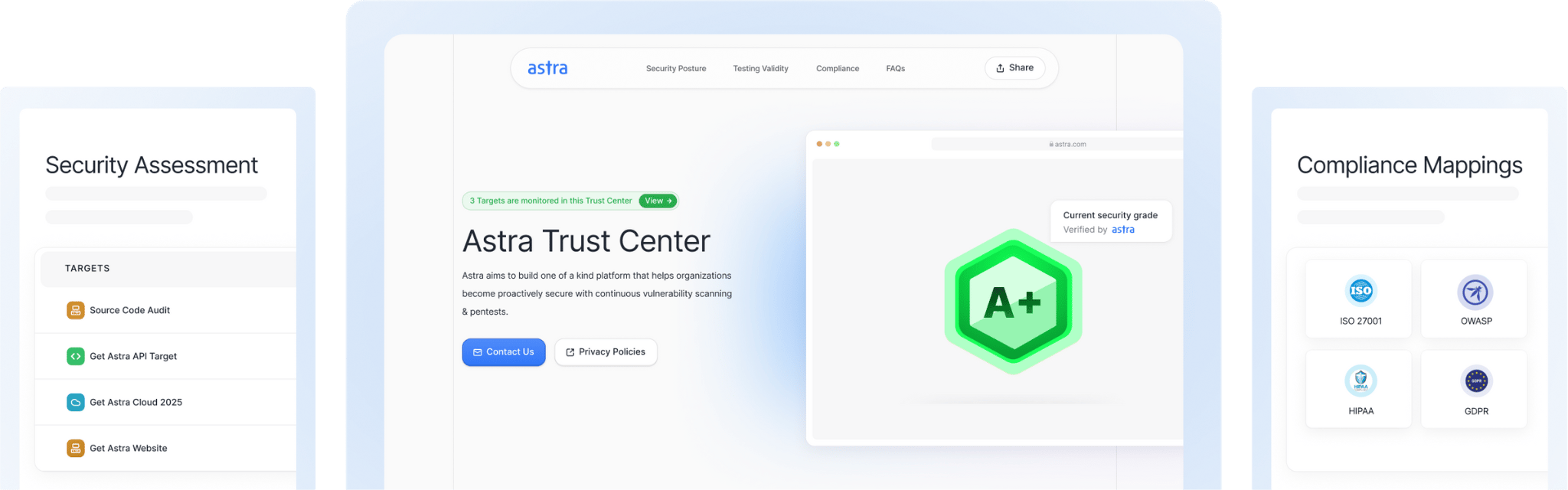
Security reviews are changing. More buyers want live, verifiable proof of your security posture and not a static PDF that changes by dawn. Astra Trust Center helps teams answer due diligence questions upfront, cutting back-and-forth questionnaires and keeping deals moving.
At the same time, attackers aren’t getting more creative, just more effective. The 2025 Verizon DBIR found that 88% of Basic Web Application Attacks involved stolen credentials. In other words, authentication and access control remain the front door. That mirrors long-running guidance from OWASP, where Broken Access Control tops the risk list and appears in 94% of tested applications.
Also, observability is already part of your day-to-day. As teams lean on OpenTelemetry for traces, metrics, and logs, we’ve made sure security becomes a part of it.
That’s the backdrop for this release. Everything we’ve shipped this season pushes in three directions: first, proving trust continuously with a modern Trust Center that give buyers real-time assurance; second, expanding real-world coverage through custom login scripts that handle MFA and complex flows, clearer connectivity insights, and smarter rescans and scheduling that mirror how teams actually work; and third, meeting you where you are by ingesting API traffic via OpenTelemetry, adding faster self-serve controls, and polishing the UI so everyday tasks take fewer clicks.
1. Trust center launch
The Problem
Security reviews drag on when buyers get static PDFs and partial context, forcing long questionnaire cycles and repeated evidence-sharing.
The Solution
We launched a Trust Center that stays up to date automatically. It shows live security posture, pentest results, and compliance status. You can put a Dynamic Trust Seal on your website, decks, or emails that links straight to your Trust Center. You can fully brand it (logo, colors) and control what’s visible (posture, assessments, compliance, APIs, FAQs).
The Impact
Buyers and partners get real-time confidence in your security, and you spend less time answering repetitive questionnaires. Deals move faster because the proof is public and current.
2. Custom login scripts for web scans
The Problem
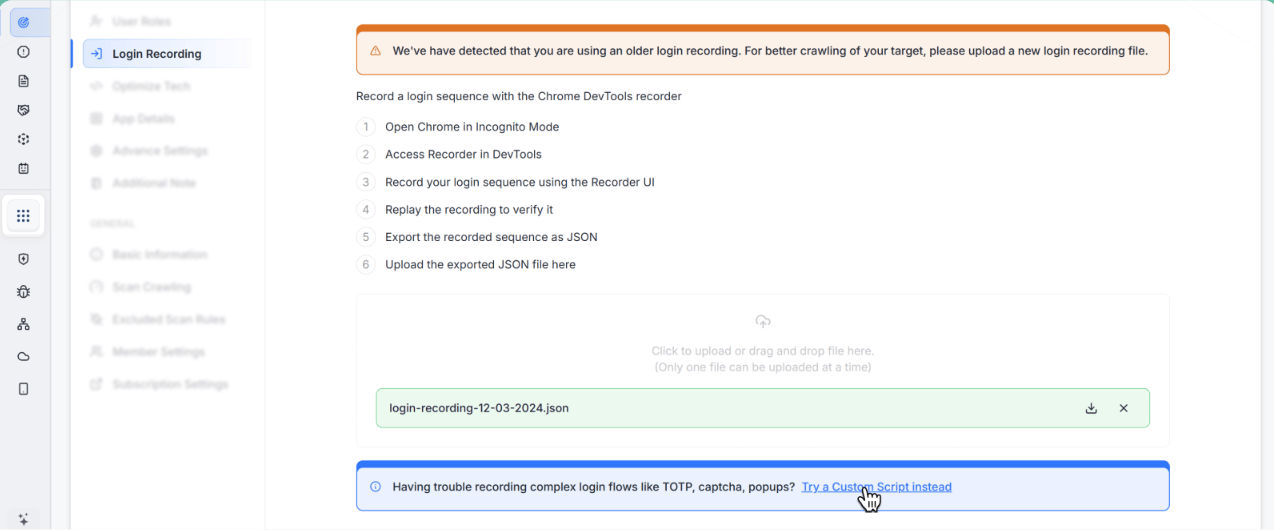
Automated scans often stopped at the login screen, especially with TOTP MFA, email magic links, or pop-up-based logins. That left essential parts of your app untested.
The Solution
We added scriptable logins with conditional steps, try/catch, and a small coding interface so you can teach the scanner exactly how to log in, even through MFA and tricky flows.
The Impact
Scans actually reach the parts of your app that matter. Coverage increases, manual workarounds decrease, and results align with real user paths.
3. OpenTelemetry SDK instrumentation (API security platform)
The Problem
Getting real API traffic into a security tool often meant building separate collectors or pipelines, which took time and maintenance.
The Solution
We now ingest API traffic via OpenTelemetry. If your apps already emit traces (Python, Node.js, Go, Java), you can route them through your existing OTel pipeline, and we’ll turn that stream into security insights.
The Impact
Faster onboarding to API security, fewer moving parts, and visibility that fits into the observability stack you already run.
4. Connectivity check failure insights
The Problem
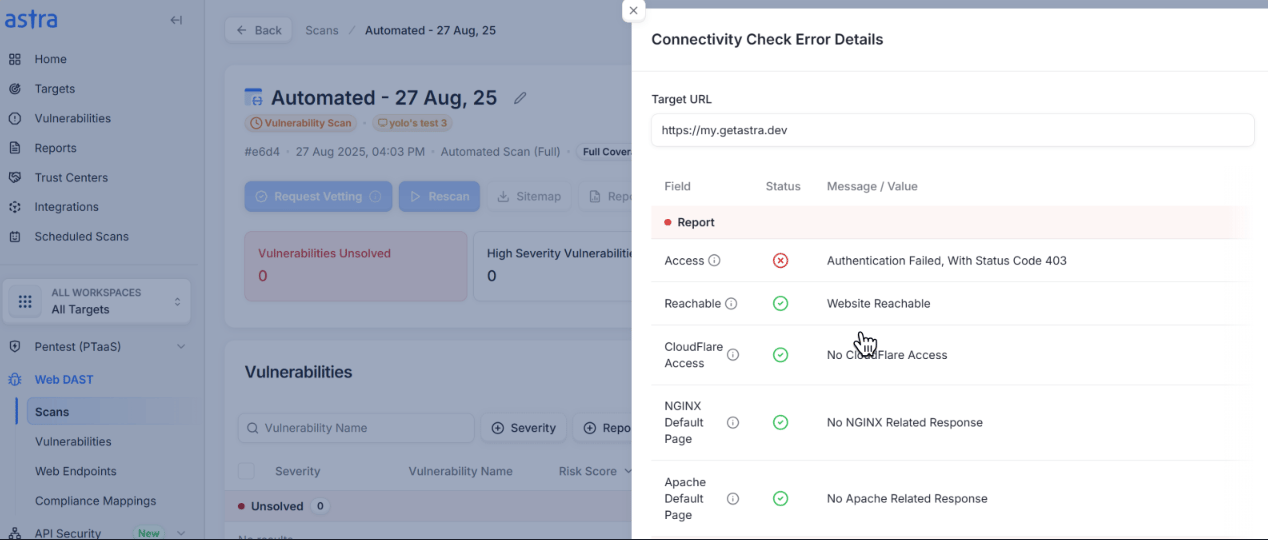
When a connectivity check failed, you only saw a generic error. It wasn’t obvious what broke or how to fix it, which slowed down scans and created support back-and-forth.
The Solution
Connectivity checks now surface actionable diagnostics and guided troubleshooting. Instead of a dead-end error, you’ll see what failed (DNS, TLS, headers, authentication, allowlisting, etc.) and the exact next steps to resolve it.
The Impact
You can fix most issues yourself in minutes, keep scans moving, and avoid waiting on a support thread.
What You’ll See Now
- Root cause at a glance: Clear reason for the failure (for example, DNS resolution, certificate mismatch, blocked IP, invalid credentials).
- Step-by-step guidance: Targeted instructions mapped to each failure type.
- Owner vs. Platform actions: A quick indicator of whether the fix is on your side (configuration/allowlist) or ours.
- Faster recovery: Retry from the same screen once you’ve applied the fix.
5. Scheduling & workflow improvements
The Problem
Scheduling manual pentests for iOS, Android, and “Other” assets was not available earlier. Bulk target selection was slow, and teams sometimes needed to start a crawl immediately but couldn’t override preconditions.
The Solution
From the Start Scan flow, you can now schedule manual pentests for iOS, Android, and Other assets (automated scans remain off for these). We added Shift+Click in the target selector for fast multi-select, and a Force-Start Crawl option to begin crawling when you decide it’s appropriate.
The Impact
One place to schedule across asset types, quicker setup with bulk selection, and the flexibility to kick off crawls on your timeline, reducing handoffs and keeping work moving.
6. Plan management & subscription clarity
The Problem
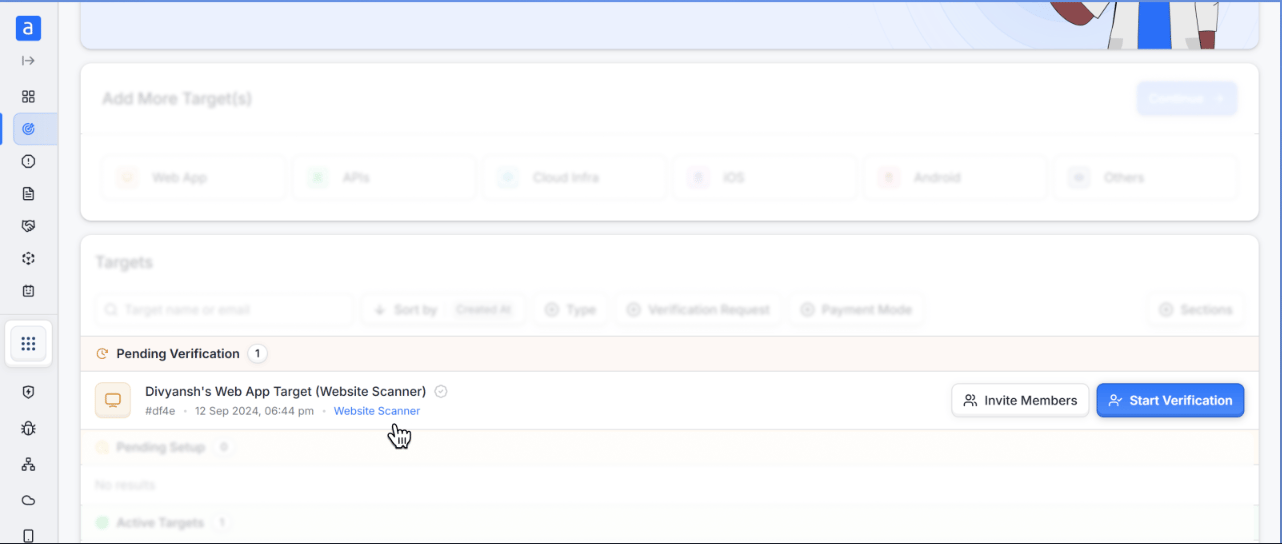
Changing plans or understanding what a plan includes often meant extra steps. People also struggled to find the right subscription from a target, and collapsed plan cards hid key details during checkout.
The Solution
You can now change plans directly from Subscriptions, and each target shows its active plan with a link that opens the subscription page already filtered to the right one. During checkout, selecting a plan automatically expands its details so nothing is hidden, status tooltips explain paused/canceled/deleted states, the Agency (Monthly) plan is visible, and an info tooltip clarifies offline subscription pricing.
The Impact
You can change plans without support, see exactly what you’re buying, and jump straight from a target to the right subscription, saving time and avoiding confusion.
7. Navigation & visibility improvements
The Problem
Too many clicks to reach the right context. Scan names weren’t always obvious, invites were hard to review in bulk, and it wasn’t clear who owned a workspace or when a rescan would expire.
The Solution
The Start Scan sheet now highlights your scan name with the target name as supporting text, and the scan name links straight to its details page. When inviting multiple users, all email addresses are visible before sending. You can open any target’s settings directly from the workspace selector, the login-recording step appears in the progress bar for automated crawl scans, rescan validity is shown more prominently on the Pentest List page, and the workspace selector displays the owner’s email so responsibility is clear.
The Impact
Fewer clicks, fewer mistakes, faster onboarding for teammates, and better visibility into scan states and ownership.
8. Findings, reporting & target setup
The Problem
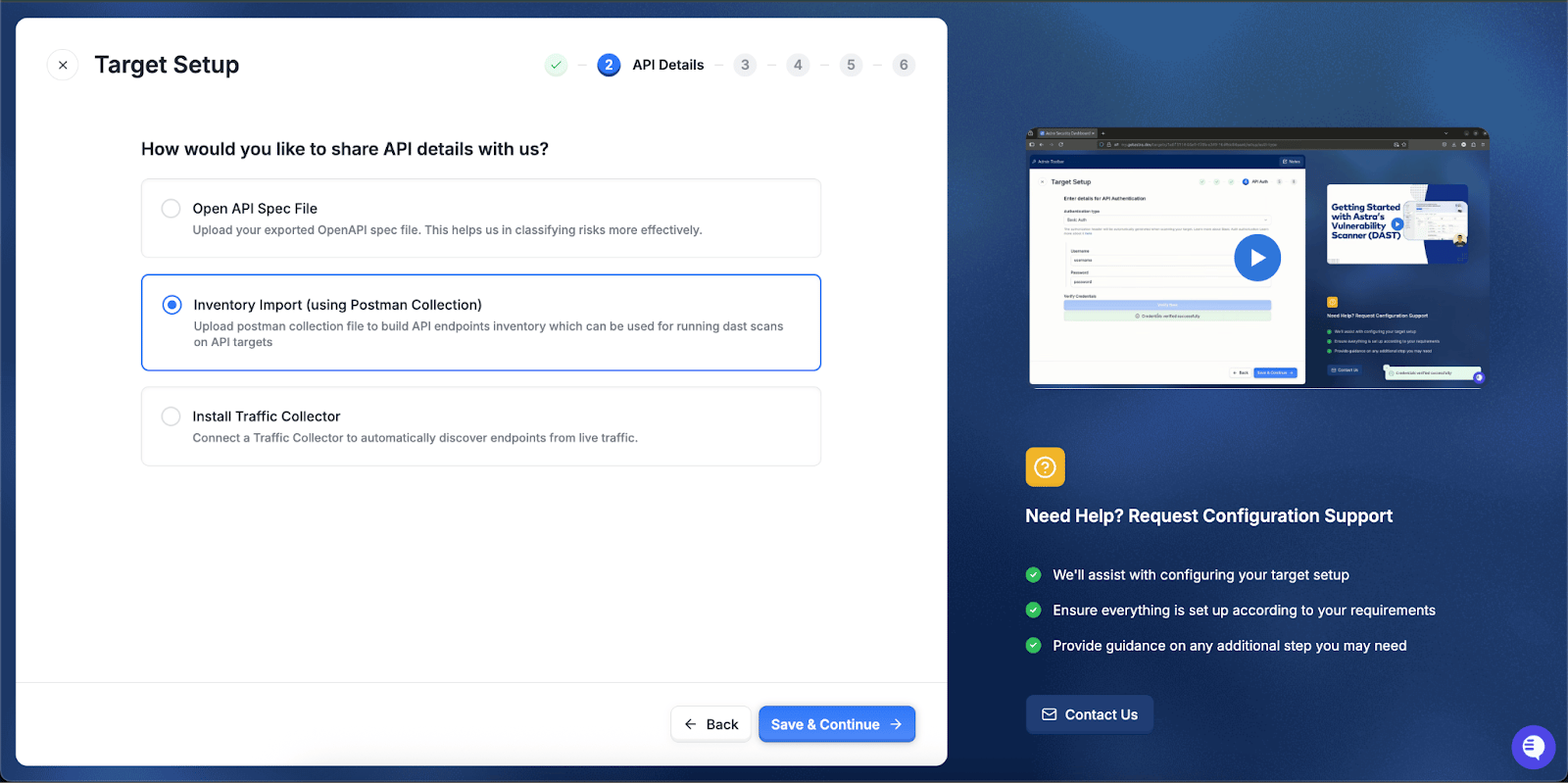
Important items were sometimes buried in lists, tables felt dense, and some report details needed to better match compliance expectations. API target setup also had one step too many.
The Solution
Findings are now sorted by severity first, then risk score, then recency, and the findings table has cleaner alignment and interactions. Final reports include CREST and PCI logos for clearer compliance signaling. API target setup is simpler because the Base URL step is merged into the main target URL field, and the false-positive flow is more precise; marking a false positive requires a reason, and the dialog explains scan exclusion.
The Impact
You focus on what matters first, reports look audit-ready, API target setup is faster, and false-positive handling drives better signal quality.
9. Open synced Jira tickets from findings
The Problem
Jumping from a security finding to its corresponding Jira ticket took too many clicks. People had to copy IDs, search inside Jira, and then hunt for the right issue that was slowing triage and handoffs.
The Solution
A new Open in Jira action appears wherever you review findings. From the findings table or the findings’ details view, you can open the already-synced Jira issue in one click.
The Impact
Triage is faster, ownership is clearer, and handoffs are smoother. Security can move directly from evidence to the exact work item, and engineering lands on the right ticket every time.
10. Scan cancellation & run transparency
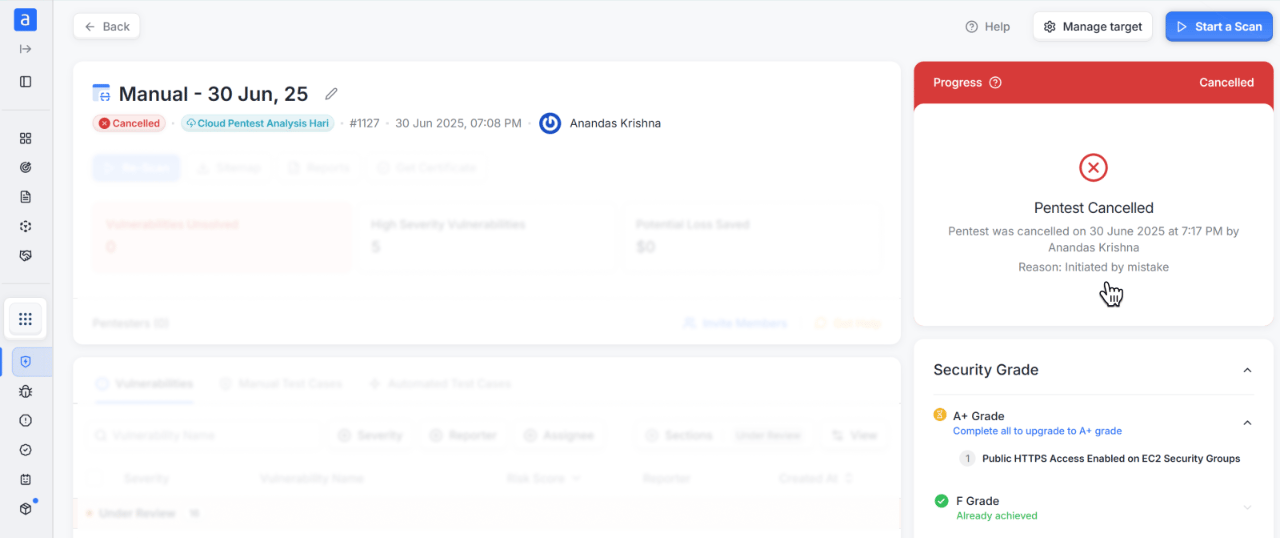
The Problem
Cancellations weren’t self-explanatory, and teams needed clearer context during long-running scans.
The Solution
Canceled runs now display the reason, so you immediately know what happened, and the login-recording side sheet shows descriptive messaging when SBL checks fail, so it’s clear how to fix setup issues.
The Impact
You understand interruptions right away and can correct setup problems without guesswork.
What’s next
Looking ahead, we’re keeping things simple: prove trust, widen coverage, and help you move faster. You’ll be able to put your Trust Center on a custom domain (for example, trust.yourcompany.com) so it feels like part of your site. You’ll also be able to buy and activate Cloud inside the product (enterprise plans will still go through sales). We’re redesigning the Home page to be cleaner and more useful, with small, clear widgets that highlight what needs attention. On compliance, we’re adding mappings to PCI, DORA, and NIST 2, and we’re building compliance-based reports for SOC 2, HIPAA, and ISO 27001 to make audits easier. Detection is getting stronger across the board: better broken access control checks for APIs, DAST improvements that find more API-specific issues, and threat model scans that fit your type of application. Finally, we’re adding secret leak detection in CI/CD (opt-in) and continuing to improve our AWS cloud security rules.