Last updated: 26 November 2026, 17:45 IST (12:15 UTC)
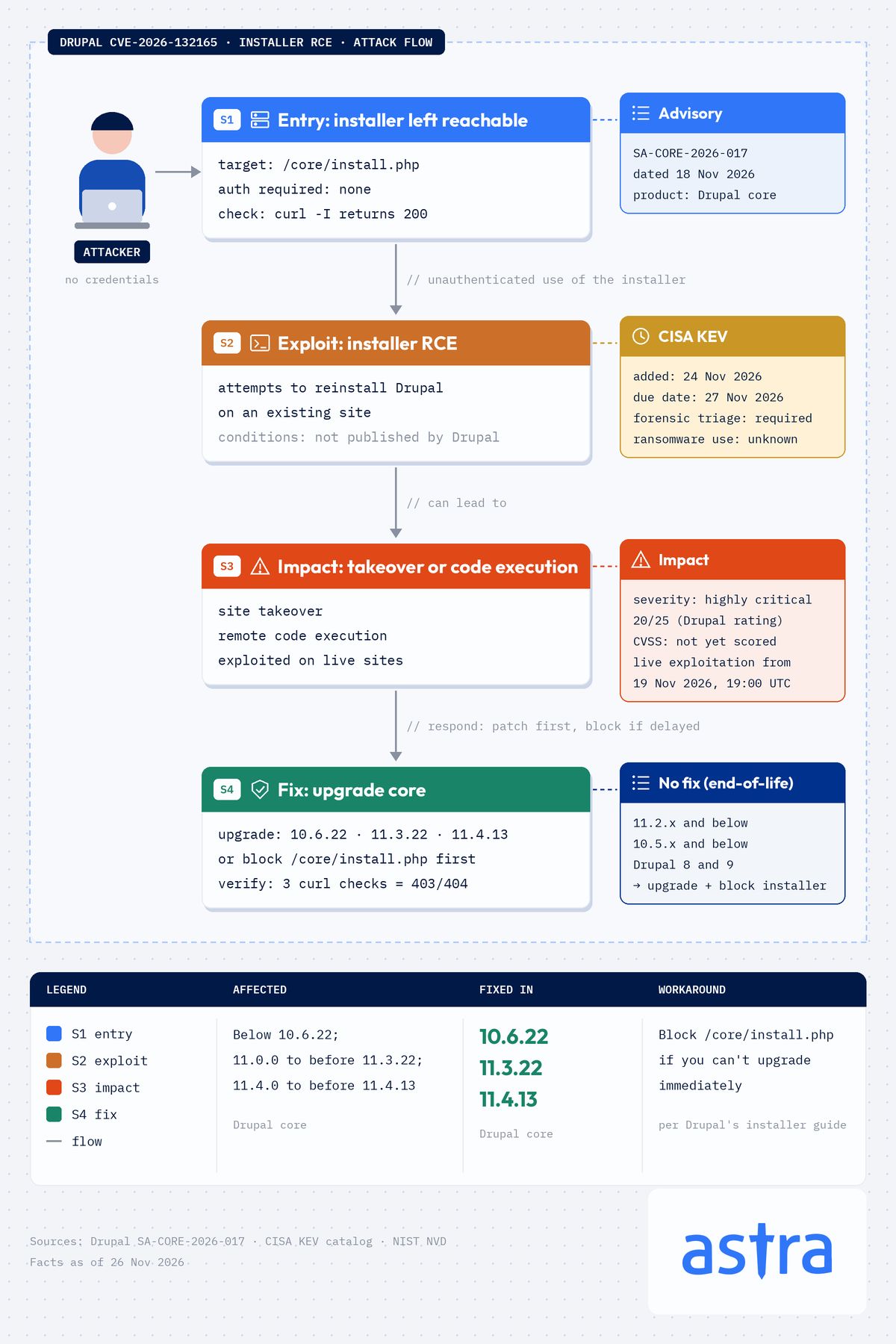
If you run Drupal core older than 10.6.22, 11.3.22 or 11.4.13, Drupal CVE-2026-132165 lets an unauthenticated attacker use the installer to take over your site or run code on it, and attackers are already exploiting this on live sites. Upgrade to 10.6.22, 11.3.22 or 11.4.13 now; if you can’t patch in the next few hours, block /core/install.php at your web server using Drupal’s installer guide.
Drupal received a report of exploitation on live sites as early as 19 November 2026, 19:00 UTC (20 November 2026, 00:30 IST). CISA added CVE-2026-132165 to its Known Exploited Vulnerabilities (KEV) catalog on 24 November 2026, with a 27 November 2026 due date for US federal agencies.
Key facts: Drupal CVE-2026-132165
Confirmed facts from Drupal’s SA-CORE-2026-017, CISA’s KEV entry and NVD:
| Item | Detail |
| Product | Drupal core |
| CVE | CVE-2026-132165 |
| Advisory | SA-CORE-2026-017, dated 18 November 2026 |
| Vulnerability | Remote code execution through the core installer (install.php); no authentication required |
| Severity | Highly critical, 20 out of 25 (Drupal’s own rating) |
| Affected versions | Below 10.6.22; 11.0.0 to before 11.3.22; 11.4.0 to before 11.4.13 |
| Fixed versions | Drupal 10.6.22, 11.3.22, 11.4.13 |
| Exploitation | Exploited on live sites as early as 19 November 2026, 19:00 UTC (20 November 2026, 00:30 IST) |
| CVSS | Not yet scored: NVD lists the CVE as Received (26 November 2026) with no CVSS score |
| CISA KEV | Yes, added 24 November 2026; due date 27 November 2026 |
| No fix (end-of-life) | Drupal 11.2.x and below, Drupal 10.5.x and below, Drupal 8 and 9 |
| Workaround | Block /core/install.php using Drupal’s installer guide if you can’t upgrade immediately |
| Found by | Anthropic’s OSS Scanner (ANT-2026-GMRPK0BU) |
What is the Drupal installer RCE (CVE-2026-132165)?
The Drupal installer RCE (CVE-2026-132165, SA-CORE-2026-017) is a highly critical flaw in Drupal core’s install.php. Under specific conditions, an unauthenticated attacker can use the installer to attempt to reinstall Drupal on an existing site, which can lead to site takeover or remote code execution. Drupal does not publish the exploit conditions.
CISA added the CVE to the KEV catalog on 24 November 2026. KEV is CISA’s list of vulnerabilities with evidence of active exploitation.
Who is affected by Drupal CVE-2026-132165 and how to check
Drupal CVE-2026-132165 affects Drupal core below 10.6.22, 11.0.0 before 11.3.22, and 11.4.0 before 11.4.13. Drupal 10.6.22, 11.3.22 and 11.4.13 fix it. End-of-life branches (11.2.x and below, 10.5.x and below, 8 and 9) get no fix, so they need an upgrade and an installer block.
Fix by branch:
- Drupal 11.4.x: update to 11.4.13.
- Drupal 11.3.x: update to 11.3.22.
- Drupal 10.6.x: update to 10.6.22.
Compare the Drupal core version in your deployment manifest or composer.lock against the ranges above. Then run Drupal’s three installer checks, replacing example.com with your hostname:
//curl -I https://example.com/core/install.php//

//curl -IL https://example.com/install.php//

//curl -I https://example.com/core/install.php/foo//
All three should end in a 403 or 404 response. A 200 means the installer is still reachable. Adjust the paths if Drupal lives in a subdirectory. Drupal’s guide notes that some managed hosting platforms already block the installer, so test before you add your own rule.
A settings.php file that your web server can’t write to or change permissions on stops only some exploit paths, not all of them.
How to patch CVE-2026-132165 or block install.php now
To fix CVE-2026-132165, upgrade Drupal core to 10.6.22, 11.3.22 or 11.4.13. If the upgrade will take hours, block /core/install.php at the web server first. Work through these steps in order:
- Block the installer at the web server. Drupal recommends this option because it survives core updates. In Apache, add this to your virtual host configuration, not .htaccess, which causes a 500 error:
<Location "/core/install.php">

  Require all denied

</Location>

In Nginx, add this to the HTTPS server block:

location ^~ /core/install.php {

  return 404;

}
Use ^~, not an exact location = match, which some Nginx PHP rules bypass with /core/install.php/foo. Run apachectl configtest or nginx -t before you reload.
- On shared hosting, use .htaccess. Add Drupal’s <Files “install.php”> deny rule to the file in your web root. Composer replaces .htaccess on every scaffold run, so add the lines with Drupal’s scaffold append setting.
- Upgrade to the fixed version for your branch. Drupal’s guide also suggests deleting core/install.php after each Composer run, since Composer restores it, and keeping the server block too.
- Re-run the three curl checks. Then confirm the site and /update.php still work; update.php is separate, so keep it out of any broad rule.
- Check for compromise. CISA marks forensic triage as required for this CVE under BOD 26-04, with a 27 November 2026 due date. The directive binds only US federal civilian agencies, but CISA urges all organizations to prioritize KEV entries, so use that date as your target.
What this means for locking down the installer after install
A Drupal site needs its installer only once, at setup. After that, block or remove install.php, and keep that control in server configuration that survives core updates.
Keep an inventory of CMS versions, confirm installer paths return 403 or 404 after every deploy, and re-test after server or platform migrations, because a config change can drop a web server rule silently. A continuous DAST scan from Astra can flag an outdated CMS version and a publicly reachable installer path after a release.
Not every critical CVE needs a same-day response, as this guide to prioritizing critical CVEs explains. This one is on KEV, so it does. Drupal runs on PHP, so also review the PHP security release of 19 November 2026 and the earlier PHP2Shell PHP vulnerabilities.
FAQs
How do I check whether my Drupal site is affected by CVE-2026-132165?
Find your Drupal core version in your deployment manifest or composer.lock. You are affected if it is below 10.6.22, between 11.0.0 and 11.3.21, or between 11.4.0 and 11.4.12. Then run the three curl checks against /core/install.php; a 200 response means the installer is reachable.
If I block /core/install.php, do I still need to upgrade?
Yes. Drupal recommends securing the installer in addition to upgrading, and offers the block as the workaround for sites that can’t upgrade immediately. The block keeps attackers away from the installer, but only the upgrade fixes the flaw in Drupal core.
Are Drupal 8 and 9 sites covered by the official fix?
No. Drupal 8 and 9 have both reached end-of-life, and SA-CORE-2026-017 lists no fix for them. Drupal 10.5.x and below and Drupal 11.2.x and below are also end-of-life with no security coverage. Move to a supported branch and block the installer until you do.
Sources
- Drupal Security Team, SA-CORE-2026-017, 18 November 2026 (updated with exploitation report)
- Drupal.org, Securing the installer (install.php)