Key Takeaways:
- IAM misconfigurations remain one of the most common and dangerous cloud security failures, often enabling unauthorized access, data exposure, and privilege escalation.
- Overly permissive roles, dormant identities, and risky cross-account access quietly expand the attack surface across AWS, Azure, and GCP environments.
- Cloud scanners play a critical role by continuously evaluating IAM policies, usage patterns, and trust relationships against best practices and compliance benchmarks.
- Detection goes beyond static policy checks, using access-activity analysis and privilege-escalation mapping to surface real-world risk paths.
- Native tools, CSPM platforms, and open-source scanners each offer value, but coverage depends on how well they’re integrated into workflows.
- IAM security improves most when scanning is paired with least privilege, CI/CD integration, MFA enforcement, and continuous auditing.
- When implemented correctly, cloud scanners turn IAM from a hidden liability into a continuously validated security control.
In cloud service providers (CSPs) such as AWS, Azure, and Google Cloud Platform (GCP), Identity and Access Management (IAM) controls who has access to which resources through roles, policies, and permissions. IAM is about who can do what, like letting a developer read from a Database, but not delete it.
Misconfigured IAM, such as roles with unnecessary privileges, is the common cause of unauthorized access/exploit/ data breaches, and resource abuse. For example, an over-privileged role might enable the attacker to exfiltrate data or spin up costly resources.
Discoveries of misconfigurations are important because they can lead to security incidents and noncompliance with regulations such as GDPR or SOC 2, and enable unauthorized access to sensitive data or privilege escalation. Routine scans make it easier to catch and correct these vulnerabilities before they are exploited.
Common IAM Roles and Permissions Issues
1. Overly Permissive Policies
This is a particular problem with wildcard permissions (e.g., “*” in AWS) and policies that grant broad access to cloud infrastructure resources. For instance, an IAM role granting full S3 bucket access when only read rights are required is a bad practice that can result in data loss or data leaks due to attackers.
Quick setups or insufficient scrutiny can lead to these policies, which are a favorite target of threat actors seeking broad control. For example, in GCP, there are permissive roles like Editor that can be assigned to service accounts, leading to unintentional changes to projects.
As part of mitigation, policies should say exactly what to do, how, and with which resources, but reality is that many environments keep loose permissions due to legacy configurations or simply poor oversight.
2. Unused or Dormant IAM Entities
IAM users, roles, or credentials that are no longer in use, such as access keys that have not been used for months, pose a risk if an intruder reactivates them. Dormant entities often retain old project and employee permissions, creating new entry points for unauthorized access.
Entities like these accumulate when not cleaned up regularly, increasing the attack surface across cloud environments. An old user account with admin rights (perhaps one previously thought inactive) might be compromised due to leaked credentials. In a multi-cloud setup, it becomes even more difficult to track these across AWS / Azure / GCP, which helps attackers move laterally.
3. Public or Cross-Account Access Vulnerabilities
IAM configurations allowing public access or unintended cross-account access can expose resources. For instance, an AWS S3 bucket policy permitting external account access without restrictions may lead to data leaks. Similarly, misconfigured trust relationships between accounts can allow unauthorized roles to assume privileges, especially in multi-tenant setups.
In Azure, public role assignments to management groups can grant outsiders access, while GCP’s organization policies might inadvertently allow cross-project access. These vulnerabilities often stem from shared resources or federated identities without proper boundaries.
4. Third-Party Integration Risks
Many third-party tools (specifically in integrations) will need IAM roles with high permissions, which, if not carefully scoped, can give an attacker the power of a higher level. For instance, a compromise of a SaaS application with an AWS role that has over-privileges can allow attackers to access the cloud.
Improper monitoring or configuration of these roles leads to a high level of these roles. In Azure, app registrations enable integrations with external services and manage their secrets, and they can be restricted at a fine-grained level.
However, sometimes the permissions are too wide. The same applies to GCP service accounts for third-party APIs that do not select the correct scopes. Regular security reviews of these integrations are a must to verify that permissions map to the understood requirements.
Continuously validate your IAM roles and permissions before misconfigurations become breaches.

How Cloud Scanners Detect Insecure IAM Roles and Permissions
1. Role of CSPM Tools in Misconfiguration Detection
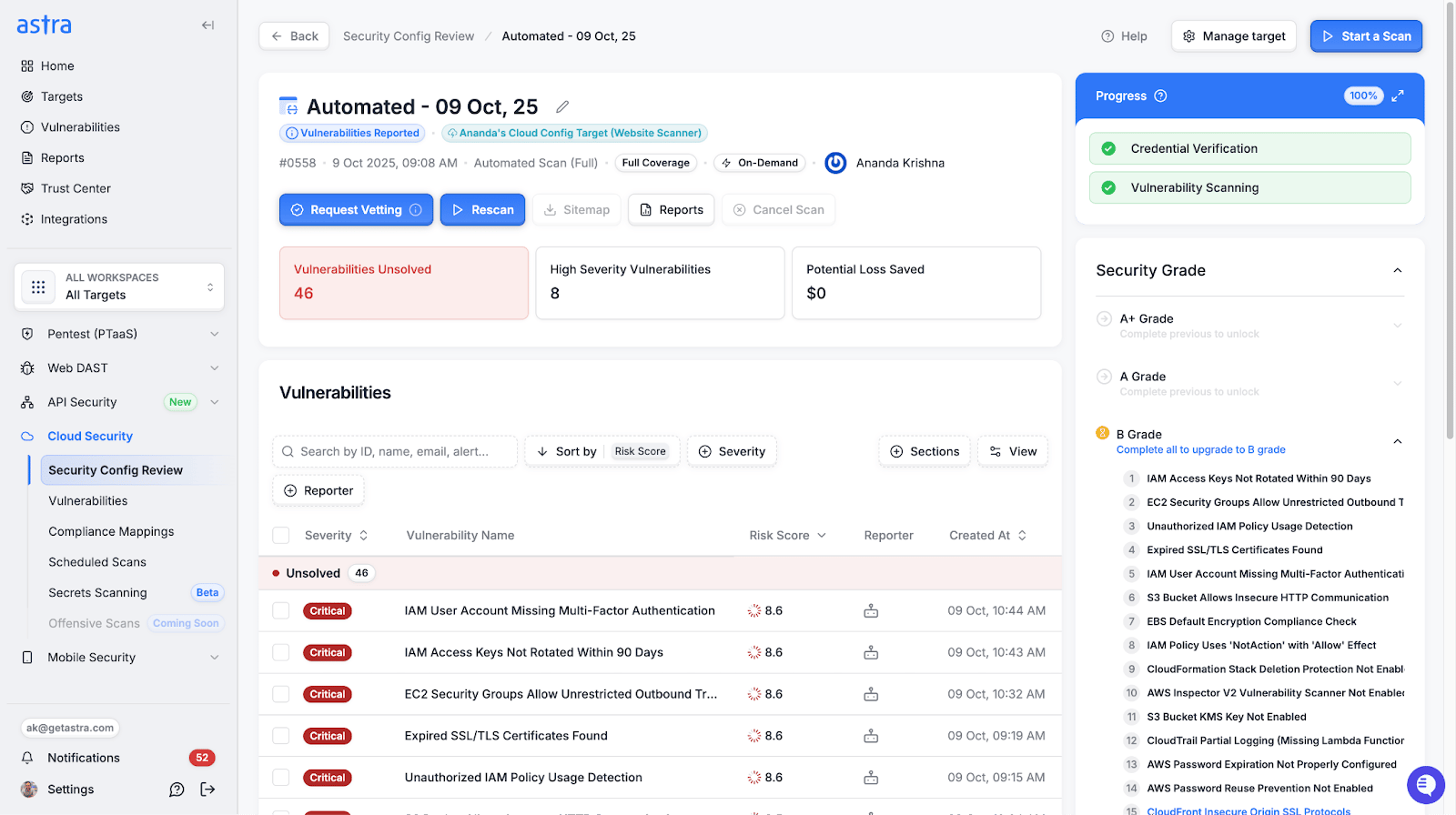
CSPM (Cloud Security Posture Management) tools evaluate IAM configurations against best practices and compliance frameworks. By analyzing policies, roles, and access patterns, they flag over-privileged roles or missing MFA to alert on potential vulnerabilities that could be exploited if not addressed in time.
These tools are integrated with cloud APIs to extract real-time data, such as AWS IAM policies or Azure role definitions, and then make comparisons to the benchmarks of security, like CIS or NIST. For widespread deployments, alerts often include severity levels and remediation steps to help teams prioritize fixes (or automated responses).
2. Policy Validation
Scanners validate IAM policies, check for wildcards, and unrestricted resource access. For instance, they will highlight AWS policies that grant “s3:GetObject” permissions on all buckets, or Azure roles with broad management group access, and suggest specific, narrow permissions.
These parse JSON policy documents and detect deny statements that trigger incorrectly or conditions that are too lenient.
3. Access Activity Analysis
IAM scanners analyze access logs to identify IAM entities with no use or too many permissions, and flag these for follow-up with the applications team. Through an examination of CloudTrail on AWS or Azure Monitor logs, they would detect dormant users, roles, or keys and abnormal access patterns; an example is a role being used in an unexpected region (potential misuse).
Usage metrics like last access time are determined, and entities that have not been used in the past 90 days get flagged.
4. Privilege Escalation Checks
Scanners detect paths for privilege escalation, such as roles that can modify their own policies or assume higher-privileged roles. For instance, an AWS role with “iam: UpdateRole” permissions might allow an attacker to gain admin access, which tools flag by mapping trust relationships and permissions.
They simulate attack paths using graph-based analysis, identifying chains like a low-privilege user attaching admin policies. In Azure and GCP, similar checks cover role assignments that enable escalation through group memberships or service principals.
Top Cloud Scanners and Tools for IAM Security Detection
Various tools help secure IAM configurations. Each offers unique features for detecting vulnerabilities and integrating with cloud platforms.
1. Native Tools
AWS IAM Access Analyzer generates findings on overly permissive roles, external access paths, and policy misconfigurations. To identify unused permissions, AWS IAM Access Advisor provides last-accessed information, highlighting actions that are not in use. It uses policy simulation to provide insights into which access is granted and recommends enhancements.
Azure Security Center identifies over-permissive and inactive accounts and complements Azure policies to support compliance. It makes suggestions based on Microsoft benchmarks and follows up with the progress of remediations.
With detailed reporting and asset inventory views that provide context, GCP Security Command Center detects IAM anomalies, including IAM vulnerabilities, public bucket access, and cross-project role contraventions.
2. Third-Party CSPM Solutions
In multi-cloud environments, Prisma Cloud scans for IAM risks, including wildcard policies and unused roles, and provides a centralized dashboard for risk prioritization; it supports AWS, Azure, and GCP. It also offers compliance reporting and automated remediation workflows.
Datadog continuously monitors real-time IAM access, correlates logs with security events, and leverages machine learning to identify anomalous behavior. The Tenable Cloud Security integrates with your existing cloud infrastructure to identify misconfigured roles and privilege escalation paths, and even includes vulnerability scanning for complete coverage.
Wiz delivers rich IAM perspectives by performing permission mapping across the three major cloud vendors (AWS, Azure, and GCP) based on risk scoring, showing where access paths & scope of permissions exist with visual graphs.
3. Open-Source Options
Prowler is an open-source tool for auditing IAM configurations and identifying potential issues before threat actors do (missing MFA and/or overly broad policies). It works as a command-line tool or runs in CI/CD, producing reports in multiple formats for better integration.
Cloudsplaining examines AWS IAM policies for over-permissioned grants and privilege escalation paths, recommending how to resolve each finding and generating an HTML report for additional visualization. Both tools integrate with CI/CD pipelines for automated scanning, and custom checks can be added to make it compatible with specific environments.
Best Practices for Implementing Cloud Scanners in IAM Management
1. Enforce Least Privilege
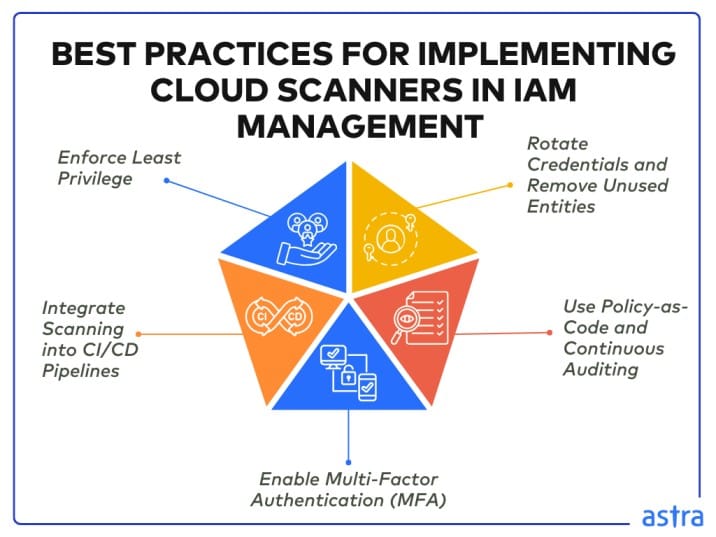
Set up scanners to enforce least privilege by identifying overly permissive (wildcard) permission policies. Provide tooling to suggest specific actions (e.g., replace “s3:*” with “s3:GetObject” for read-only access), and specify RBAC to restrict roles to their necessary tasks, thereby minimising the damage from compromised credentials.
Automate policy generators based on access patterns and review the scanner findings weekly to refine permissions. Wherever possible, standardize least privilege across providers to avoid inconsistencies in multi-cloud environments.
2. Integrate Scanning into CI/CD Pipelines
Incorporate IAM scanning into CI/CD pipelines to detect misconfigurations as early as possible. Prowler or Prisma Cloud can be used to run automated checks during infrastructure-as-code deployments to ensure that any new IAM roles/policies meet security requirements before they are enabled in production, thereby catching misconfigurations upfront.
Use hooks in tools like GitHub Actions or Jenkins to run scans on pull requests and prevent merges if policy violations are found. It facilitates shift-left security, enabling developers to rectify IAM issues during coding.
3. Enable Multi-Factor Authentication (MFA)
Ensure MFA is enabled for all IAM users and roles using IAM scanners, especially the admin accounts. Similarly, with a tool like AWS IAM Access Analyzer or Azure Security Center, you can be alerted to any account that does not use MFA and quickly require users of that account to enable 2FA as an additional layer against credential theft.
Implement org-wide MFA policies and monitor for attempts to bypass them. Use hardware keys or virtual MFA whenever possible for human users and role assumptions to ensure complete coverage.
4. Use Policy-as-Code and Continuous Auditing
Embrace policy-as-code with tools like Terraform, CloudFormation, and use scanners to ensure policies comply before deployment. CSPM tools then monitor compliance status through continuous auditing, keeping an eye out for changes such as new roles or modified permissions that could introduce risks.
In configuration, enable daily scans, separate alerts, and integrate with SIEMs for central logging. This way, policies can be versioned and rolled back if required.
5. Rotate Credentials and Remove Unused Entities
Configure scanners to warn when IAM users, roles, or keys aren’t used, and to rotate credentials every 90 days. Datadog and Wiz, for example, use reporting features that include inactivity data to determine whether a deployable entity is dormant; you can completely remove these entities based on such recommendations to reduce the attack surface and mitigate unauthorized access.
Use AWS Secrets Manager or Azure Key Vault to automate rotation and confirm unused entities before deleting. Keep documentation on how you would rotate this knowledge between teams.
Test whether your IAM controls actually enforce least privilege in real-world cloud environments.
Final Thoughts
Cloud scanners effectively detect insecure IAM roles and permissions by identifying over-privileged policies, unused entities, and privilege escalation risks through policy validation, access analysis, and continuous monitoring.
Properly implemented, tools like AWS IAM Access Analyzer, Prisma Cloud, or Prowler ensure robust IAM security and help maintain compliance. For advanced cloud security testing, check out Astra’s cloud penetration testing services.
FAQs
1. Can cloud scanners reliably detect insecure IAM roles and permissions?
Yes, cloud scanners can reliably detect insecure IAM configurations when properly deployed. They analyze policies, access patterns, and trust relationships to identify over-privileged roles, unused identities, public exposure, and privilege escalation paths across cloud environments.
2. Why are overly permissive IAM roles considered such a high-risk issue?
Overly permissive IAM roles grant broader access than required, allowing attackers to escalate privileges, exfiltrate data, or misuse resources. Because these permissions often look legitimate, they are frequently abused through normal API calls without triggering traditional security controls.
3. Do native cloud tools provide enough IAM security visibility on their own?
Native tools offer strong baseline visibility but are typically limited to single-cloud contexts. In complex or multi-cloud environments, gaps appear in cross-account access, usage correlation, and continuous enforcement, which is why many teams supplement them with CSPM platforms.
4. How do cloud scanners detect privilege escalation risks?
Cloud scanners map IAM permissions and trust relationships to identify escalation paths, such as roles that can modify policies or assume higher-privileged roles. They simulate potential attack chains to reveal how low-privilege identities could gain elevated access.