
Web application penetration testing methodology has a reputation for being more complicated than it needs to be, as new testers are often dropped into a sea of tools and terminology with little guidance on how an objective test should flow.
The same problem shows up higher up the org chart, with Founders, CTOs, and other technical leaders who regularly receive pentest reports packed with screenshots and acronyms but short on clarity: what actually matters, what can wait, or how serious the risk really is.
This post takes a slower, more practical approach, walking through web application penetration testing methodology from start to finish, focusing on how tests are run and how findings translate into real risk for the business.
What is Web App Pentesting?
Web application penetration testing methodology is a deliberate attempt made by white hat experts on your behalf to break your own application the same way a real attacker would, including chaining low CVEs together, abusing trust boundaries, and testing how the application actually enforces authentication, authorization, and business logic.
Simply put, penetration testing platforms, along with web application checklists, help organizations comply with security standards and regulations such as PCI-DSS, HIPAA, GDPR, and SOC 2 while uncovering & mitigating security risks to improve the applications’ safety posture before they can be exploited.
Why Does Web Application Pentesting Methodology Matter?

 Expert Opinion
“Security is increasingly shifting to the hands of developers, while security teams find themselves more overwhelmed than ever.”
Irrespective of how advanced the tools are, most security teams are still reacting, chasing the next patch, the next alert, until a breach like Discord’s exposes the gaps. Security rarely collapses in one blow, but rather it wears down over time.
A missed update here, a misconfigured bucket there, a forgotten API key, all of which add to the rust beneath layers of code and convenience. Then one random day, the structure collapses. Thus, continuous pentesting keeps security aligned with how modern software is actually built: fast, iterative, and always online.
- Stay ahead, not behind: Build a proactive mindset, securing by design, not by patch.
- Catch issues early: Stop vulnerabilities before they become breaches.
- Protect trust: Every leak erodes credibility. Every secure release strengthens it.
- Stay compliant: Meet regulatory standards like ISO 27001, SOC 2, and GDPR without scrambling at audit time.
- Cut risk and cost: A single breach today costs $4.4 million in losses alongside damage that often even PR can’t fix.
- Know where you stand: Benchmark your app’s information security posture and track real improvement.
Wondering if you’re covering all the essentials in a web app pentest?

What is Web Application Penetration Testing Methodology?
The usual process of web application penetration testing follows a defined lifecycle that simulates real-world attacks in a controlled, measurable way, which breaks down into six phases:
- Scoping and Planning
- Discovery and Reconnaissance
- Vulnerability Scanning
- Exploitation (Pentesting)
- Reporting & Risk Analysis
- Remediation and Retesting
While tools and techniques might differ from one vendor to another, the underlying structure of the methodology remains consistent from planning to retesting. Each phase builds on the last to expose, validate, and remediate vulnerabilities such as misconfiguration, unpatched software, SQLi, cross-site scripting, etc.
Phase 1: Scoping & Planning
A web app pentest typically begins with defining a precise scope mutually including:
- Which assets, sites, SPAs, APIs, Cloud Apps, backends, and environments to cover
- How deep the analysis must go (external vs internal, authenticated flows, business-logic testing)
- What success looks like
In simple words, it defines what is legally and technically allowed. Without clear scoping, testing risks cause outages or violate policy.
What is Included?
Objective and Scope Definition
The first step is clearly defining the objective of the test, which usually falls into one of two categories:
- Regulatory or compliance-driven, such as PCI DSS, HIPAA, or SOC 2 requirements
- Security-driven, such as validating real-world risk, hardening a critical application, or assessing secure development practices
The objective determines the depth of testing, acceptable risk during exploitation, and reporting requirements. For example, a PCI-driven test may focus heavily on external attack paths, while a secure development review may prioritize deep flaws in application logic.
Once objectives are defined, the technical scope is documented in precise terms, including:
In-scope assets:
- IP addresses or CIDR ranges
- Fully qualified domain names
- Specific application URLs or APIs
Target environments:
- Production
- Staging or pre-production
- Explicit exclusions
- Third-party services
- Shared infrastructure
- Systems not owned or controlled by the organization
Most importantly, exclusions are as crucial as inclusions. Anything not explicitly listed as in-scope is assumed to be off-limits to prevent accidental testing of systems that could cause outages, contractual issues, or legal exposure.
Methodology Selection
The methodology defines the amount of prior knowledge the tester receives and how closely the test simulates a specific attacker profile; thus, directly influencing attack complexity, discovery time, and findings.
Black Box Pentesting
In a black-box pentest, the tester has no internal knowledge of the application or infrastructure, including access to source code, credentials, and/or security architectural context, but simulates an external attacker, relying completely on reconnaissance, enumeration, and exploitation techniques to gain access.
Black box testing is commonly used for PCI DSS external network testing and perimeter exposure validation. Its primary limitation is coverage, as without credentials or internal visibility, some vulnerabilities may remain undiscovered.
Grey Box Pentesting
This method of pentesting provides the tester with limited access to simulate a realistic scenario in which an attacker has already compromised a legitimate user, often through phishing or credential reuse.
This model enables testing of:
- Privilege escalation
- Insecure Direct Object References (IDOR)
- Access control enforcement
- Lateral movement within the application
Grey box penetration testing is the most commonly adopted approach as it balances realism with efficiency, allowing the tester to focus on high-impact internal attack paths without requiring full system knowledge.
White Box Pentesting
White box testing provides full transparency to the pentest expert, who as such, has access to source code, credentials, configuration details, and architecture diagrams.
This approach is often used ny in-house teams for:
- Deep application security assessments
- Secure development lifecycle validation
- Compliance requirements such as ISO 27001 Annex A.8.29
White box pen testing enables precise identification of root causes and reduces guesswork, but it does not fully simulate an unknown attacker.
| Category | Type | What It Means | Typical Use Case |
|---|---|---|---|
| Approach | Black-Box | Tester has little to no prior knowledge of the application, code, or architecture and relies on reconnaissance and public information. Closely simulates an external attacker but may miss internal issues. | External exposure testing, perimeter validation |
| Gray-Box | Tester has limited knowledge, such as login credentials or basic architecture details, but no source code access. Balances realism with coverage and predictable timelines. | Most real-world pentests, access control and lateral movement testing | |
| White-Box | Tester has full access to source code, documentation, and infrastructure details. Enables the most thorough analysis of code-level and design flaws. | Secure development reviews, deep application assessments | |
| Scope | External | Testing targets internet-facing systems using limited information such as domains, IPs, or credentials. Often performed by third parties. | Identifying blind spots visible to external attackers |
| Internal | Testing assumes access inside the organization and focuses on lateral movement, privilege escalation, and internal weaknesses. | Validating internal controls and insider threat scenarios | |
| Methodology | DAST | Automated scanners actively interact with a running application to identify vulnerabilities based on responses. | Broad coverage of common runtime vulnerabilities |
| SAST | Source code is analyzed to identify insecure patterns and logic flaws before deployment. | Early detection during development | |
| Execution | Manual Pentesting | Human-led testing that validates exploitability and business impact through real attack paths. | Confirming real-world risk and chaining vulnerabilities |
Rules of Engagement
These rules define how the test is conducted operationally, ensuring such pentesting is controlled, predictable, and safe. Some key elements include:
- Testing windows or approved timeframes when testing is allowed, often outside peak business hours for production environments.
- Communication channels define points of contact for both teams, ensuring issues can be discussed quickly or paused as needed.
- Escalation procedures cover a clear plan for handling critical findings, such as active data exposure or system instability, outlining who must be notified, when, and how.
Such rules define which actions are permitted during exploitation: whether denial-of-service conditions are allowed, or whether data exfiltration must be limited to proof-of-concept only.
Overall, the above help focus the pentest and set legal, safety, and cost boundaries.
Phase 2: Discovery and Reconnaissance
The goal of reconnaissance is to map the application’s attack surface and identify potential entry points by collecting as much data about the web app, its environments, processes, etc. Combining passive and active techniques, this phase answers one core question: “If I were an attacker, what do I have to work with?”
Discovery relies on reconnaissance and traffic observation tools. Nmap is used to map exposed hosts and services, while intercepting proxies like Burp Suite or OWASP ZAP are used to observe application behavior, enumerate endpoints, and capture authentication flows.
Similarly, tools such as Nikto can help identify apparent server misconfigurations early, but do not replace manual analysis.
Passive Reconnaissance
Passive reconnaissance collects information about the target without directly interacting with the application in a way that could be detected or logged as suspicious. Some passive techniques include:
- Search engine queries to identify exposed endpoints or documents
- Reviewing historical versions of the application using the Wayback Machine
- Identifying legacy pages, deprecated APIs, or previously exposed functionality
In our experience, passive recon often reveals: old admin panels that are no longer linked, deprecated endpoints are still accessible, test or staging functionality was unintentionally exposed
These findings frequently become high-value targets during exploitation.
Active Reconnaissance and Network Discovery
On the other hand, active reconnaissance goes deeper by crawling the web app, enumerating subdomains, and mapping out APIs, endpoints, and parameters, to directly probe the target systems.
- Network Discovery and Port Scanning
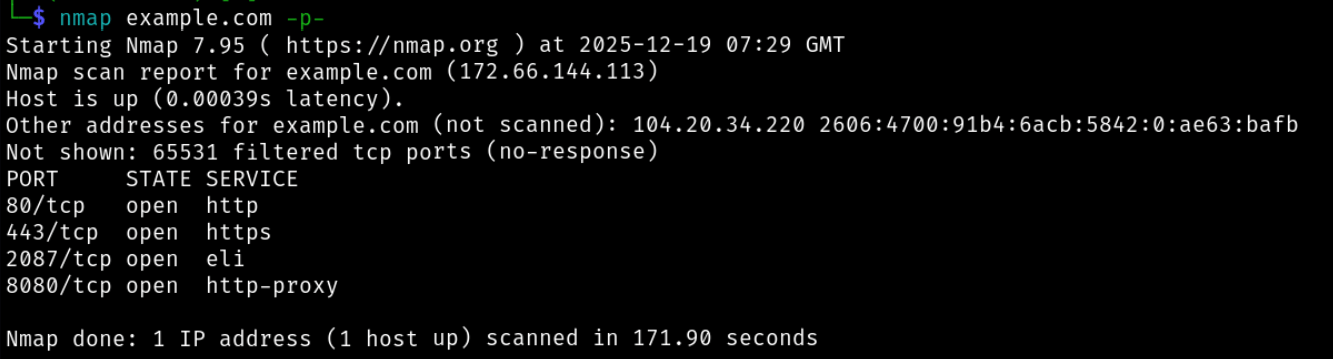
- Nmap (an open-source tool) is used to identify live hosts, open ports, and service versions.
Example:
nmap example.com -p-
- Similarly, tools such as FFUF, Dirsearch, Gobuster, etc., can be used for finding hidden directories via directory fuzzing or enumeration.

Image: Directory fuzzing in action with FFUF, uncovering hidden routes and unlinked endpoints that attackers routinely abuse.
crt.shandassetfindercan also be preferred by our in-house team at this stage to find subdomains.
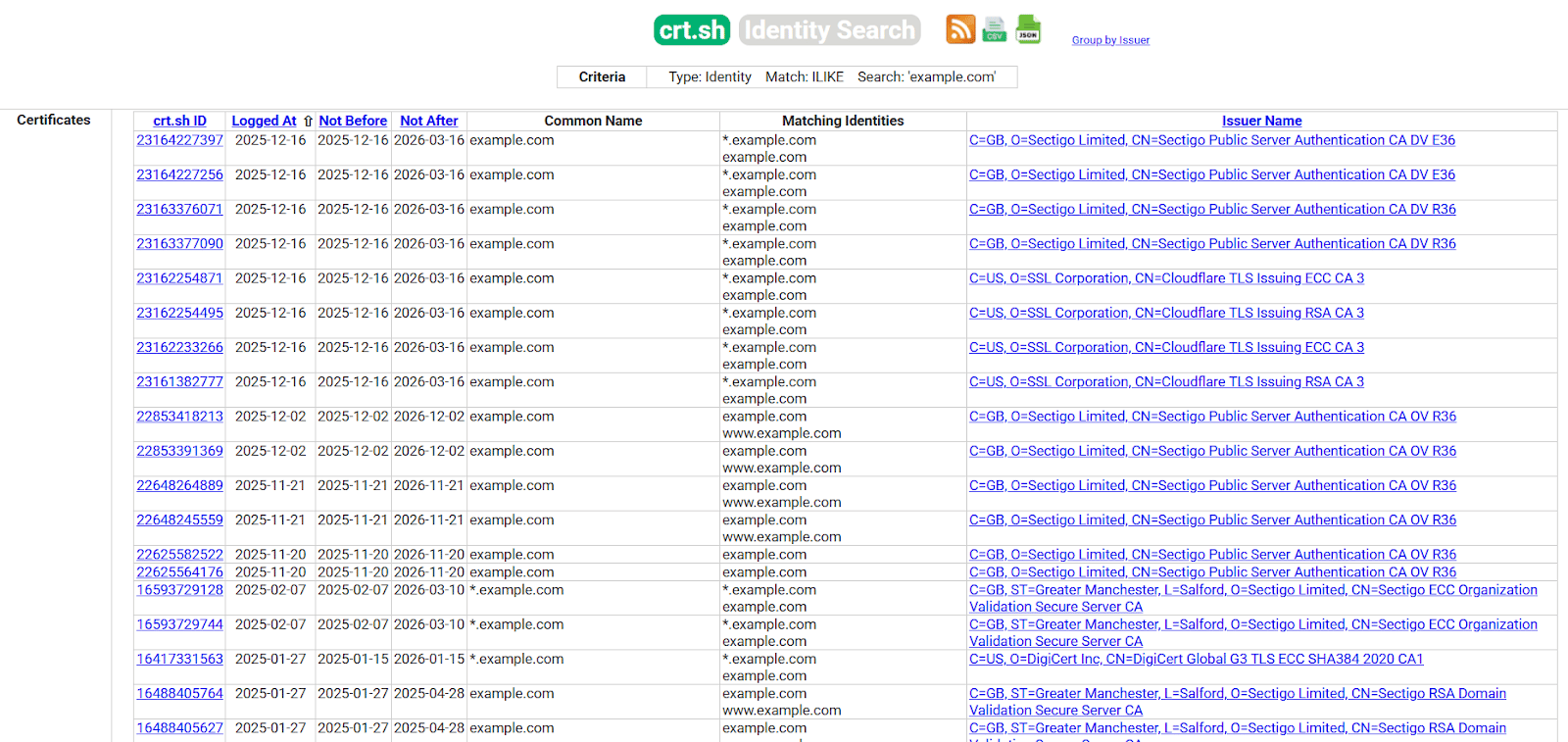
Image: Certificate transparency logs queried to enumerate subdomains and forgotten assets outside the main attack surface using crt.sh.
Pro Tip: Nikto, can also be a powerful open-source tool here that helps scans web servers for:
- Outdated software
- Known vulnerabilities
- Insecure configurations
Example:
nikto -host example.com
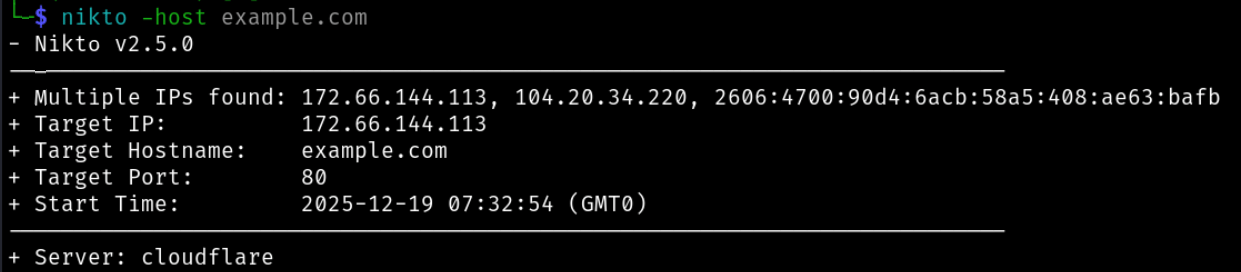
Image: Web scanning with Nikto to surface low-effort, high-noise issues early.
In other words, it helps identify low-hanging issues early, but does not replace manual testing.
Application Mapping with an Intercepting Proxy & Crawling
The most important discovery work happens in the application itself. An intercepting proxy lets the tester watch and tweak the traffic moving between the browser and the app, and tools like Burp Suite or OWASP ZAP make that practical at scale.
Some typical configurations to capture requests and responses include:
- Browser proxy set to
127.0.0.1 - Port
8080
This allows the pentester to inspect parameters, modify headers and payloads, and replay requests manually. The automated crawlers in Burp or ZAP may also be used to discover all reachable endpoints, input parameters, dynamic pages, and APIs, including unauthenticated routes as well as authenticated functionality after login
The goal is to build a complete inventory of the application’s attack surface.
Manual Application Logic and Access Mapping
Automated tools cannot understand intent. Manual analysis is required to understand how the application is meant to behave, whereby the tester maps:
- User roles and permission levels
- Role-based or attribute-based access controls (RBAC / ABAC)
- Which endpoints should be restricted to specific roles
The tester manually traces application workflows to understand the required sequences of actions, server-side enforcement of rules, and the trust assumptions made by the application.
Some key questions considered during this step include:
- Can steps be skipped or reordered?
- Are controls enforced server-side or only in the UI?
- Are state changes properly validated?
This mapping is critical for later testing of access control failures.
The goal of this phase in web app pentesting is to understand the application’s structure and uncover exposed areas before a single exploit is attempted, as without proper discovery, the following phases may lead to false positives, blind spots, and wasted effort.
Phase 3: Vulnerability Scanning
Once the application has been mapped, vulnerability scanning is introduced as a coverage exercise, not a discovery mechanism. At this stage, the tester already has an enumerated attack surface: routes, parameters, authentication states, and role-specific behavior.
Scanning is used to systematically probe the known surface for established vulnerability classes rather than to guess what the application looks like.
This is where scanners make sense, as they are good at one thing: finding boring, repeatable problems at scale. Missing patches. Old libraries. Unsafe defaults. Weak headers. These aren’t subtle bugs, but they’re exactly the issues attackers look for because they’re cheap to exploit and everywhere.
Keeping in mind the detailed map of endpoints, roles, and workflows that Phase 2 offered, scanning is now applied selectively, scoped to:
- Specific URLs and parameters
- Authenticated functionality using valid session tokens
- High-risk endpoints such as file uploads, search fields, and account management routes
Findings from this phase are treated as unverified until proven exploitable.
Most teams start with tools like OWASP ZAP or Burp Community.
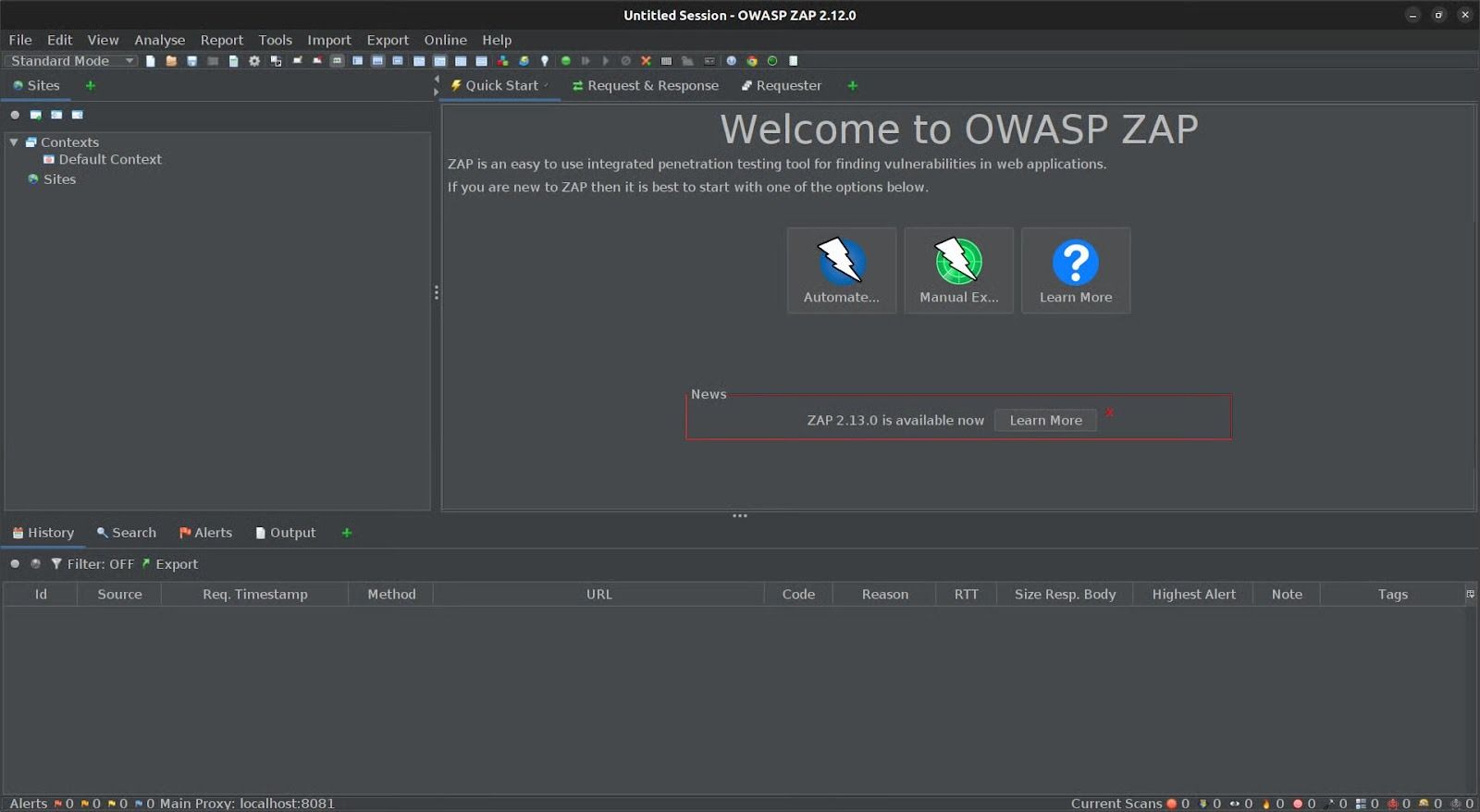
Image: Baseline vulnerability scanning used to flag common misconfigurations and low-effort attack paths.
At a larger scale, managed scanners or continuous DAST platforms such as Astra Security make sense for tracking regressions and catching obvious mistakes over time. Just don’t confuse coverage with confidence.
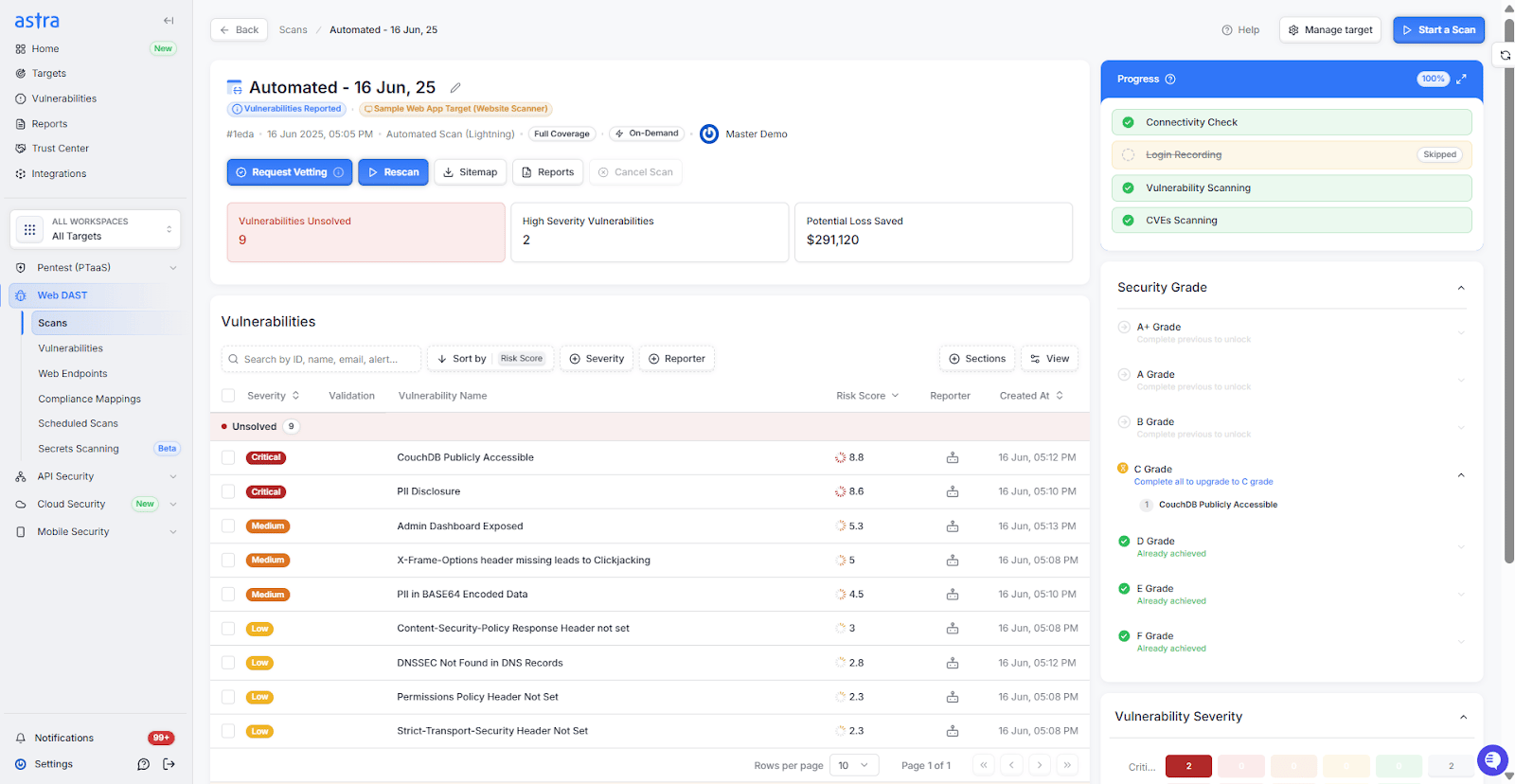
Image: Continuous Astra Security DAST highlighting recurring weaknesses and regressions across releases.
Nonetheless, depending on the scanner’s maturity, false positives and vetting are a must at this stage.
Common Web Application Security Vulnerabilities
The OWASP Top 10 (2025) provides a classification of common web application vulnerability categories based on observed prevalence and impact across testing and incident data; commonly used to structure risk identification, reporting, and remediation prioritization.
The sections below describe each category in practical, implementation-level terms.
| Category | What It Means | Example Vector / Note |
|---|---|---|
| A01:2025 Broken Access Control | Authorization checks are missing or incorrectly enforced, allowing users to access or modify resources beyond their privileges | IDOR by changing /users/101 to /users/102; bypassing role checks on admin endpoints |
| A02:2025 Security Misconfiguration | Insecure default settings, exposed services, or unnecessary features enabled in application or infrastructure components | Public cloud storage buckets, debug mode enabled, exposed admin consoles |
| A03:2025 Software Supply Chain Failures | Compromise or misuse of third-party dependencies, build systems, or CI/CD pipelines | Plaintext secrets, weak password hashing, improper key management, and lack of TLS |
| A04:2025 Cryptographic Failures | Sensitive data protection is improperly implemented due to weak, missing, or incorrect cryptographic controls | Plaintext secrets, weak password hashing, improper key management, and lack of TLS |
| A05:2025 Injection | Untrusted input is executed or interpreted by downstream systems | SQL injection, command injection, template injection |
| A06:2025 Insecure Design | Security controls are missing or ineffective at the architectural or design level | No tenant isolation in multi-tenant apps; trust boundaries assumed but not enforced |
| A07:2025 Authentication Failures | Weak or broken authentication and session handling mechanisms | Pulling malicious packages from public registries; compromised CI runners are injecting backdoors |
| A08:2025 Software or Data Integrity Failures | Integrity of code, data, or updates is not verified or enforced | Unsigned updates, unsafe deserialization, tampered configuration files. |
| A09:2025 Security Logging and Alerting Failures | Insufficient logging, security monitoring, or alerting for security-relevant events | No alerts on repeated login failures or privilege escalation events |
| A10:2025 Mishandling of Exceptional Conditions | Errors and edge cases are not safely handled, leading to information disclosure or unintended behavior | Missing MFA, credential stuffing without rate limiting, and session fixation |
Beyond the Top 10
The OWASP list covers the essentials, but many serious breaches come from what isn’t there.
Business Logic Flaws
Bugs in workflows or authorization logic that let users act outside intended limits. For example, upgrading to a premium plan without validation or reusing a one-time coupon indefinitely.
Race Conditions
When simultaneous requests manipulate the state before it updates, attackers exploit these in payments, bookings, or balance transfers to double-charge or double-withdraw.
Chained Exploits
Real attacks rarely rely on one bug; a minor info leak, combined with SSRF or IDOR, can open a path to full compromise. These need creativity to detect.
API Abuse
Modern apps rely on APIs that often lack proper access control, validation, or rate limiting, allowing attackers to fuzz endpoints, replay tokens, or exploit integration flaws to gain deeper access.
Phase 4: Exploitation (Pentesting)
The exploitation phase validates whether identified weaknesses are practically exploitable. Suspected vulnerabilities are manually exercised to confirm exploitability, impact, and attack preconditions. Findings are only recorded when exploitation is demonstrated or when exploitability can be shown with a clear, technically sound attack path.
Exploitation answers a single question: “What can an attacker actually do with this weakness?”
In simple words, this phase focuses on controlled exploitation, impact analysis, and evidence collection.
Before attempting exploitation, each candidate vulnerability is manually verified by pentesters. Scanner results and reconnaissance indicators are tested using controlled inputs to confirm:
- The vulnerability is reproducible
- Server-side controls do not block exploitation
- The issue exists in a meaningful execution context
Some key vulnerabilities and exploits in web app pentesting include:
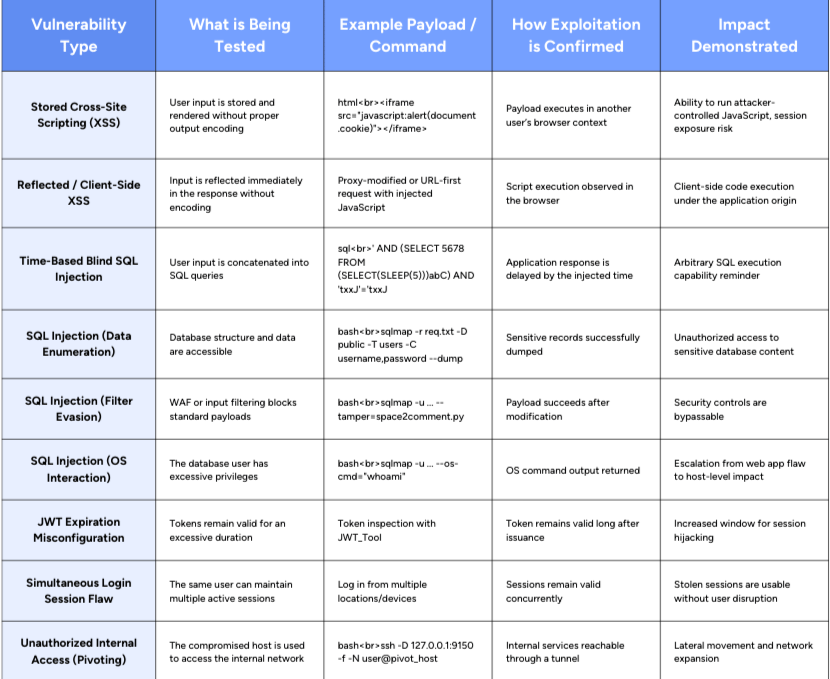
For each exploited vulnerability, the given evidence must be recorded, including but not limited to payloads or commands used, request and response data, screenshots or command output, relevant timestamps, and user content.
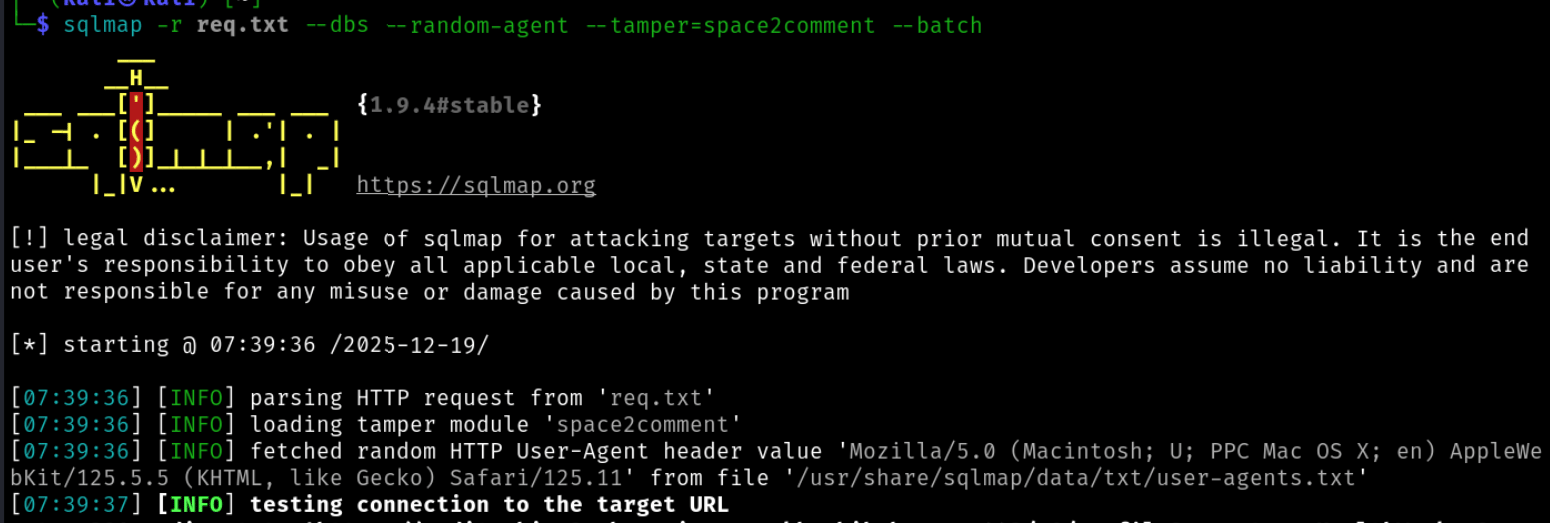
Image: Automated SQL injection exploitation with SQLmap used to confirm data access and database-level impact.
Note: Multiple low-severity issues can be chained to produce a high-impact exploit. For example, information disclosure can enable object enumeration, which is then abused via IDOR.
Likewise, directory traversal can be used to reach writable paths and combined with code injection to deploy a web shell and obtain remote code execution.
Moreover, each successful exploitation must answer three questions:
- What was gained?: Data access, session control, system access, or network reach.
- How reliable is the exploit?: Can it be repeated consistently, or does it depend on timing or user interaction?
- What is the realistic impact?: Account takeover, data exfiltration, regulatory exposure, or internal network compromise.
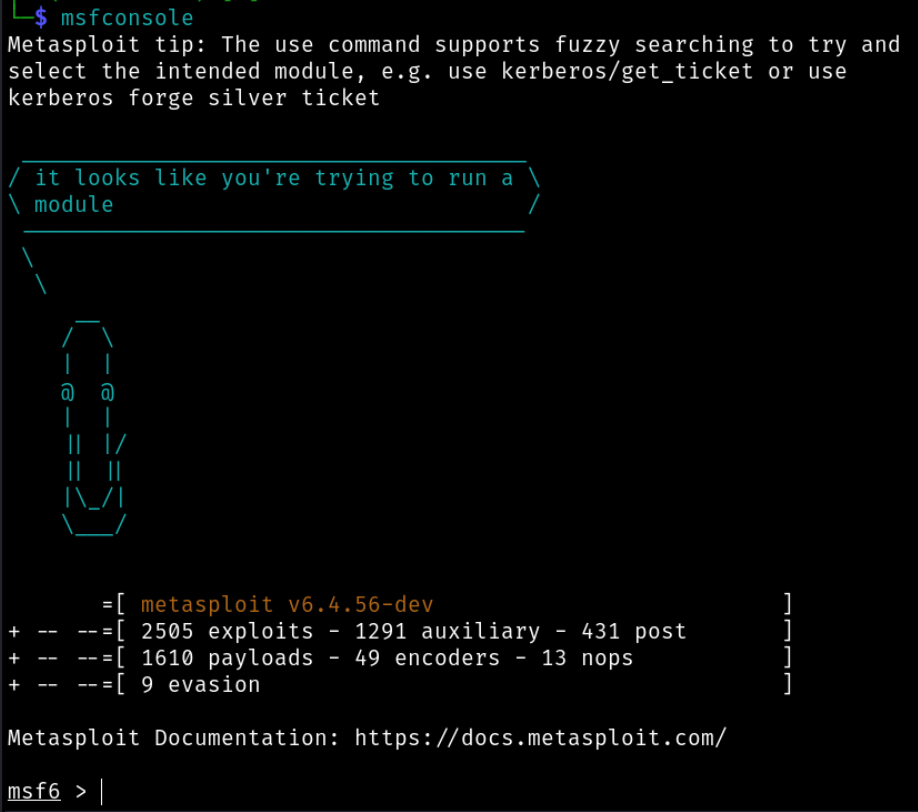
Image: Controlled exploitation framework used to validate real-world impact beyond scanner findings with Metasploit.
Only vulnerabilities that clearly demonstrate impact move forward into the final report.
Phase 5: Reporting and Remediation
A penetration testing report must serve multiple audiences. It needs to be clear enough for non-technical stakeholders while retaining sufficient technical depth for engineers responsible for remediation.
Executive Summary
The executive summary provides a high-level, non-technical overview of the assessment. It typically includes:
- The overall security posture of the application
- High-level risks identified during testing
- A summary of critical and high-severity findings
This section focuses on business impact and risk exposure rather than exploitation mechanics. Its purpose is to quickly communicate why the findings matter.
Detailed Technical Findings
Each confirmed vulnerability is documented as an individual finding. Only vulnerabilities that were successfully exploited or conclusively validated are included.
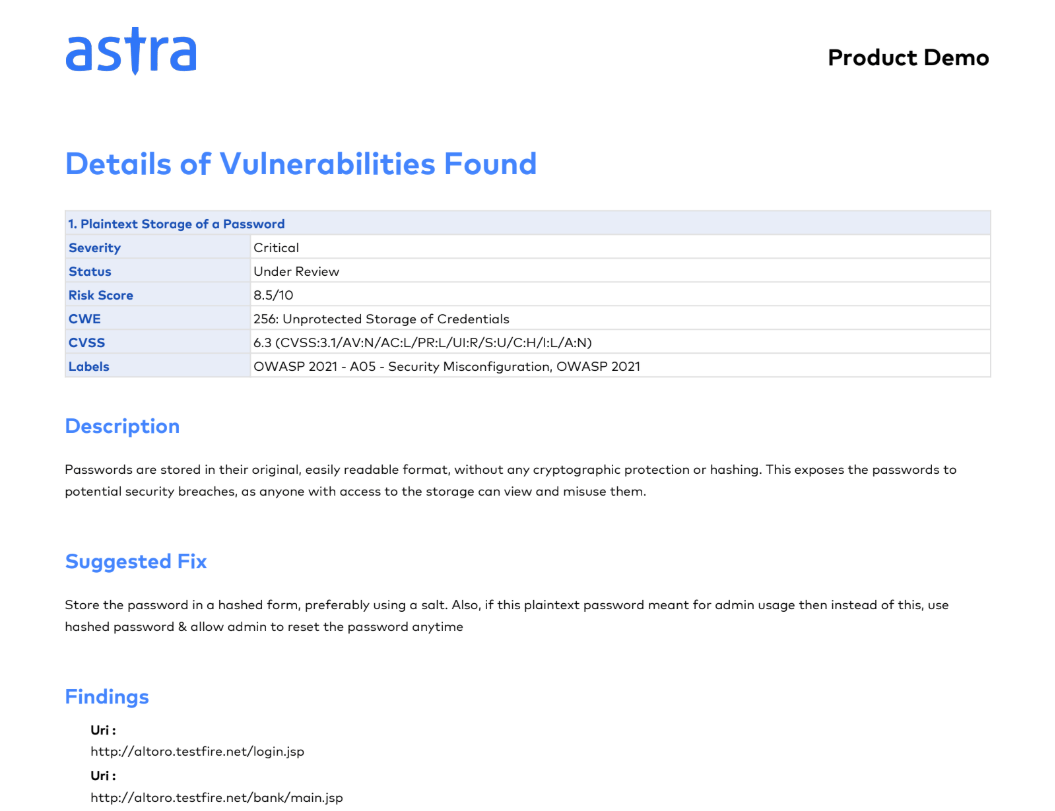
Image: A snippet of a fully documented finding showing severity, impact, evidence, and remediation guidance in one view by Astra Security.
A complete finding contains the following elements:
Vulnerability Description
A clear explanation of the issue and how it manifests within the application.
Affected Components
Specific endpoints, parameters, user roles, or services impacted by the vulnerability.
Proof of Concept (PoC)
Concrete evidence demonstrating exploitability, which may include:
- Payloads or commands used
- Request and response excerpts
- Screenshots or command output
Impact Analysis
A concise explanation of what an attacker can realistically achieve, such as unauthorized data access, account compromise, or lateral movement within the environment.
Risk Scoring and Severity Analysis
To standardize severity and support prioritization, findings are scored using the Common Vulnerability Scoring System (CVSS), which evaluates risk based on:
- Exploitability, including attack vector, attack complexity, privileges required, and user interaction
- Scope, determining whether the vulnerability affects components beyond its original boundary
- Impact, measured across confidentiality, integrity, and availability
Typical severity ranges include:
- Low: CVSS 0.1–3.9
- Medium: CVSS 4.0–6.9
- High: CVSS 7.0–8.9
- Critical: CVSS 9.0–10
CVSS scoring allows teams to objectively compare risk across findings and prioritize response efforts.
Evidence Quality and Reproducibility
All findings must be reproducible. Reports should include enough detail for an independent party to verify the issue without ambiguity.
This includes:
- Step-by-step reproduction instructions
- Exact payloads or commands used
- Clear evidence that exploitation occurred
Findings that cannot be reliably reproduced undermine the credibility of the assessment and are typically excluded.
Compliance and Control Mapping
Where applicable, findings are mapped to relevant regulatory or security framework controls, such as:
- PCI DSS requirements (for example, Requirement 11.4)
- HIPAA security safeguards
- SOC 2 trust criteria
This mapping shows how technical vulnerabilities translate into control failures and supports audit and compliance requirements.
Risk Context and Prioritization
Not all vulnerabilities present equal risk, even when they appear similar from a technical perspective. Risk management analysis, therefore, considers additional context, including:
- Exploit reliability
- Ease of attack
- Required attacker access
- Potential blast radius
This context helps engineering and DevOps teams focus remediation efforts on issues that pose the greatest real-world risk, rather than treating all findings equally.
To summarize, once the exploitation phase is complete, your pentesting team should provide a detailed report illustrating all the findings, including:
- An executive summary for non-technical stakeholders
- A description of each vulnerability identified
- The severity of the vulnerability (based on CVSS scoring or other metrics)
- The potential impact of exploiting the vulnerability
- Step-by-step instructions on reproducing the vulnerability (for internal remediation teams)
- Recommendations for remediation
Want to explore what a full real-world pentest report should include?
Phase 6: Remediation & Retesting
The remediation and retesting phase is where you actually close the loop on a penetration test. At this stage, the risks have been identified and documented; now, it’s about moving beyond the report to actually fix the problems.
Remediation is the “doing” part of the process. You prioritize the most dangerous vulnerabilities—the critical and high-severity issues—and work your way down. This might mean rewriting code, tweaking configurations, or updating security controls.
Once fixes are applied, the same team (or an independent one) follows up with a retest to verify that vulnerabilities have been adequately resolved and that no new issues were introduced in the process. Depending on the type of vulnerability and threat, this may be targeted or holistic and, as such, may be conducted using automated scanners, manual expertise, or both.
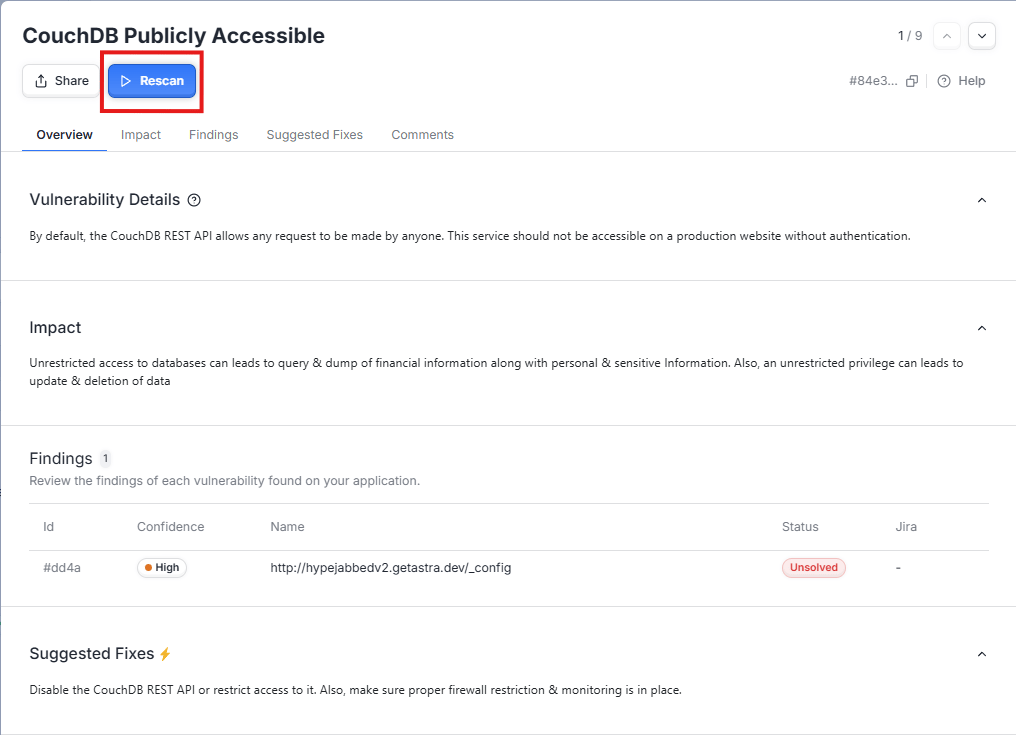
Image: Retesting confirms whether fixes actually close the vulnerability instead of masking symptoms with Astra Security’s targeted automated rescans.
Mature organizations loop these results back into their SDLC, updating secure-coding practices and automation pipelines to prevent regression.
Where Common Pentesting Tools Fit in the Testing Process
To tie everything together, the table below maps common penetration testing tools to each stage of the workflow. This helps clarify when a tool is used, why it’s used, and how it fits into the broader web security testing process, especially for readers who are new to penetration testing or reviewing results at a leadership level.
| Pentesting Phase | Primary Goal | Tools Commonly Used | How the Tool Fits the Phase |
|---|---|---|---|
| Phase 1: Scoping & Planning | Define scope, objectives, and rules of engagement | (No offensive tools used) | This phase is process-driven. Decisions here determine which tools are allowed and how aggressively they may be used later. |
| Phase 2: Discovery & Reconnaissance | Map the attack surface and understand application behavior | Nmap, Burp Suite, OWASP ZAP, Nikto, FFuF, Dirsearch, Gobuster, crt.sh, and assetfinder | Nmap identifies exposed hosts and services. Burp/ZAP intercepts traffic to enumerate endpoints, roles, and workflows. Nikto highlights obvious server misconfigurations. |
| Phase 3: Vulnerability Scanning | Identify common weaknesses and misconfigurations | OWASP ZAP, Burp Suite (Community/Pro), Astra Security DAST, Nessus | DAST tools interact with the application to surface potential vulnerabilities that require manual validation. |
| Phase 4: Exploitation (Pentesting) | Validate exploitability and demonstrate real-world impact | Burp Suite, sqlmap, Metasploit, SSH | Burp enables manual request manipulation. sqlmap confirms and exploits SQL injection. Metasploit and SSH support post-exploitation and controlled pivoting. |
| Phase 5: Reporting & Risk Analysis | Document findings and assess risk | (Analysis-focused, no new tools) | Evidence from earlier phases is consolidated into reproducible findings, CVSS scoring, and impact analysis. |
| Phase 6: Remediation & Retesting | Verify fixes and prevent regression | Burp Suite, OWASP ZAP, Astra Security | Targeted retesting confirms fixes. Automated scanners help validate remediation and monitor for regressions between pentests. |
| Across All Phases | Provide a stable testing environment | Kali Linux | Serves as the operating system bundling reconnaissance, exploitation, and post-exploitation tools. |
How Astra Security can Help?
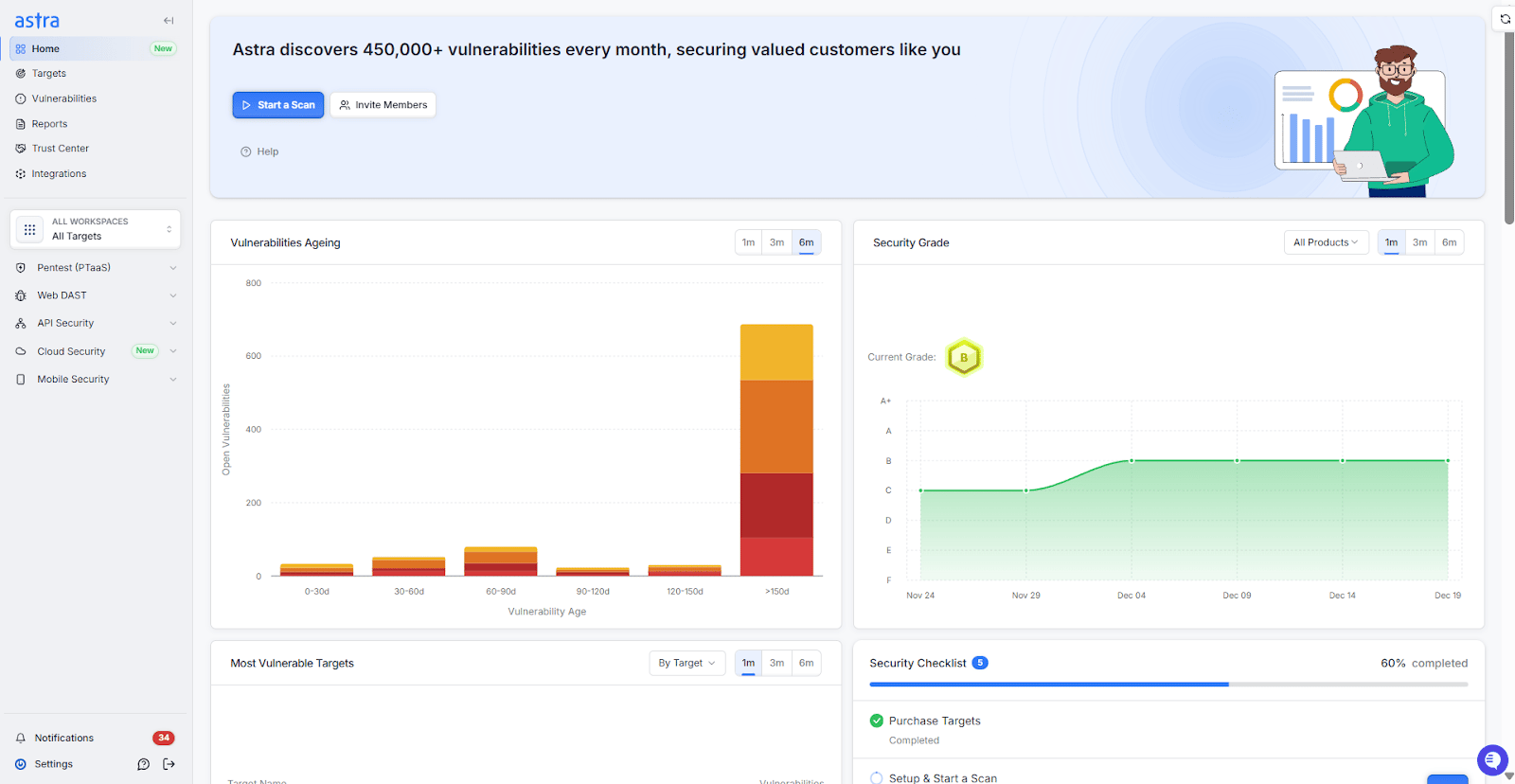
Image: Security posture visibility that helps teams track risk, remediation progress, and compliance over time with Astra Security.
Key Features:
- Platform: SaaS
- Pentest Capabilities: Continuous automated scans with 15,000+ tests and manual pentests
- Accuracy: Zero false positives (with vetted scans)
- Compliance Scanning: OWASP, PCI-DSS, HIPAA, ISO27001, and SOC2
- Expert Remediation Assistance: Yes
- Customizable Reports: Yes
- Publicly Verifiable Pentest Certification: Yes
- Workflow Integration: Slack, JIRA, GitHub, GitLab, Jenkins, and more
- Price: Starting at $1999/yr
Astra Security is a vulnerability assessment and penetration testing company that provides 24/7 web app pentesting services. It detects vulnerabilities using a combination of automated and manual methods per OWASP and SANS25.
Astra’s vulnerability scanner conducts 15,000+ tests and adds new tests every fortnight to find zero-day vulnerabilities. It conducts in-depth checks in critical areas, such as payment systems and behind login pages, to identify business logic vulnerabilities. Our CXO-friendly dashboard offers real-time vulnerability tracking and facilitates collaboration with development teams directly within the platform.
Our VAPT solution helps your team with:
- Better security coverage for web and mobile applications, cloud infrastructure, networks, and APIs.
- Detection and remediation of vulnerabilities and security gaps of varying criticality.
- Maintenance of compliance with regulatory requirements like HIPAA, SOC2, PCI-DSS, ISO 27001, and GDPR.
- Shifting from DevOps to DevSecOps gives priority to security testing applications in SDLC.r
Final Thoughts
Web application penetration testing methodology isn’t about catching every possible bug or proving that an application is “secure.” It’s about reducing uncertainty, as a good test shows where assumptions break, where controls fail under pressure, and where effort is best spent.
For beginners, this process provides a clear framework for learning how attackers think and how vulnerabilities are validated in practice. For engineering leaders and founders, it delivers something equally important: evidence. When understood this way, penetration testing becomes a practical engineering tool rather than a compliance or incident response exercise.
FAQs
What is web app pentesting?
Web application penetration testing is a comprehensive and methodical process that leverages various tools and techniques to identify, analyze, and prioritize vulnerabilities in the application’s code and configurations. It goes beyond basics to find interlinked business logic vulnerabilities before attackers can gain unauthorized access to sensitive data, disrupt operations, or steal user data.
What is the web application penetration testing checklist?
A web application penetration testing checklist is a formal guide for security testers to review. The sections usually covered in the checklist are information gathering, vulnerability assessment, and manual testing, all of which together provide an end-to-end security test.
What are the benefits of web application penetration testing?
Web application penetration testing goes beyond WAST, offering a deeper security analysis. It uncovers hidden vulnerabilities in your application’s logic, infrastructure, and external APIs, preventing data breaches and boosting overall security.
What is the timeline for web app pen testing?
Pen testing web applications takes 7-10 days. The vulnerabilities start showing up in Astra’s pentest dashboard on the third day, so that you can get a head start on remediation. The timeline may vary with the pentest scope.
How often should a web application be pentested?
At a minimum, once a year or after any major update, infrastructure change, or new feature release. High-traffic or regulated apps benefit from continuous testing or quarterly assessments to catch new vulnerabilities before they’re exploited.
Can web application pentesting prevent security breaches?
Pentesting doesn’t guarantee immunity, but it drastically reduces risk by uncovering vulnerabilities before attackers can. It shifts teams from reactive to proactive, turning unknown weaknesses into known, fixable issues that strengthen overall security posture.
How much does a web app pentest cost?
Our automated vulnerability scanning plans start at $69, while penetration testing plans begin at $5,999. Custom plans are also available for enterprises, tailored to application size, testing depth, and desired ROI to ensure maximum security and value.