

Key Takeaways:
- DAST finds security issues in your app that only show up when it’s running, not just during code reviews.
- Start with fast “smoke” scans in CI for urgent issues, and run deeper scans after big releases to avoid slowing down dev velocity.
- Each API or microservice update adds new risks, so use automated tools to map entry points and keep scans up to date.
- Soft gates mean trust, hard gates mean safety. Start with warnings for mid-level issues, but block major vulnerabilities right away.
- For complete security, pair DAST with SAST for early code bugs and SCA for scanning dependencies.
In 2025, the McDonald’s AI chatbot breach exposed over 64 million job applicants’ personal data after researchers cracked it with the password “123456”. A textbook broken authentication vulnerability that DAST could have detected during runtime testing. Application‑layer threats are evolving faster than ever, and annual or quarterly scans simply can’t keep up.
Yet most teams still treat security as a checkbox, i.e., formal, slow, and disconnected from rapid releases. Developers hesitate at manual scans on every commit, false positives flood inboxes, and critical bugs slip through until it’s too late.
The answer isn’t more audits. It’s continuous, automated runtime testing. Integrating DAST in the DevOps workflow helps catch live‑app flaws, reduces noise, and delivers real‑time feedback. This guide shows you exactly how to integrate DAST into CI/CD without slowing sprints, turning security from a blocker into a seamless part of every build.
What Is DAST (and What It’s Not)?
Dynamic Application Security Testing simulates real-world attacks on your running application. Think of it as hiring an ethical hacker who tests your app from the outside, just like an attacker would.
DAST sends HTTP requests, analyzes responses, and probes for vulnerabilities while your application is live. It doesn’t need source code access or internal documentation. It just needs a URL, and it starts exploring.
What DAST isn’t:
- Not SAST: Static analysis examines code before it runs. DAST tests the actual running application in its real environment.
- Not a vulnerability scanner: Network scanners check server configurations. DAST tests general application logic, APIs, and business workflows.
Simply put, DAST catches issues that only appear when code meets infrastructure, APIs interact, and authentication flows under real conditions.
Looking to implement DAST in your workflow? Check out our comprehensive guide to the best DAST software

What Makes Astra the Best VAPT Solution?
- We’re the only company that combines automated & manual pentest to create a one-of-a-kind pentest platform.
- The Astra Vulnerability Scanner runs 10,000+ tests to uncover every single vulnerability
- Vetted scans ensure zero false positives.
- Our intelligent vulnerability scanner emulates hacker behavior & evolves with every pentest.
- Astra’s scanner helps you shift left by integrating with your CI/CD.
- Our platform helps you uncover, manage & fix vulnerabilities in one place.
- Trusted by the brands you trust like Agora, Spicejet, Muthoot, Dream11, etc.

Why Does DAST Matter for DevOps Security in 2026?
A collective of leaked datasets exposed up to 16 billion compromised login credentials from major services (including Google, Facebook, Apple, and more), highlighting how credential theft and infostealers create widespread risk across platforms.
Both vulnerabilities existed in running applications, not source code. Static analysis would have missed them, but DAST could have caught them during staging only.
Though there are many such reasons, here are just a few reasons why DAST is vital for DevOps today:
1. Detects Runtime Vulnerabilities Missed by SAST
Your application behaves differently when it’s live. Configuration errors, environment-specific bugs, and integration flaws only surface at runtime.
DAST finds general business logic flaws that look fine in code but break in practice. Session management that works in development but fails with load balancers. API endpoints that leak data under specific conditions.
2. Language, Deployment Strategy & Framework Agnostic
DAST works regardless of your tech stack. Python, Node.js, Java, doesn’t matter. Microservices, monoliths, and serverless are all testable.
It can handle modern architectures like GraphQL APIs, single-page applications, and REST services. Hence, your team can use one tool across diverse projects instead of learning different scanners for each technology.
3. Enables Continuous AppSec in CI/CD
Modern development needs continuous security feedback. DAST integrates into pipelines, running automated scans on every major deployment without blocking developers.
Fast feedback loops catch issues early when fixes are cheap. So no more discovering critical vulnerabilities days before release.
4. Essential for Regulatory Compliance
PCI-DSS, HIPAA, and SOC 2 all require runtime security validation. DAST provides the evidence auditors want to see. Proof that your deployed application handles real-world attacks appropriately.
How to Integrate DAST into Your DevOps Workflow?
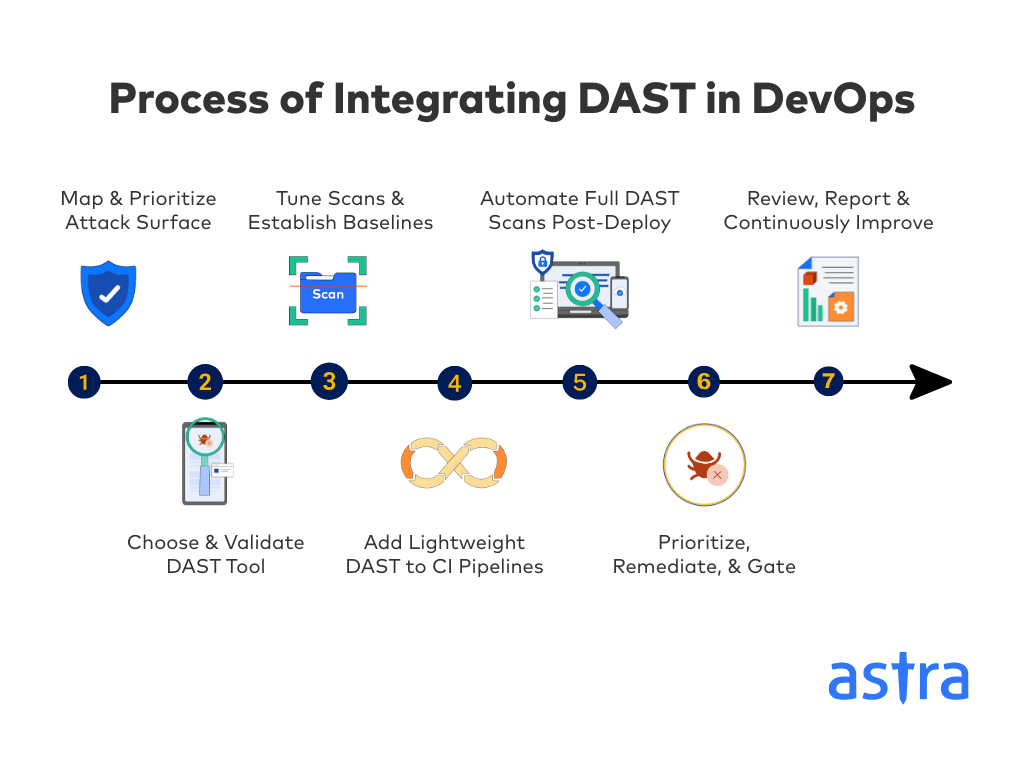
Step 1 – Map & Prioritize Your Attack Surface
Start by charting every entry point your app exposes. This includes front‑end pages, APIs, microservices, and third‑party integrations. List out each authentication flow (SSO, OAuth, session cookies) and flag high‑risk areas like payment gateways, PII storage, and admin consoles. This narrative approach makes your scope obvious to everyone.
Then, use automated discovery tools to keep that map up to date as you ship new features. By the end of this step, you should have a scan‑scope manifest covering at least 95% of all your endpoints.
Pro Tip: Add extra CPU and memory resources to application deployments during DAST scans. This prevents website outages caused by scanner traffic and ensures accurate results.
Step 2 – Choose & Validate Your DAST Tool
Every DAST solution differs in coverage, ease of integration, and reporting. Narrow your list by stack support (REST, GraphQL, SPAs) and CI/CD plugins. Then run a quick POC against a login‑protected page, test MFA, expired sessions, and SSO to ensure your scanner handles real‑world authentication without manual tweaks.
Finally, build a simple matrix scoring each tool on those criteria. You will know which one fits your environment in under a week.
Pro Tips:
- Ensure the tool you choose supports blacklisting rules. You don’t want brute-force attacks running against production systems, even during authorized testing.
- Best open-source and enterprise DAST scanners that offer comprehensive coverage across CI/CD include Astra Security, OWASP ZAP, and Burp Suite Professional.
Step 3 – Tune Scans & Establish Baselines
Default scan profiles often flood you with noise. Tweak your crawler to skip logout links and static files, then run a full staging scan to capture genuine issues. Review and mark all false positives, and tailor payload profiles to your tech stack. JSON injections for APIs, and GraphQL probes for GraphQL endpoints.
Once you finish, you will have a baseline report that reflects your application’s normal security profile and keeps false positives under 15%.
Step 4 – Add Lightweight DAST to CI Pipelines
Lightweight or “smoke” scans deliver rapid feedback. Seed your crawler with a .HAR file or sitemap.xml and limit checks to key OWASP Top 10 issues. Configure your pipeline to fail only on new critical findings; medium and low issues can pass as advisories that show up in the report.
This approach adds under two minutes to your CI run and keeps build‑failure noise below 5%.
Pro Tip: Start in “audit mode” for the first few weeks. Build team trust and tune configurations before enforcing hard gates that block merges.
Step 5 – Automate Full DAST Scans Post-Deploy

Deep scans should happen after every major merge or on a set schedule. Trigger comprehensive testing in UAT or staging environments overnight or over weekends, so it doesn’t compete with production traffic. Align these scans with sprint milestones to ensure full coverage without constant overhead.
Have your scanner auto‑open high‑severity tickets in Jira or GitHub within 24 hours of detection to keep remediation moving.
Pro Tip: Integrate with ticketing systems for auto-assignment to component owners. Real-time SLA dashboards help teams self-manage remediation timelines.
Step 6 – Prioritize, Remediate & Gate
Not all findings are equal. Combine CVSS scores with data sensitivity (PII, payment) and exploit maturity to rank issues. Enforce “soft gates” for medium vulnerabilities, i.e, warnings that don’t block merges, and “hard gates” for critical vulnerabilities to prevent risky code from being introduced.
Auto‑assign remediation tickets to the relevant engineering teams and track MTTR in dashboards to maintain visibility and accountability.
Pro Tip: Pilot soft gating for a few sprints before implementing stricter policies. This builds developer buy-in and reduces friction.
Step 7 – Review, Report & Continuously Improve
Your security strategy should evolve with your product. Share monthly reports on scan volume, severity trends, and false positive rates with both engineering and executives. Update scan rules quarterly and hold cross‑training sessions on OWASP Top 10 and recent exploits.
Aim for at least a 30% reduction in critical findings year‑over‑year, proving continuous DAST adds real value.
Pro Tips:
- Cross-train AppSec and engineering teams together. Shared threat models improve fix quality and foster a strong security-first culture.
- Partner with DAST providers offering trend dashboards for both engineering and executive visibility. Clear metrics drive action and investment.
Best Practices for Integrating DAST in DevSecOps Workflows
Run Scans in Parallel Pipelines Without Blocking CI
Separate DAST from critical build paths to avoid developer frustration. Run security scans parallel to main workflows, providing feedback without slowing releases.
Establish Risk-based Remediation
High-risk modules handling payments or PII should undergo daily scans. In contrast, lower-risk components can be tested weekly or monthly. Focus your resources where they matter the most.
Ensure Dev + Security Collaboration on Triage
Shared dashboards and clear remediation SLAs reduce friction between teams. This is important because developers need context, not just severity scores.
Continuously Monitor & Adjust Your DAST Based on Coverage Drift
Applications evolve constantly. Update scan configurations when new endpoints, APIs, and services are added. Automated discovery helps maintain comprehensive coverage.
Build Security into Culture, Not Just Pipelines
Train developers on common vulnerabilities and DAST findings. Include security feedback in sprint reviews and retrospectives. Make security everyone’s responsibility, not just the security team’s.
No other pentest product combines automated scanning + expert guidance like we do.
Discuss your security
needs & get started today!

What’s Best: DAST or a Hybrid (SAST + DAST + SCA) AppSec Approach?
Runtime, code-level, and third-party risks each require different scanning tools. And no single solution covers everything effectively.
SAST catches coding errors early. DAST finds runtime issues and misconfigurations. SCA identifies vulnerable dependencies. And together, they provide comprehensive application security coverage.
Unified dashboards bring all findings into one view, helping teams prioritize based on actual risk rather than tool-specific severity scores.
Here is a quick table outlining when to use each approach:
| Feature | SAST | DAST | SCA |
|---|---|---|---|
| Access Type | White-box (source code access) | Black-box (no code access) | Component analysis (dependencies) |
| Testing Phase | Early in SDLC (coding, build) and also during code reviews | Later in SDLC (testing, staging, production) | Early in SDLC (coding, build) |
| Vulnerability Focus | Code-related design flaws and coding errors | Runtime issues, configuration errors, and business logic | Known vulnerabilities in third-party libraries |
| Primary Use Case | Secure coding practices, early bug fixes | Real-world behaviour, exposed interfaces, and APIs | Open-source risk management, license compliance |
| Example Vulnerabilities | Buffer overflows, insecure cryptography | SQL Injection, XSS, authentication bypass, and misconfigs | CVEs in dependencies, outdated components |
| False Positives | Higher (lack of runtime context) | Lower (active testing, real-world engagement) | Variable (depends on vulnerability database) |
| Performance Impact | Minimal (static analysis), although large codebases can make it slower | Can impact performance during testing | Minimal (static analysis of component manifest) |
| Integration | IDEs, CI/CD pipelines | CI/CD pipelines, staging environments | CI/CD pipelines, package managers |
| Limitations | No runtime context, may miss data flow | Requires running app, limited code pinpointing | Only known vulnerabilities, no custom code analysis |
How Can Astra Help with DAST DevOps Integration?

Key Features:
- Delta scanning for only changed endpoints
- Always-on monitoring in production (no performance impact)
- Chained attack simulation for multi-step exploits
- Audit-ready, timestamped logs with PDF exports
- Public Trust Center to share live security status
- Cloud & container awareness (Kubernetes, Docker, serverless)
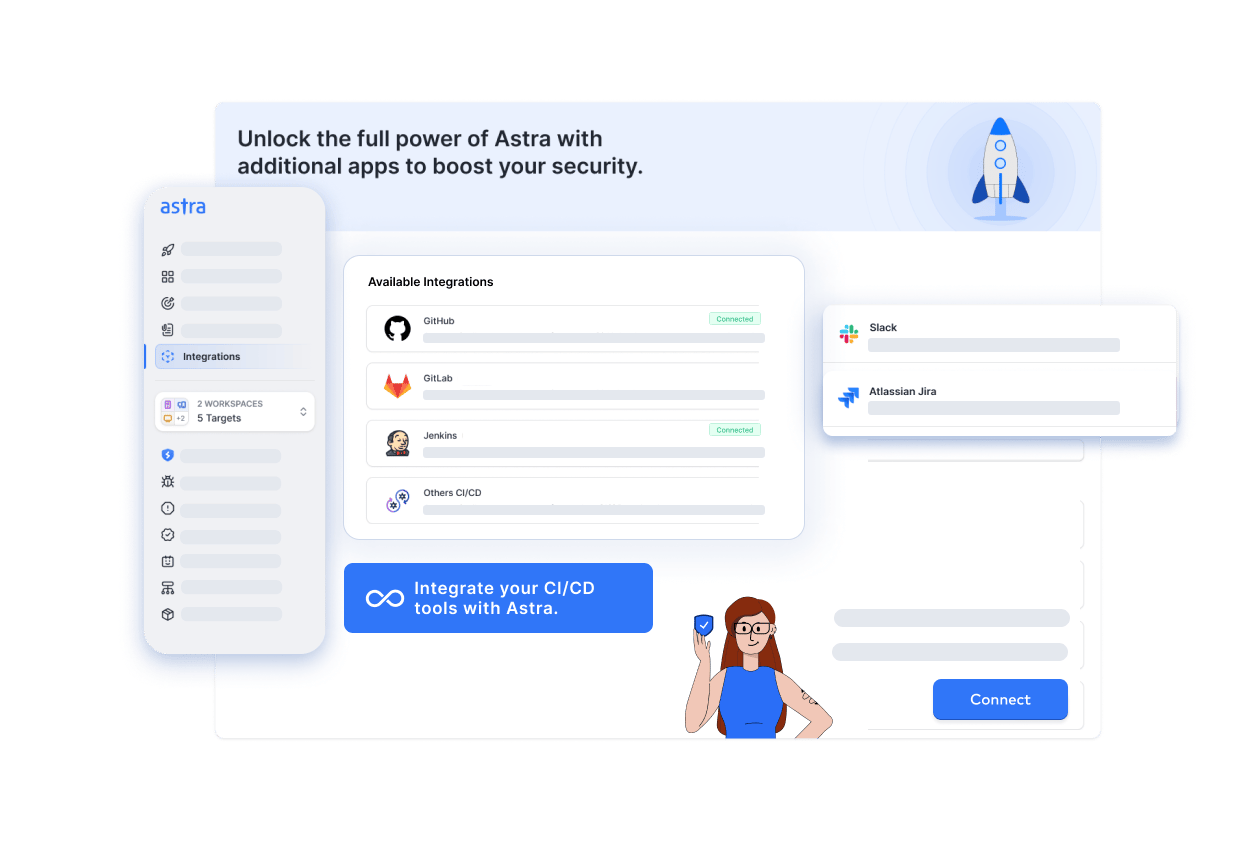
- Built-in CI/CD and Jira integration for seamless workflows
Astra’s DAST scanner delivers broad AppSec coverage without slowing your team. Run 15,000+ unified tests across OWASP, SANS, ISO, and SOC controls, then let always-on monitoring keep an eye on production between releases.
Beyond scanning, Astra Security offers full lifecycle integration. Project management dashboards give leadership visibility, feature-dev hooks trigger scans on code push, and release management gates enforce policy before deployment. Results automatically flow into Jira, assigning vulnerabilities to the right owners so fixes happen fast and you always know exactly where your security posture stands.
Astra Pentest is built by the team of experts that helped secure Microsoft, Adobe, Facebook, and Buffer

Final Thoughts
Security can’t wait until after code lands. Integrating DAST into your CI/CD pipeline transforms security from a gate into a continuous guard.
Runtime testing catches the vulnerabilities that static checks miss and keeps feedback loops shorter. Delta scanning, chained attack simulation, and always-on monitoring ensure your defenses evolve with your code. Audit-ready logs, public trust status, and Jira integration make compliance and accountability effortless. And ultimately, by making DAST part of every sprint, you shift left, fix early, and build trust.
FAQs
What is DAST in DevOps?
Dynamic Application Security Testing (DAST) is a method of actively probing a running application or API, simulating real-world attacks from the outside in. In a DevOps setting, it runs automatically within CI/CD pipelines to catch runtime vulnerabilities before release, helping detect issues that code-only analysis can’t see.
Is DAST the same as vulnerability scanning?
Not exactly. Traditional vulnerability scanners focus on known system or server misconfigurations, missing many runtime flaws. DAST goes in-depth and actively attacks web apps and APIs in their live state, detecting runtime vulnerabilities like SQL injection or authentication breakdowns.
Can DAST be part of DevSecOps?
Absolutely. DAST is a foundational component of DevSecOps. It enables continuous, automated security testing in the CI/CD pipeline via “shift-left” practices. By integrating runtime testing early and often, teams catch more real-world vulnerabilities while maintaining development speed and quality.
Can DAST be automated completely in DevOps?
Yes, DAST can be fully automated within DevOps pipelines using CI/CD integrations, scripted scans, and scheduled triggers.
But to keep the results accurate, the initial setup still needs tuning, especially for authentication, scanning scope, and false positive filtering.