

Key Takeaways:
- False positives are more than noise, they waste developer time, erode trust, and increase business risk.
- False positive triage must be a pipeline feature, not an afterthought, combining automated reachability, cross-tool correlation, and human review.
- Hybrid testing with SAST, DAST, and IAST, along with ML, reduces recurring noise at the source and raises confidence in findings.
- Choose tools that validate before notifying, ideally with human-in-the-loop verification, to quickly restore developer buy-in.
In 2025, DevOps teams are overwhelmed not by missing vulnerabilities but by too many false ones. SAST reports flagging “phantom bugs” that stall pipelines, while DAST scans misfire on runtime edge cases. The noise has become deafening, and developers are starting to tune out entirely.
False positives are not just noise. They are a growing attack surface in themselves. They slow down real fixes and create blind spots where actual threats hide. This guide breaks down what causes them, how to build a bulletproof false positive triage strategy, and most importantly, which tools actually solve the problem instead of adding to it.
What Is a False Positive in Application Security Testing?
A false positive in application security testing occurs when a scanner incorrectly identifies secure code or configurations as vulnerable, creating alerts for non-existent threats.
For example, your SAST tool marks a debug function as a potential security risk. But in production, that function is completely inaccessible behind authentication walls and feature flags. The alert wastes developer time because the “vulnerability” can’t actually be exploited.

DAST false positives happen when scanners misinterpret application behavior during runtime testing. A scanner might trigger an error message and assume it has found an injection vulnerability, when it’s actually hitting a properly configured Web App firewall that is blocking the malicious payload as designed.
False negatives are the opposite. They are real vulnerabilities that scanners miss. False positives cost time and trust. In contrast, false negatives cost security and compliance. The goal is to tune tools so that they catch real threats while keeping noise low.
Why Do False Positives Happen in SAST & DAST?
Understanding the main causes helps you prevent false positive detection issues before they hit your pipeline. Here are just some of them:
Causes in SAST
- Pattern-based scanning without runtime context: SAST tools match code against known risky patterns but cannot see which paths actually run. They will flag code that looks dangerous even when that branch never executes in production, creating noise that developers must sort through.
- Framework and language quirks: Modern frameworks provide automatic protections that scanners may not recognize. A template engine might auto-escape variables, or a framework-level sanitizer might neutralize input, yet the tool still raises an alert.
- Library and version mismatch: Scanners can report known CVEs for a library even if your app never uses the vulnerable function. The result is ghost alerts that point at a package but not at real exploitable usage.
- Path explosion and dead code: Static analysis explores many hypothetical execution paths and often reports issues in unreachable or legacy code. These worst-case assumptions inflate the findings list with low-value items.

Causes in DAST
- Authentication & session handling failures: DAST scanners struggle with complex login flows and session state. If the tool loses authenticated context, it may report vulnerabilities that only appear to unauthenticated users.
- Payload overreach and defenses: A scanner’s malicious payload can trigger WAF rules or generic error responses. The scanner may then interpret that behavior as a successful injection when in reality, your defenses stopped it.
- Environmental drift between staging and prod: Scans run against staging that is not identical to production produce misleading results. Differences in WAFs, feature flags, or enabled modules lead to false alarms.
- Limited response context: DAST only sees HTTP responses and not internal logic. Generic errors, verbose stack traces, or custom error pages can look exploitable even when they are harmless application behaviour.
The Real Impact of False Positives on DevOps Teams
The business cost of poor false positive classification goes far beyond wasted developer hours.
1. Time & Resource Drain:
Triaging a single false positive in SAST often takes 15 to 30 minutes. That time adds up fast when scanners return hundreds of findings. Developers get pulled from feature work and lose flow, which multiplies the real cost beyond the raw triage minutes.
2. Alert Fatigue and Developer Morale:
A 2024 SOC survey found that about 53% of security alerts were false positives. Constant noise breeds complacency, and developers start skipping or ignoring security tickets. When trust erodes, morale drops, and security awareness becomes a checkbox, not a practice.
3. Reduced Security Team Efficiency:
AppSec teams spend their time validating noise instead of doing threat modeling or architecture reviews. That opportunity cost weakens proactive defenses and strategic security work. The team becomes reactive, and firefighting replaces planning.
4. Delayed Remediation of Real Threats:
True positives can get buried under backlogs of false alarms. Critical fixes take longer, and exposure windows widen. This increases the chance of incidents and can trigger compliance failures.
5. Breakdown of Trust Between Dev & Security:
When security is seen as a blocker, collaboration suffers. Developers may route around controls or deprioritize fixes. Over time, security becomes an afterthought instead of an integrated part of delivery.
How to Build an Effective False Positive Triage Framework?

An effective incident triage workflow transforms noisy security pipelines into a trusted, actionable intelligence system. And here’s a step-by-step roadmap of how you can build one:
Step 1: Auto-Filter by Severity & Reachability
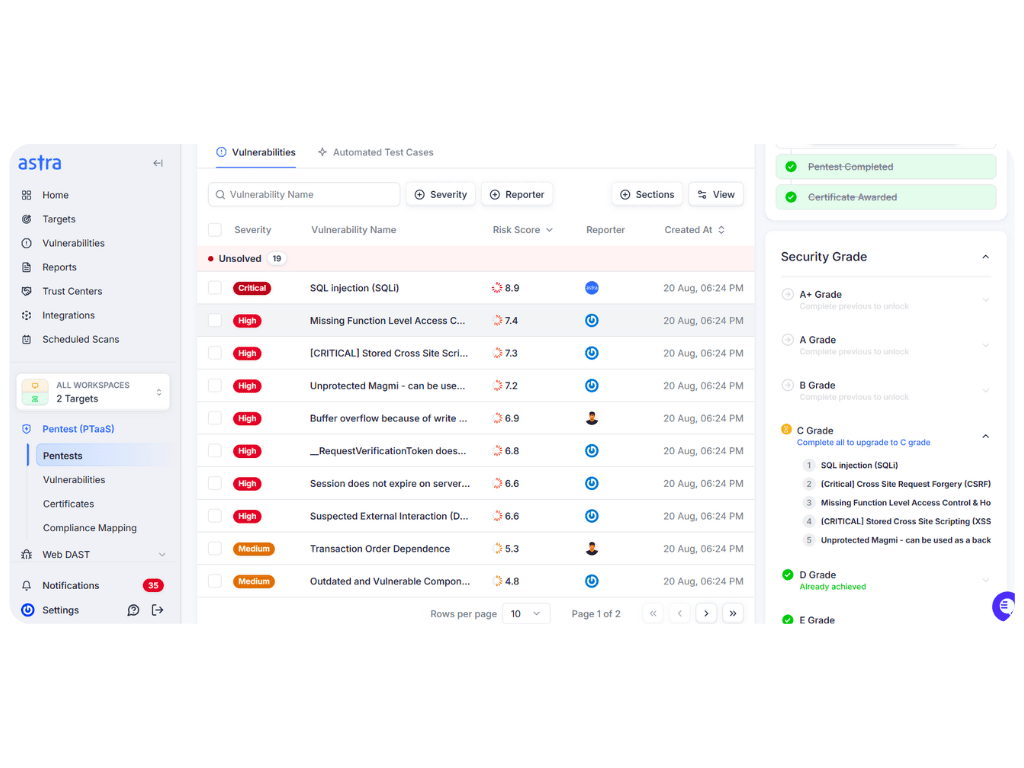
Start with automated filters that drop findings unlikely to represent real risk. Use reachability analysis to check if user input can reach the flagged code path. Configure severity thresholds so only the issues that match your sprint capacity surface to developers.
Pro Tip: Use advanced SAST tools that perform reachability and function usage analysis, so vulnerabilities only block deployment when actively exploited in code.
Also suppress known low-impact rules automatically and rescan after builds so noise never reaches the backlog.
Step 2: Correlate Across SAST, DAST, & IAST
Don’t trust a finding that appears in only one signal. Cross verification between static, dynamic, and interactive tools increases confidence quickly. Build rules that promote alerts seen by multiple scanners so you escalate fewer false positives.
When SAST and DAST both point at the same vector, you can skip some manual checks and move faster.
Step 3: Run Quick Proof of Exploit Scripts
Automate safe proof-of-concept checks in isolated environments for ambiguous findings. Small scripts can confirm injection points, auth bypasses, and access control flaws without waking developers. This gives concrete evidence before human effort is spent.
Keep these PoC scripts minimal and sandboxed so they never touch production data.
Step 4: Flag Unverified Alerts for Human Review
If automation cannot validate an alert, route it to a triage queue for expert analysis. This prevents developers from receiving low-confidence tickets and keeps their backlog clean. Human reviewers focus only on cases that need judgment.
Use SLAs for the triage queue so that you don’t lose items.
Step 5: Human Triage Checklist
When security analysts review flagged findings, they should follow a structured approach:
- Exploitability validation: Can this vulnerability actually be triggered by an attacker? Is the affected code reachable from user input? Are there compensating controls that mitigate the risk?
- Environmental context: Is this finding relevant to the production environment? Does it exist in test-only code, deprecated features, or behind authentication that changes the risk profile?
- Business impact assessment: What would successful exploitation actually accomplish? Is this a theoretical finding or something that would provide meaningful access to sensitive data or functionality?
Step 6: Tag & Learn (Feedback Loop)
Log every triage outcome and why it was marked false or true positive. Use these tags to tune suppression rules, train ML models, and build regression tests. Over time, the system will drop repeat noise and raise the overall signal quality.
Try making feedback part of your CI pipeline so each release benefits from past triage decisions.
Best Practices to Reduce False Positives
Fine-Tune Rules and Thresholds
Default scanner rules catch everything, but they also surface a lot of noise. Tailor rule sets to your stack and risk appetite so only relevant issues appear.
For example, if you use a framework with built-in sanitizers, stop flagging every template variable. Review those thresholds after major architecture changes.
Tune Your SAST and DAST Tools Early and Regularly
Spend time up front to configure scanners rather than cleaning up noise forever. Run an initial baseline against your main branches and adjust false positive-prone rules.
Schedule configuration reviews after releases, library upgrades, or platform shifts so scanners can keep pace with your code.
Looking to fine-tune your setup? Explore our curated list of the best DAST tools built for precision and low false positives.
Contextualize Alerts
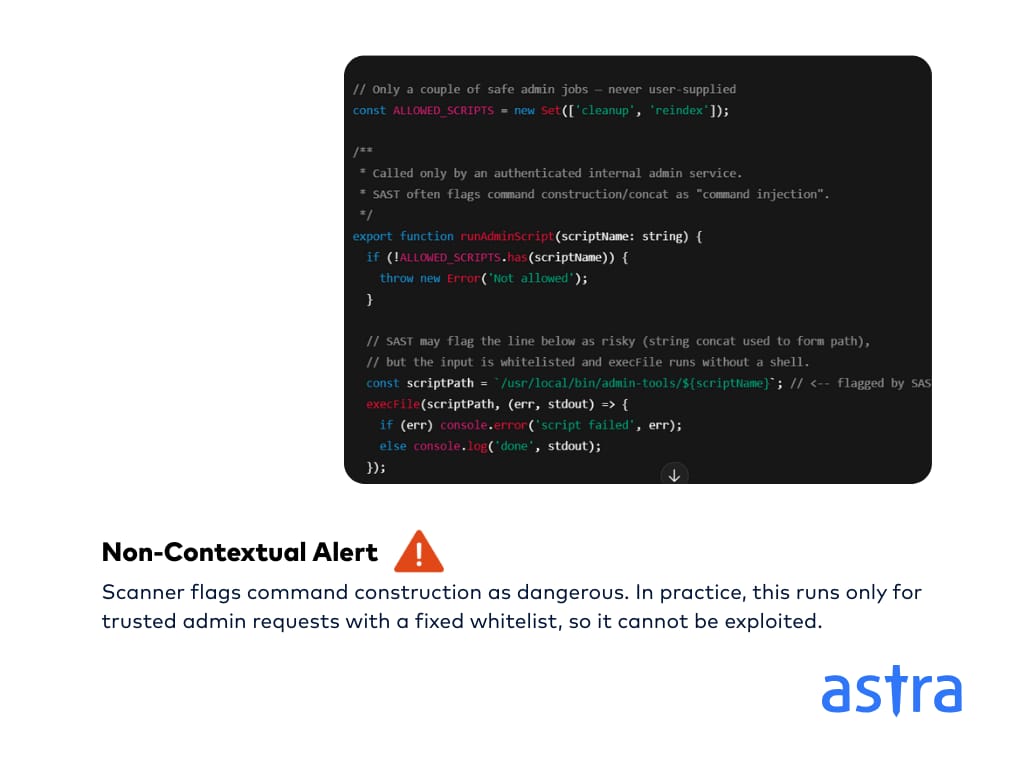
Raw scan output rarely gives the full story. Add environment and business context before sending tickets to developers. Explain affected user roles, exploit scenarios, and suggested fixes so engineers can act quickly and with confidence.
Validate in Staging Before Dev Teams See Alerts
Let security teams act as a first filter and validate high-volume findings in a staging environment. This prevents noisy tickets from landing in developer backlogs. It costs some SecOps time but saves far more developer hours and trust.
Adopt Hybrid Testing Approaches
Use SAST, DAST, and IAST together to raise confidence. Static findings backed by runtime evidence are worth escalating.
Interactive testing helps confirm whether a flagged path actually runs in production and reduces repeat false positives.
Incorporate ML & Continuous Monitoring
Feed triage outcomes back into your tool so suppression rules get smarter over time. Use machine learning to surface recurring false positive patterns and to prioritize alerts.
Continuous monitoring also checks that fixed issues do not reappear after new deployments.
What Are the Best Automated Tools for False Positive Triage?
| Feature | Astra Security | SemGrep | Contrast Security |
|---|---|---|---|
| False Positive Reduction Method | Human-in-the-Loop (HITL) validation: Expert pentesters manually verify all findings before actually reporting. | AI-Powered SAST: ML-driven context-aware auto-triage and filtering. | Interactive Application Security Testing: Runtime sensors provide real-time verification and context |
| Primary Testing Type | DAST + PTaaS | SAST | IAST |
| Unique Value Proposition | Guarantees zero false positives through human expert validation | Highly accurate developer-centric SAST with AI-driven triage | Superior runtime accuracy with fewer false positives through behavioural analysis |
| Example Use Case | DAST scan reports 80 issues. Astra's expert team validates and confirms only five genuine vulnerabilities, delivering clean, actionable reports | SAST scan flags potential vulnerability. Semgrep’s AI analyzes code context and historical data to auto-classify as a false positive before developers see it. | SAST flags a vulnerability in a third-party library. Contrast’s IAST agent, active in the running app, confirms the vulnerable function isn’t being used, eliminating false positives. |
Advanced Techniques for Reducing False Positives at the Source
Moving beyond basic triage requires addressing false positives at their source rather than just managing the aftermath. Here are ways through which that can be done:
SAST Tool Configuration Optimization
Tune rules to the frameworks you use so scanners stop flagging safe patterns as vulnerabilities. For example, if your app uses Spring Security or built-in template escaping, reduce generic auth and encoding alerts that don’t apply to your stack.
Improve taint analysis and cut unreachable paths so the tool reasons about real execution. Integrate static scans with your build system so the scanner sees compile flags, test-only code, and feature toggles and avoids reporting artifacts.
DAST Scan Optimization for Higher Accuracy
Script realistic authentication flows so scanners maintain valid sessions and test the app as real users would. When the scanner looks like a normal client, it stops misreading auth failures as security issues.
Tune payloads to exercise business logic instead of triggering WAF rules or infra defenses. Add fine-grained checks and fingerprints so generic errors are not flagged as exploitable.
Hybrid Testing Approaches (SAST + DAST + IAST)
Use static analysis plus runtime verification to confirm threats. Then create tickets. If SAST flags a path and DAST or IAST shows it executing or returning sensitive data, escalate with evidence.
Use IAST to observe actual data flow inside the running app and confirm exploitability in context. A layered approach catches complex logic flaws while keeping false positive rates low across the stack.
AI-Powered Triage
Train adaptive models on your historical triage outcomes so the system learns what is noise for your codebase. Over time, the model will auto-rank and suppress recurring harmless patterns and reduce repetitive manual work.
Apply context-aware suppression that considers framework, reachability, and role boundaries before auto-suppressing a finding. Always pair ML decisions with human review and an audit log so suppression is safe and explainable.
How Can Astra Help?
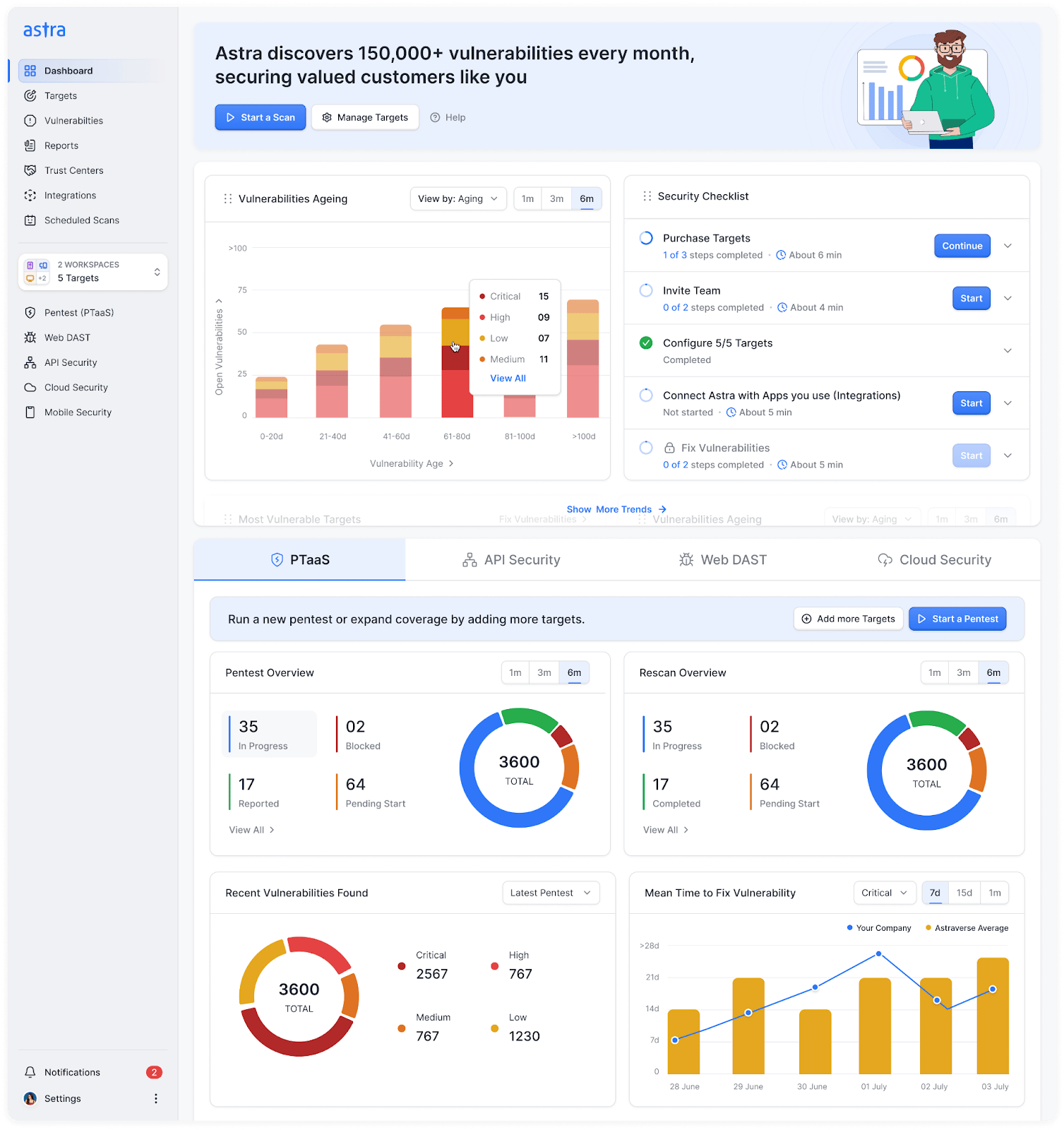
Key features:
- Zero false positives through human-verified findings and detailed PoCs.
- 15,000+ unified test cases combining automated scans and manual pentesting.
- CI/CD-ready integrations with GitHub, GitLab, Jenkins, and Jira for seamless workflows.
- Automated and manual rescans to prove fixes and produce audit-ready PDFs.
Astra Security’s DAST + PTaaS platform eliminates triage noise by validating findings before they reach your developers. Our PTaaS mixes automation with certified pentesters having OSCP and eWPTXv2 certification, so only actionable issues become tickets. And once an issue is marked as a false positive, it will never be included again in the future. Every finding ships with reproduction evidence and clear remediation steps as well.
Validated issues flow into your pipelines, and the resolution center keeps devs and Astra experts in one place. Rescans confirm fixes, and the Trust Center or exportable reports give compliance-ready proof. The result is fewer interruptions, faster fixes, and restored trust between security and DevOps.
Final Thoughts
False positives are leaking time, trust, and security capital. When alerts drown out the signal, developers chase noise, and real threats slip by. A focused false positive triage pipeline filters the clutter, confirms exploitability, and returns only actionable issues to DevOps.
Make triage part of your CI/CD loop, correlate SAST, DAST, and IAST, and keep human review for edge cases. Doing this will stop security from being a blocker and will become a measurable, auditable control that supports velocity and compliance.
FAQs:
What is an example of a false positive alert in cyber security?
An antivirus flagging a critical system file like svchost.exe as malware. Deleting it causes reboot cycles even though the file is legitimate. This misclassification disrupts systems and wastes IT time to recover.
What is false positive rate in cyber security?
The false positive rate measures how often a system incorrectly flags safe activity as a threat. In security monitoring, a median percentage is between 3%-75%.
What is the primary concern associated with false positive alerts in security monitoring?
False positives lead to alert fatigue, where analysts grow desensitized and may ignore real threats. That delay or miss can let actual incidents slip through and put your organization at serious risk.