

Key Takeaways: DAST Best Practices
- Run scans in staging or ephemeral environments to avoid false signals and production risk.
- Always scan authenticated and role-protected areas; unauthenticated scans miss critical logic.
- Integrate DAST into CI/CD at the merge or deploy stages, not every commit, to balance speed and depth.
- Build a real process for triage, ownership, and retesting
- Route findings into issue trackers with clear SLAs, ownership, and automated retesting workflows.
- Tune scan configs to your app architecture (SPA, API, GraphQL) to reduce false positives and blind spots.
- Expand DAST to cover compostable and third-part surfaces.
DAST often underdelivers, not because the tool is broken, but because it’s misapplied. It gets dropped into pipelines without strategy, runs against partial environments, skips authenticated areas, and generates findings that teams ignore. The result is predictable: wasted cycles and lost credibility.
DAST best practices focus on addressing operational failures that render scans ineffective. They focus on where and how to run tests, how to tune signal-to-noise, and how to connect results to actual risk. When done right, DAST reveals the kind of runtime behavior that static tools cannot catch. That is what teams need in 2025, and this guide outlines it.

Why is Astra Vulnerability Scanner the Best Scanner?
- We’re the only company that combines automated & manual pentest to create a one-of-a-kind pentest platform.
- Vetted scans ensure zero false positives.
- Our intelligent vulnerability scanner emulates hacker behavior & evolves with every pentest.
- Astra’s scanner helps you shift left by integrating with your CI/CD.
- Our platform helps you uncover, manage & fix vulnerabilities in one place.
- Trusted by the brands you trust like Agora, Spicejet, Muthoot, Dream11, etc.

Why is DAST Still Relevant in a World of AI, SAST, and Zero Trust?
DAST isn’t obsolete; however, it has been eclipsed by louder, newer tools. SAST gets the spotlight because it integrates cleanly into code pipelines. SCA gets funding because it’s easy to report on. AI-enhanced scanning grabs headlines with natural-language insights.
Meanwhile, despite targeting an entire class of runtime risks that the others can’t see, DAST gets labeled as legacy. The misconception? Modern security stacks (especially those leaning on zero trust and SBOMs) eliminate the need for runtime testing. However, while focusing on securing identity, infrastructure, and components, they don’t validate how the system behaves when it runs.
DAST does. It helps reveal misconfigurations to pinpoint real-world exploit paths that bypass perfectly written source code. To better understand where DAST fits in 2025, and where it doesn’t, here’s a simple breakdown:
| Capability | SAST / SCA | DAST | AI-Based Analysis |
|---|---|---|---|
| Detects known code-level bugs | Yes – scans source code and dependencies for known issues | No, does not analyze source code | Yes, analyzes code for risky patterns |
| Finds runtime behavior flaws | No, cannot observe live application behavior | Yes, actively tests the running application | No, does not interact with runtime environments |
| Covers authentication and session flows | No, lacks execution context | Yes, if properly configured with credentials and flows | No, limited to static inputs |
| Maps real attacker behavior | No, theoretical analysis only | Yes, simulates attacker interactions with the live app | No, cannot model multi-step interactions dynamically |
| Easy to automate in CI/CD | Yes, native support in modern pipelines | Partially; requires tuning for environments and stability | Yes, easily scriptable, depending on the tool |
| Prone to false positives | Sometimes, depends on rules and code quality | Sometimes, depends on the scan configuration | Frequently, especially with less mature models |
| Dependent on the source code | Yes, requires access to codebases | No, can scan black-box targets | Yes, requires structured or annotated code |
| Effective on third-party apps | No, limited without source or SBOM | Yes, works without source access | No, source necessary for meaningful analysis |
What are Non-Negotiable Best Practices for Leveraging DAST?
By 2025, DAST has a reputation problem due to issues that aren’t inherent to the process itself, but rather how it’s implemented. If you want DAST to deliver real value, you have to solve five core issues:
- Where should scans run to maximize signal and minimize noise?
- How do you scan authenticated areas without triggering auth locks or skipping core logic?
- How do you integrate scans into CI/CD without breaking dev velocity?
- How do you handle findings in a way that’s actionable and repeatable?
- And how do you tune scans so they match how your app actually behaves?
Let’s break down the top 7 DAST best practices.
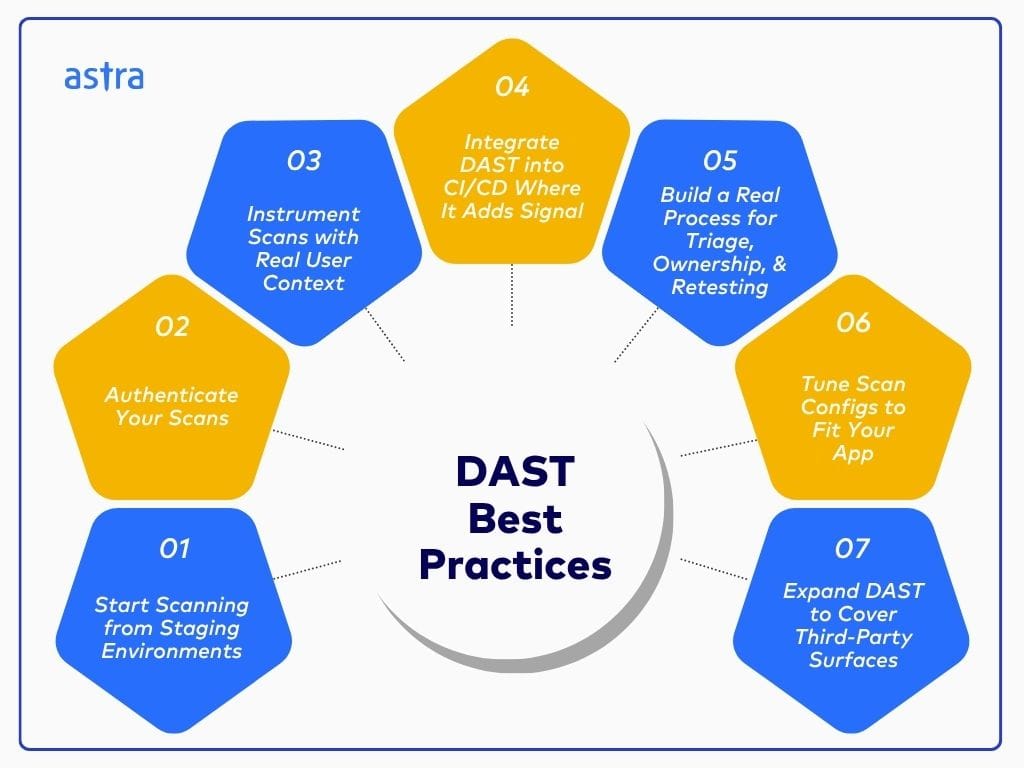
Start Scanning from Staging Environments
Production is not your test bed. Yet many teams still run dynamic scans directly against live systems, creating performance risks and collecting junk data. Instead, run DAST from staging itself, closely mirroring production, or even better, in ephemeral environments spun up per pull request or feature branch.
These environments allow you to scan aggressively without disrupting real services or skewing metrics. “Safe” production scanning has its place, but only with strict controls: scoped targeting, read-only routes, hardened rate limits, and real-time monitoring.
Authenticate Your Scans or You’re Flying Blind
DAST without authentication is a theater. You’ll miss the business logic, the role-based access control, and the actual attack surface. Modern apps demand authenticated scanning, with full support for:
- API tokens and session headers
- SSO flows using service accounts
- MFA-safe workflows (e.g., pre-authenticated users or bypass tokens)
- Headless browser automation for complex login UIs (think Puppeteer or Selenium)
Set up reusable, secure credential handling. Rotate test credentials regularly. If your scanner can’t reach the logic users actually touch, your results are worthless.
Instrument Scans with Real User Context
DAST doesn’t automatically know what matters. If you feed it generic inputs, you’ll get generic results. The most effective scans simulate real users navigating real flows across roles, routes, and dynamic states.
Preload test users with appropriate roles, passing headers and tokens, and scripting flows that reflect how users interact with the app. The closer your test conditions are to production behavior, the more signal you get from the scan.
Integrate DAST into CI/CD Where It Adds Signal
DAST doesn’t belong on every commit. Over-scanning leads to slow pipelines and alert fatigue. Trigger scans on merge to main, release branches, or staging deploys, i.e., points where code is stable enough to matter but early enough to fix without delays.
Keep scan durations short enough to avoid bottlenecks during deploys. Push results back to where devs live:PR comments, dashboards, and ticketing systems. DAST is only helpful if the feedback loop is fast and visible.
Build a Real Process for Triage, Ownership, and Retesting
DAST findings that sit in dashboards go nowhere. What matters is who owns them and how fast they get fixed. Build a workflow where:
- Findings are routed to the right team or service owner
- Severity maps to clear SLAs
- Vulnerabilities are pushed directly to your issue tracker (e.g., Jira, Linear)
- Fixes are automatically retested and marked resolved only on verification
If you’re just logging vulns but not closing the loop, you’re not reducing risk—you’re tracking it. That’s not good enough.
Tune Scan Configs to Fit Your App
Off-the-shelf scan configs don’t work on modern systems, triggering too many false positives, missing key routes, and wasting time. To fix this, tune your stack:
- Apply rate limits to avoid timeouts and bans.
- Exclude paths like static assets, health checks, and non-sensitive routes.
- Use vulnerability filters to focus on high-impact categories.
- Align profiles to architecture, for e.g., GraphQL introspection, API schema coverage, or DOM-aware scanning for SPAs.
DAST isn’t about checking every box but rather hitting the right ones with precision.
Expand DAST to Cover Composable and Third-Party Surfaces
Between embedded widgets, third-party services, micro frontends, and federated GraphQL APIs, the attack surface often extends beyond your core codebase. Yet most teams still scope DAST to what they built, ignoring the runtime behavior of what they integrate.
Effective DAST in 2025 must test how third-party components behave in your environment:
- How does that marketing script handle session tokens?
- Can a misconfigured embedded form expose PII?
- Does a federated API leak more data depending on how it’s queried?
You don’t need to own the code to own the risk. If it runs in your app, it’s your attack surface, and your scans should reflect that.

What do Modern Engineering Teams get Right (& Wrong) About DAST?
DAST is one of the most misunderstood tools in the modern security stack. Not because teams ignore it, but because they trust it too much, automate it too quickly, or assume it can just “plug into” DevOps. That’s the mistake.
For every success story, there are frustrated engineers swapping war stories on Reddit about broken builds, useless scan results, and scans that took down production environments. Worse, behind those stories are two core problems: authentication and integration.
Teams aren’t failing at DAST because they don’t care. They’re failing because DAST demands more care than they expected, as coverage can’t translate to security without intention.
One engineer wrote:
“Unauthenticated DAST in pipelines gives virtually nothing useful… mostly missing headers.”
Another added:
“Trying to get DAST working across multiple systems with different auth is a massive pain… I’ve never heard of anyone being successful on this.”
How Do Real Teams Adapt DAST to Their Workflow?
The teams getting value from DAST aren’t the ones forcing it into every pipeline—they’re the ones who bend their process and the tool to fit their reality. Take the teams who have pulled DAST out of CI entirely and handed the keys to QA:
“We partner with our QA team. They trigger DAST scans in staging per feature. That way, security is part of QA’s success criteria.”
This move does three things:
- Avoids blocking builds with flaky or long-running scans.
- Leverages existing test environments with closer-to-real data.
- Builds security into quality, not just compliance.
Other teams rely on orchestration scripts that spin up a test container, inject static credentials, and run a scoped scan, often outside of business hours or as part of the release validation process.
Simply put, all successful implementations rely on scope precision: scanning only what changed, scanning only known risk areas, and scanning APIs independently from web UIs. Instead of trying to scan the world, they scan the piece they just touched or the ones that matter the most, with proper processes, guardrails, and humans in the loop.
How Should DAST Best Practices Evolve to Meet New Threats?
AI in DAST: Attacker and Ally
The current wave of AI-powered DAST tooling mostly focuses on re-ranking results or labeling alerts. That’s low value. Where AI should be applied is in how the scanner behaves, specifically in deciding which paths to explore, recognizing dynamic states, and modifying attack payloads on the fly.
Today’s threat actors are already utilizing AI in this manner: automatically generating inputs, mutating payloads, and reverse-engineering app behavior in real-time. DAST needs to match that level of fluidity, not by just making DAST “smarter” after the scan, but to make the scanning itself smarter.
DAST Needs a Feedback Loop
The dynamic app scanning process was designed for black-box testing; however, black-box testing alone is no longer sufficient. It won’t detect a poisoned dependency quietly siphoning data, unless that behavior is exposed at runtime, and the scanner is watching for it.
Today, orgs need a runtime participant that ingests data from logs, proxies, or RASP sensors and responds to what the system is doing. A failed login shouldn’t just be a 200 OK. It should be treated differently if it comes with a redirect, an unexpected token, or repeated failures under a specific user role.
You can’t Compliance Audit What You Can’t Trace
Scanners that dump raw findings into a PDF are effectively unusable in regulated environments. Today, audit frameworks aren’t asking if you scanned, but rather what you did with what you found. They want evidence of ownership, triage, remediation, and verification.
Simply put, structured reporting should be the default best practice in application security, with traceable findings, linked to the affected endpoints, tagged with severity, assigned to teams, and validated upon closure.
More importantly, those records should map directly to compliance requirements across frameworks such as PCI DSS, ISO 27001, and HIPAA, rather than being retrofitted after the fact.
Questions Security Leaders Should Ask Their Team or Vendors
- Are we scanning all critical parts of the app, including authenticated and role-restricted areas?
- When was the last time we tuned scan rules, updated configurations, or validated scanner coverage?
- What’s our SLA for triaging, fixing, and retesting DAST-detected vulnerabilities?
- Are DAST scans slowing down our CI/CD pipelines or introducing build instability?
- Do we route DAST findings into our issue tracker, ASPM platform, or vulnerability management system?
- What’s our approach to scanning production environments—are we doing it safely, or not at all?
- Are we including APIs, third-party applications, and mobile backends in our dynamic testing scope?
How Can Astra Help with DAST?

Key Features:
- Scan Depth: 15,000+ evolving test cases powered by browser-based crawling
- Coverage: SPAs, REST/SOAP/GraphQL APIs, custom auth, token/MFA/SSO flows
- Speed & Accuracy: Verifies 4.87 findings per minute with zero false positives
- Compliance Tracking: Real-time monitoring for SOC 2, ISO 27001, PCI-DSS, GDPR, HIPAA
- Collaboration: Role-based access, AI chatbot fix guidance, and ticket management
- Integrations: GitHub, GitLab, CircleCI, Jira, Slack, Jenkins, Vanta, and more
Astra’s DAST scanner automatically maps your app and API surface, executing deep, authenticated scans across SPAs, REST, SOAP, and GraphQL endpoints. It supports MFA, SSO, token-based auth, and custom flows to scan behind logins reliably. You can trigger scans from your CI/CD or schedule them, run vetted scans for zero false positives, and re-test individual vulnerabilities within minutes.
Get real-time visibility into scan progress, potential losses prevented, and security posture. Use dedicated views for vulnerabilities and compliance, export audit-ready reports, and collaborate directly in-platform. Delta scans, RBAC, custom headers, and smart integrations ensure Astra seamlessly integrates into modern development workflows, enabling secure releases without slowing teams down.
Astra Pentest is built by the team of experts that helped secure Microsoft, Adobe, Facebook, and Buffer

Final Thoughts
DAST remains essential in 2025, not because it’s trendy, but because it catches what others miss. To unlock that value, teams must shift from checkbox scanning to strategy-driven DAST best-practices-first execution. That means scanning in the right environments, authenticating thoroughly, integrating cleanly into CI/CD, and treating findings like code issues with ownership, SLAs, and retesting.
These best practices serve as operational guardrails. When followed, they turn DAST from a noisy afterthought into a reliable signal. If you want dynamic testing that keeps pace with modern engineering, this is the bar to meet.
FAQs
Which is the ideal environment to perform DAST?
DAST should be run in staging or ephemeral environments that mirror production. These enable aggressive scanning without risking downtime or compromising real data. Avoid running DAST in production unless it’s scoped, rate-limited, and monitored. Staging ensures realistic coverage without exposing critical services to potential disruption.
What is the DAST framework?
A DAST framework refers to a structured approach for dynamically testing applications at runtime. It typically includes target identification, authentication handling, crawling, vulnerability scanning, result analysis, and remediation feedback. Unlike static testing, DAST interacts with a live application to find flaws in absolute execution paths and logic.
When to perform DAST?
DAST should be performed at key points: post-build, during pre-release QA, or after deployment to the staging environment. Triggering it on merge to main or during nightly builds avoids pipeline delays while ensuring fresh code is tested. Continuous, targeted scans after significant changes or releases help maintain runtime security posture.
What are the phases of DAST?
DAST typically follows these phases:
Target Discovery: Identifying URLs, endpoints, and components
Authentication: Gaining access to protected areas
Crawling: Mapping the app’s surface area
Attack Simulation: Sending payloads to test for vulnerabilities
Analysis & Reporting: Interpreting findings and generating alerts