

Key Takeaways
- Catch runtime vulnerabilities missed by SAST and SCA before code reaches production.
- Run dynamic security tests automatically on deploys, merges, or PRs in real environments.
- Scope scans intelligently, runs them asynchronously, and feeds results directly to devs.
- Choose tools built for CI/CD: fast, scriptable, auth-aware, and API-friendly.
- Meet compliance requirements (PCI, SOC 2, ISO 27001, HIPAA, GDPR) with audit-ready outputs per build.
Every pipeline shift introduces a new blind spot. SAST catches coding flaws, and SCA catches dependency risks; however, as delivery moves to CI/CD, new risks have emerged, not in the code itself, but in how it is executed. From broken access controls and authentication drift to logic flaws behind feature flags, these threats show up in production.
Continuous DAST in CI/CD pipelines isn’t just “another layer” but a runtime check that’s most likely to catch what gets exploited. This guide focuses on embedding continuous security into how your software ships: fast, automated, and built to pinpoint CVEs that other solutions miss.
What is Continuous DAST in CI/CD Pipelines?
Continuous DAST is the practice of automatically running dynamic application security tests against your application during the software delivery process, integrating into CI/CD pipelines and running on every deploy, build, or merge. It targets running applications in real-world environments to detect security vulnerabilities in real-time.
In the context of CI/CD, this means testing deployed application instances, such as staging, review apps, or ephemeral test environments, with automated security scanners that simulate real-world attack techniques. These scanners probe the application’s runtime behavior, API responses, session handling, and input validation logic.
The key characteristics of continuous DAST in CI/CD include:
- Automation: Triggered by CI/CD events like pull requests or deployment completions.
- Environment-aware: Targets the actual application in a deployed state, not just code.
- Behavioral: Focuses on how the app handles inputs, sessions, data flows, and access.
- Feedback-driven: Returns results directly to developers via pipeline output, tickets, or dashboards.
It gives teams real-time insight into whether the deployed application is exploitable, not just whether the code appears secure.
From Manual Scans to Continuous Testing
DAST has historically lived outside the delivery lifecycle for practical reasons. It required a deployed environment, stable infrastructure, and often manual setup to handle tasks such as authentication, session state, or scan scoping, making it a post-release or pre-prod task for security teams, decoupled from CI/CD tooling, and often operating with limited context on recent code changes.
Today’s pipelines deploy to ephemeral environments multiple times a day, application state is dynamic, and runtime behavior changes frequently. Without automated runtime testing embedded in the pipeline, teams miss real vulnerabilities until they hit production. Continuous DAST closes that gap.
| Features | Traditional DAST | Continuous DAST |
|---|---|---|
| Trigger | Manual, scheduled | Automated via CI/CD events |
| Environment | Static staging or QA | Ephemeral or pre-prod test environments |
| Frequency | Monthly or per-release | Per-PR, per-merge, or per-deploy |
| Ownership | Security team | Shared by dev, security, DevOps |
| Feedback loop | Days to weeks | Minutes to hours |
| Scalability | Hard to scale across teams | Pipeline-native, repeatable, async |
Why CI/CD Pipelines Need Continuous DAST (Not Just SAST)
SAST is a baseline, fast, and easy to automate, although it doesn’t consider how the app behaves once it’s deployed.
Real issues don’t always live in code. They show up in how input moves through layers, how authentication is applied, and how features interact. SAST loses its effectiveness when logic is abstracted, dynamic, or simply complex or messy:
- A supposedly protected API leaks data when a base64-encoded userId is passed via a query parameter. Looks clean in code, but bleeds in runtime.
- An XSS payload that sits dormant across a redirect, renders in a React tooltip, and only triggers when a user is in a specific role. Static tools miss the chain. DAST walks the whole path.
- A route that skips authentication because one middleware isn’t applied to it. The rest of the app is fine, but the attacker has found its way in.
That’s where continuous DAST in CI/CD pipelines comes in, addressing runtime gaps, such as broken access control based on role or context, misconfigured authentication flows, or expired tokens, sensitive data exposure via error messages, headers, or misused API,s as well as injection attacks in serialized objects, HTTP headers, or hidden fields.

Why is Astra Vulnerability Scanner the Best Scanner?
- We’re the only company that combines automated & manual pentest to create a one-of-a-kind pentest platform.
- Vetted scans ensure zero false positives.
- Our intelligent vulnerability scanner emulates hacker behavior & evolves with every pentest.
- Astra’s scanner helps you shift left by integrating with your CI/CD.
- Our platform helps you uncover, manage & fix vulnerabilities in one place.
- Trusted by the brands you trust like Agora, Spicejet, Muthoot, Dream11, etc.

What Does Continuous DAST Look Like in a CI/CD Workflow?
At its core, Continuous DAST integrates seamlessly into your pipeline, positioned just after deployment and before code reaches production, which means the system must be live, reachable, and testable.
A typical integration flow looks like this:

- The developer opens a pull request.
- CI runs tests, linters, SAST, and SCA checks.
- If the build passes, the code is deployed to a testable environment (staging or ephemeral).
- A DAST scanner is triggered automatically from the pipeline (e.g., running DAST in GitHub Actions, Jenkins pipeline, or GitLab CI)
- Results are returned via pipeline logs, PR comments, tickets, or dashboards.
This setup ensures that DAST is part of every deploy cycle, not a post-release ritual, providing developers with timely feedback on runtime behavior, scoped to the changes they have just made. The challenge isn’t in whether to run DAST. It’s where and how you plug it in without slowing things down or flooding the team with noise.
Example: Full GitHub Actions Workflow for CI + Continuous DAST
name: Full CI + DAST Pipeline

on:
  pull_request:
    branches: [ main ]

jobs:
  verify:
    runs-on: ubuntu-latest
    timeout-minutes: 10
    steps:
      - uses: actions/checkout@v3

      - name: Install dependencies
        run: npm install

      - name: Run Linter
        run: npm run lint

      - name: Run Unit Tests
        run: npm test

      - name: Run SAST (CodeQL)
        uses: github/codeql-action/init@v2
        with:
          languages: javascript

      - uses: github/codeql-action/analyze@v2

      - name: Run SCA (npm audit)
        run: npm audit --json > audit-report.json

      - name: Upload Audit Report
        uses: actions/upload-artifact@v3
        with:
          name: npm-audit-report
          path: audit-report.json

  deploy:
    needs: verify
    runs-on: ubuntu-latest
    timeout-minutes: 5
    steps:
      - name: Deploy to Staging (mocked)
        run: echo "Deploying to https://staging.example.com"

  dast:
    needs: deploy
    runs-on: ubuntu-latest
    timeout-minutes: 15
    steps:
      - name: ZAP Baseline Scan
        uses: zaproxy/[email protected]
        with:
          target: 'https://staging.example.com'
          fail_action: false
          cmd_options: '-r zap-report.html'

      - name: Check and Upload ZAP Report
        run: |
          if [ -s zap-report.html ]; then
            echo "Uploading report..."
          else
            echo "ZAP report is empty or missing!"; exit 1

      - name: Upload DAST Report
        uses: actions/upload-artifact@v3
        with:
          name: zap-dast-report
          path: zap-report.html
This GitHub Actions pipeline runs linting, testing, SAST (CodeQL), SCA (npm audit), deploys to a staging URL, and finally triggers an OWASP ZAP scan with results uploaded as artifacts — giving you real-time feedback on security risks introduced in each pull request
What are the Integration Models for continuous DAST?
1. Post-Deploy to Staging
This is the most common pattern: deploy to a shared staging environment and trigger DAST scans from the CI.
It’s simple to set up and maps closely to production behavior. Staging typically features a complete infrastructure, real integrations, and stable test data, which reduces the likelihood of false positives. The downside: results can lag behind the change that caused them, especially if staging isn’t refreshed per PR.
Example: Triggering a ZAP Scan Post-Staging Deploy in GitHub Actions
Here’s how you can automate a DAST scan against your shared staging environment after deployment:
name: DAST Scan After Staging Deploy

on:
  workflow_dispatch:  # manual trigger for safety

jobs:
  zap_scan:
    runs-on: ubuntu-latest

    steps:
    - name: ZAP Baseline Scan
      uses: zaproxy/[email protected]
      with:
        target: 'https://staging.example.com'  # replace with your real app URL
        fail_action: false                     # do not break CI on findings
        cmd_options: '-r zap-report.html'      # output HTML report

    - name: Upload ZAP Report
      uses: actions/upload-artifact@v3
      with:
        name: zap-report
        path: zap-report.html
This job scans your live staging environment with OWASP ZAP and uploads the scan report — giving your team visibility into real runtime risks without waiting for production deployment.
2. Ephemeral Environments per PR
For tighter feedback loops, teams spin up disposable environments per pull request. These are deployed automatically by the CI system and torn down after the scan.
DAST runs against a clean, isolated instance, matching the exact code and config introduced in the PR to remove ambiguity, streamlining developer feedback, and enabling safe experimentation. The tradeoff is infra complexity. You’ll need orchestration tooling (e.g. Terraform, Pulumi, Kubernetes jobs, or platform-native review apps) to manage the lifecycle of these environments.
Example: DAST on Per-PR Review Apps (GitHub Actions + Vercel)
The following GitHub Actions job scans an ephemeral review environment created for a PR, using OWASP ZAP:
name: PR DAST on Ephemeral Env

on:
  pull_request:
    branches: [ main ]

jobs:
  zap_dast:
    runs-on: ubuntu-latest

    steps:
      - name: Wait for Review App Deployment
        run: |
          echo "Waiting for deployment..."
          for i in {1..10}; do
             if curl --silent --head "${{ secrets.DEPLOY_PR_URL }}" | grep "200 OK"; then
                echo "App is live"
                break
             fi
                 echo "Still waiting..."
                 sleep 10
         done


      - name: ZAP Scan on PR Review App
        uses: zaproxy/[email protected]
        with:
          target: '${{ secrets.DEPLOY_PR_URL }}'
          fail_action: false
          cmd_options: '-r zap-review-report.html'

      - name: Upload ZAP Report
        uses: actions/upload-artifact@v3
        with:
          name: zap-review-report
          path: zap-review-report.html
This ensures feedback is scoped to exactly what changed in that PR, and testing occurs in an isolated environment, reducing false positives and protecting production.
3. Shadow Endpoints in Production
Some orgs route DAST traffic to non-user-facing endpoints in production. These may be duplicate paths, QA routes, or internal-only interfaces that mirror public APIs.
This ensures that DAST always tests the actual production setup, i.e., real authentication, configuration, and infrastructure. It’s the most accurate way to catch deployment drift or misconfigurations that staging might not expose. However, scans must be tightly scoped, non-destructive, and throttled to avoid degrading real systems.
Example: Passive Scan Against a Shadow API in Production
zap-cli quick-scan \
  --spider \
  --self-contained \
  --timeout 120 \
  https://prod.example.com/internal-api/shadow-status
This command scans a non-user-facing internal route that mirrors real production behavior. It avoids intrusive attacks and only performs passive analysis, helping detect issues like missing headers, session flags, or exposed error messages without affecting end users.
Tip: Always scope scans to internal routes, throttle traffic, and avoid fuzzing or payload injection in production.
It is one small security loophole v/s your entire website or web application.
Get your web app audited with
Astra’s Continuous Pentest Solution.

Comparing the Approaches
| Model | Feedback Loop | Fidelity | Complexity | Ideal For |
|---|---|---|---|---|
| Staging Deploy | Slower | High | Low | Most teams are getting started |
| Ephemeral Per PR | Fast | Very High | Moderate to High | Teams with strong infrastructure automation |
| Shadow in Prod | Varies | Maximum | High | Mature orgs with tight controls |
Making It Developer-Friendly
For continuous DAST to succeed, it must integrate seamlessly into the developer workflow without creating friction. If it slows down builds or floods teams with noisy results, it won’t get adopted. This translates to the following practices:
Firstly, don’t block the pipeline unless there’s proof of a critical vulnerability. Most teams run DAST scans asynchronously after deployment. Results are collected and posted back to developers via comments on PRs, Slack alerts, or linked tickets, without delaying the merge unless a confirmed high-severity issue is found. This maintains high velocity while still providing teams with the necessary signal.
Second, scope the scans intelligently. Running a full attack surface scan on every deploy is rarely practical; instead:
- Use commit diffs or route-level metadata to determine what changed
- Leverage OpenAPI or Postman specs to focus the crawler
- Limit scans to services, endpoints, or paths touched by the PR
This keeps scan time low and results focused, making it more likely that developers will pay attention.
Third, make triage easy. Findings should include the full request/response context, reproduction steps, and a rationale for severity. Bonus if you can link back to the source commit or responsible service.
The goal isn’t just to find flaws. It’s to make runtime security part of the feedback loop: fast, scoped, and credible enough that teams trust what it tells them.
- name: Run ZAP Scan (non-blocking)
  uses: zaproxy/[email protected]
  with:
    target: ${{ secrets.REVIEW_APP_URL }}
    fail_action: false
- name: Post scan result to Slack
run: |
curl -X POST -H 'Content-type: application/json' \
--data '{"text":"ZAP scan passed! No high-risk issues."}' \
${{ secrets.SLACK_WEBHOOK_URL }}These steps allow teams to run DAST on every pull request without interrupting developer velocity, results go straight to Slack or PR comments, not into a black hole or a blocked merge gate.
How to Choose the Right Continuous DAST Tool for CI/CD?
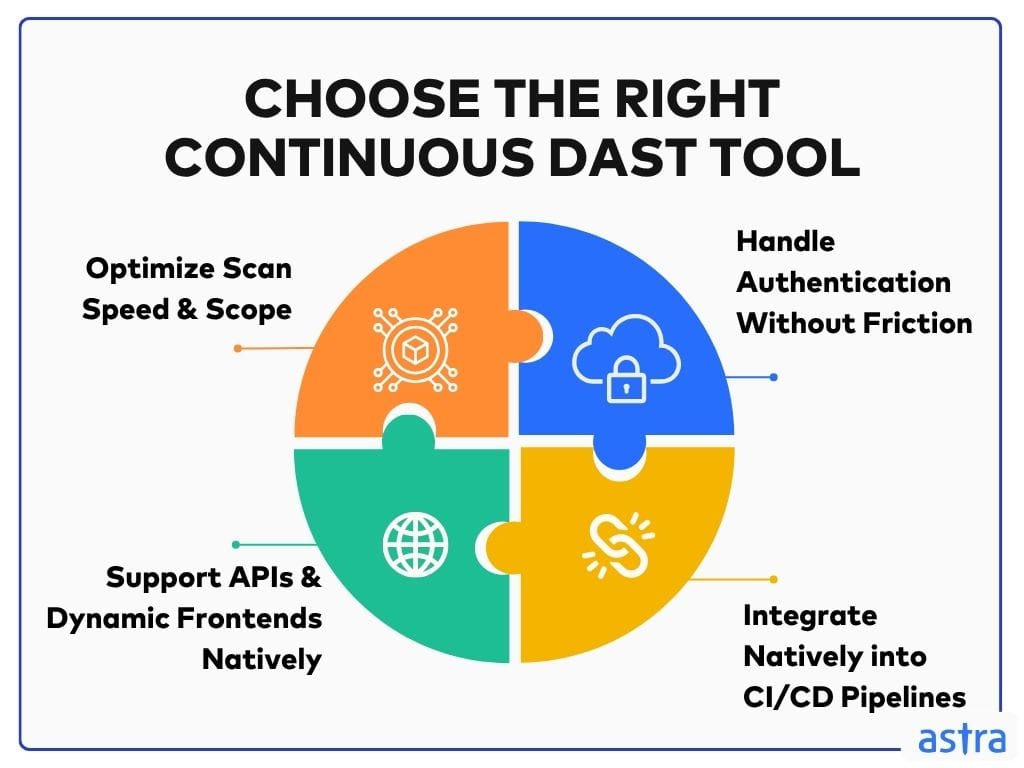
Optimize Scan Speed and Scope
DAST only works in CI/CD if it finishes before the developer has moved on. Long scans delay feedback and get ignored. What matters is the ability to scan narrowly and fast, ideally per pull request, targeting only the code that changed.
Tools should support scoped scans that use OpenAPI specs or diffs, and they should allow you to define what gets tested based on commit history, routes, or tags. Full scans across the entire app may still be helpful, but those should be scheduled, not tied to every build.
Example: How to scope a scan using OpenAPI (fast and targeted)
zap-cli quick-scan \
  --openapi-definition https://staging.example.com/swagger.json \
  https://staging.example.com
Handle Authentication Without Friction
If the scanner can’t log in and stay authenticated, it’s blind to the most critical attack surface. Runtime bugs often reside behind sessions, role-specific routes, and conditional flows that only become apparent after authentication. Your DAST tool should be able to navigate that without needing constant reconfiguration.
Look for support for session scripts, headless browser automation, or token injection that works in dynamic, CI-driven environments. The process should be durable and repeatable. If you’re spending hours troubleshooting auth each week, the tool is working against you.
Example: auth scripting example using ZAP Python API
from zapv2 import ZAPv2
zap = ZAPv2(apikey='your-api-key')
# Log in and store sessionzap.urlopen('https://app.example.com/login')zap.script.load('auth-script.js', 'standalone')zap.script.enable('auth-script.js')
Support APIs and Dynamic Frontends Natively
Modern apps don’t expose everything through simple HTML forms. They rely on dynamic UIs, asynchronous API calls, and frontends that construct requests on the fly. Your scanner needs to handle that natively, rather than treating it as an edge case.
This is especially true if you work with SPAs, mobile clients, or GraphQL endpoints, as the OpenAPI spec support is a minimum baseline; however, it’s runtime behavior, such as JavaScript rendering, chained requests, and stateful flows, that separates tools that can test modern apps from those that cannot.
Integrate Natively into CI/CD Pipelines
DAST should behave like any other automated check. You should be able to configure it via code, trigger it via CI events, and have the results pushed to where your teams work.
This is where CLI support, webhooks, and flexible output formats are most important. Your tool should:
- Run headlessly inside GitHub Actions, GitLab CI, Jenkins, or whatever pipeline you use
- Export machine-readable output like JSON or SARIF for integration with dashboards or issue trackers
- Respect config-as-code principles so that the setup is versioned and reproducible
If the only way to start a scan is by clicking around a GUI, it’s not pipeline-ready. Some teams combine these approaches. For example, a company may scope DAST on every PR using review apps and schedule deeper scans nightly on the staging environment.
Example: How to configure DAST as code using YAML
- name: Run ZAP
  uses: zaproxy/[email protected]
  with:
    target: 'https://test-env.example.com'
    cmd_options: '-r report.html'
Continuous DAST Tools for CI/CD
| Capability | Astra | OWASP ZAP | Burp Suite Pro | Invicti |
|---|---|---|---|---|
| Scan Speed | The lightning scan claimed ~3–7 minutes. Full scans take up to 72 hours | 10–20 min for scoped targets; full scans can run much longer in CI. | 15–30 min semi-automated; full scans are slower. | 5–12 minutes for targeted scans; full scans can run 20 minutes or more. |
| Burst vs Full Scans | Supports “lightning”, “emerging”, “delta”, and full scans. | Scoped runs via scripts; full crawls are slower. | The hybrid approach needs manual setup. | Supports incremental and full-surface scans. |
| Auth Handling | Built-in login flows; supports session/token replay in CI. See docs (help.getastra.com, reddit.com, synopsys.com). | Requires scripting (ZEST or Selenium). | Manual or extension-based; less CI-savvy. | Good script and token reuse support. |
| Modern App Support | Explicit SPA/GraphQL support; JS crawling via headless browser. | Good REST support; SPA requires extra config. | Limited SPA automation. | Full OpenAPI support and async flow handling. |
| Proof of Exploit | Provides PoC request/response with replay capabilities. | Possible with tuning and scripting. | Manual confirmation is often needed. | Generates proof-of-concept for critical issues. |
| CI/CD Integration | CLI, GitHub/GitLab/Jenkins/Bitbucket/Azure/Circle. | CLI + GitHub Actions; requires setup. | Limited CI support; plugin dependent. | Native CLI + REST; pipeline plugins. |
| Noise Management | Offers prioritized results with expert-vetted findings. | Can be noisy; tuning needed. | High false positives if not managed. | Prioritized, low-noise by default. |
| Config-as-Code | YAML config in repo. | CLI flags + external scripts. | Manual or GUI-focused configs. | Full CLI and API configuration. |
| Team Integration | Slack/Jira notifications are built-in. | Uses external integrations. | Basic manual report exports. | Dashboards + Slack/Jira. |
| Best Fit Use Case | Fast CI adoption: Lightning scans and authentication flows. | Highly customizable, scripting-savvy teams. | Security engineers focused on manual testing. | Enterprise environments need deep coverage + reporting. |
Authentication Handling & Session Management
Most critical vulnerabilities exist behind authentication: business logic flaws, privilege escalation, IDORs, and role-based access control failures. Yet, this is where most DAST tools struggle or fail silently.
In CI/CD, authentication isn’t static. You’re scanning ephemeral environments with fresh sessions, scoped roles, and dynamic tokens. If your DAST tool can’t handle that, it scans the login page and calls it done.
Here’s what strong auth handling looks like in continuous DAST:
- Headless browser support to navigate real login flows (SAML, MFA, OAuth2, etc.)
- Session scripting to simulate login and store auth tokens dynamically
- Cookie injection and token reuse, especially in ephemeral environments
- Role-based access testing, where the scanner replays flows as different users and checks for permission leaks.
Example: How a scanner should switch roles or users
zap.context.include_in_context('AuthContext', 'https://app.example.com/admin/*')
zap.authentication.set_authentication_method(
    '1', 'scriptBasedAuthentication', {'script': 'admin-login.js'}
)
No other pentest product combines automated scanning + expert guidance like we do.
Discuss your security
needs & get started today!

Overcoming DAST Adoption Challenges
“It Slows Down My Pipeline” – A Developer’s Perspective
One of the most common pushbacks is that DAST slows down builds or introduces flaky pipeline behavior. And if misconfigured, it does. But runtime testing doesn’t need to block velocity; it just needs to be architected right.
What works:
- Run non-blocking scans per PR, with alerts pushed to the dev or security channel, not treated as a hard gate.
- Use scheduled full scans nightly or weekly to identify deep-seated issues without disrupting deploys.
- Scope your scans using OpenAPI diffs or metadata to test only the routes or services touched by the change.
Developers on Reddit and Stack Overflow consistently agree: scheduled scanning is the default, and PR scans are scoped and async.
DAST becomes a bottleneck only when it’s treated like a synchronous code check. Treat it like integration testing: parallel, smart, and scoped. Example: How to run ZAP without blocking the build.
- name: Run ZAP non-blocking
  uses: zaproxy/[email protected]
  with:
    target: 'https://staging.example.com'
    fail_action: false
This makes scans async, i.e., they won’t block merges unless you explicitly want them to.
False Positives, Triage Fatigue, and How to Fix Them
DAST tools that flood teams with unverified findings get ignored. Security teams end up triaging instead of enabling. The fix isn’t to reduce testing but to raise the bar for what gets surfaced.
What works:
- Tune for exploitability over theoretical matches; tools that show real request/response pairs with PoC payloads get taken seriously.
- Prioritize findings based on CVSS score, exploitability, and business context, rather than just CWE mappings.
- Push results directly into the location where triage occurs: Jira, Slack, SIEMs, or the same dashboards used for test failures.
Centralizing findings in a DevSecOps platform or dashboard enables the tracking of remediation, coverage, and blind spots over time, ensuring developers stop seeing DAST as noise and start treating it like every other signal in the CI pipeline.
Example: How to filter and prioritize results using CLI flags (hypothetical example)
zap-cli alerts --json | jq '.alerts[] | select(.risk == "High")'This filters for high-severity, actionable alerts, not every theoretical risk.
Security vs. Developer Velocity – Aligning Teams
Successful DAST adoption isn’t about coverage, but rather about culture, and that starts with treating developers as owners, not gatekeepers.
What helps:
- Use dev-native reporting formats, markdown summaries in PRs, inline annotations, or GitHub Checks, not PDFs or CSV dumps.
- Empower internal security champions within engineering teams. These aren’t gatekeepers but advocates who understand both the code and the threat model.
- Evangelize by showing impact: XSS caught pre-merge, auth bypass stopped in staging, SLA met because runtime risk was flagged early.
Example: how to add scan results directly as PR comments
- name: Comment scan summary on PR
  uses: marocchino/sticky-pull-request-comment@v2
  with:
    message: |
      DAST Scan Summary:
      - High Risk: 0
      - Medium Risk: 1
      - Report: [Download here](...)
How to Meet Standards Without Manual Pain?
Modern security frameworks, including PCI DSS, ISO 27001, SOC 2, and GDPR, require organizations to demonstrate ongoing vulnerability management. This includes testing application behavior, not just static code.
Continuous DAST provides a direct and verifiable way to meet those expectations within CI/CD pipelines. It delivers repeatable, build-linked runtime testing that aligns with requirements around technical control, system integrity, and proactive risk mitigation.
| Framework | Control Requirement | How Continuous DAST Applies |
|---|---|---|
| PCI DSS 4.0 | Test public-facing apps for vulnerabilities after changes | DAST runs post-deploy and verifies runtime behavior |
| SOC 2 (CC7.1) | Continuously assess and mitigate system vulnerabilities | CI-integrated scans validate security per release |
| ISO 27001 (A.12.6.1) | Apply technical vulnerability management controls | Automates vuln discovery and remediation tracking |
| GDPR (Art. 32) | Ensure technical protection of personal data | Test real-world attack paths to sensitive data |
| HIPAA (164.308(a)(1)(ii)(A)) | Conduct regular risk assessments on systems that process PHI | Validates runtime exposure paths and access controls in deployed apps |
DAST, when appropriately integrated, becomes a continuous source of compliance evidence. Each scan can be tied to a specific version of the application, tested in a controlled environment, and tracked through the vulnerability lifecycle.
To operationalize this:
- Store scan outputs (SARIF, JSON, HTML) with CI artifacts, tagged by commit or version
- Include environment metadata, timestamps, and scan configurations in pipeline logs
- Track each finding’s status through ticketing tools, linked to release records
- Export or sync reports to compliance dashboards mapped to control frameworks
This enables audit teams to verify not only that testing occurred, but that it was timely, scoped, reproducible, and tied to accountable resolution workflows. A properly instrumented DAST pipeline provides a clear paper trail for every release, continuous validation of technical controls, alongside faster, cleaner audit preparation with minimal manual overhead.
How can Astra’s Continuous DAST in CI/CD Pipelines Help You?
Astra integrates seamlessly into your CI/CD pipelines to catch vulnerabilities before they hit production. With flexible APIs and plug-and-play support for tools like GitHub, GitLab, Bitbucket, Vanta, Slack, JIRA, Jenkins, CircleCI, and Azure DevOps, among others, Astra seamlessly integrates into your release cycles, eliminating the need for context switching.
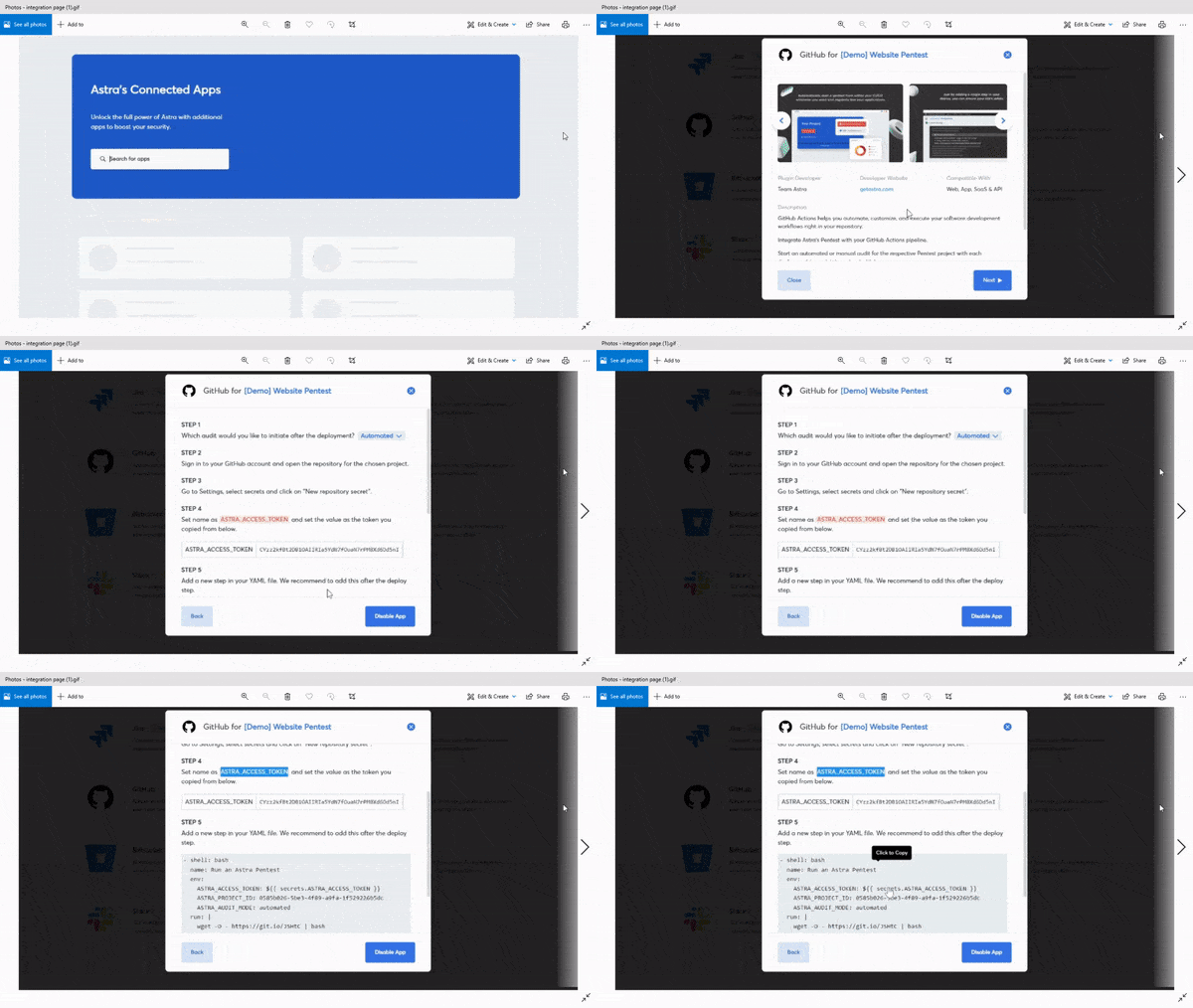
Various scans can be triggered and scheduled with every push, build, or deploy, ensuring continuous security without disrupting your velocity. Every scan runs against Astra’s ever-evolving library of 15,000+ test cases, sourced from real-world penetration tests and new CVEs.
Findings are enriched with CVSS scores, business impact, and potential financial loss in tailored reports, making it easier for both developers and leadership to prioritize and take action. Teams can view results, assign issues, validate fixes, and generate audit-ready reports from a single dashboard.
- Trigger scans automatically on every build or deployment via native CI/CD integrations.
- Run delta scans to focus only on what’s changed, improving speed and precision.
- Scan authenticated flows and SPAs using login recordings and session handling.
- Validate fixes quickly with smart, targeted rescans.
- Manage access and scan controls with role-based permissions.
- Track scan status and showcase prevented losses directly in our CXO-friendly dashboard.
- Get instantaneous automated re-scans to verify patches.
Astra Pentest is built by the team of experts that helped secure Microsoft, Adobe, Facebook, and Buffer
Final Thoughts
As software delivery accelerates, runtime security can’t remain a reactive, post-release exercise. Continuous DAST in CIC/CD pipelines enables teams to test how applications behave, not just how they’re written, across every environment they interact with.
That said, implementation matters. Success depends on selecting tools that can handle dynamic environments, integrate seamlessly, and deliver results that developers trust and act on. Done right, continuous DAST becomes a core part of how modern engineering teams ship secure, production-grade software.
FAQs
How to implement DAST in CI CD?
Integrate DAST tools like Astra Security, OWASP ZAP, or Burp Suite into CI/CD by triggering scans post-deployment in staging. Automate reporting, set thresholds, and fail builds on critical vulnerabilities to ensure continuous application security.
Why is continuous testing important within a CI/CD pipeline?
Continuous testing is important in a CI/CD pipeline because it ensures software quality at every stage of development. It helps detect bugs early, reduces risk, speeds up delivery, and supports faster, more reliable releases.