
Key Takeaways
- Purpose: The ABHA Web Application Security Certificate ensures that only secure apps can access India’s national health data network.
- Scope: It applies to any platform handling ABHA-linked data, from EMRs to PHR apps and consent managers.
- Process: Certification requires passing a CERT-IN-led security audit after functional testing in the ABDM sandbox.
- Authority: Only CERT-IN empaneled agencies are authorized; STQC and internal audits are not valid.
Most healthtech teams focus on building fast, getting the ABHA APIs working, passing the sandbox, and moving to production. However, the reality is that over functionality, if your app can’t prove it’s secure, you don’t go live. The ABHA Web Application Security Certificate exists for one primary reason: to prevent vulnerable systems from accessing India’s health data network.
If you’re handling ABHA-linked data, such as records, consents, or identities, you’re in a position of trust that must be earned, not assumed. The certificate is the line between building for production and being allowed to operate in it.
What is the ABHA Web Application Security Certificate?
The ABHA Web Application Security Certificate is a formal approval issued by the National Health Authority (NHA) after a digital health application has passed a rigorous web application security audit or WASA audit, validating that your application meets the security standards necessary to safely handle sensitive health data and integrate into the ABDM ecosystem.
This validates that your app is secure enough to handle sensitive health data and interact with ABDM APIs. It’s required for any product (web or cloud-based) that deals with ABHA-linked data, including:
- Hospital systems and EMRs
- Pharmacy and diagnostic platforms
- Teleconsultation apps
- Health lockers, aggregators, and wellness portals
In simple terms, if your software interacts with ABDM or ABHA in any way, this certification is your entry ticket.
An Insight into ABDM and ABHA
The Ayushman Bharat Digital Mission (ABDM) is an infrastructure layer designed to unify the creation, storage, access, and sharing of health data in India. It’s composed of core building blocks: registries (for doctors and facilities), APIs (for ABHA creation, consent, and data flow), and a Gateway that securely routes everything.
At the user level, it all revolves around the ABHA ID, a unique 14-digit health identifier that links patients to their medical records. With consent, those records can be pulled or pushed across providers, apps, and platforms. To ensure the security of such critical data, NHA mandates the ABHA WASA (Web Application Security Audit so that no weak link compromises the broader network.
Where and How Does WASA Fit into the ABHA Integration Journey?
As part of onboarding into the ABDM ecosystem, every digital health application must undergo an ABHA application audit process, a rigorous, standardized assessment governed by CERT-IN empaneled agencies to ensure the app meets stringent security standards. Some key security domains include:
- Authentication & session management
- Access controls and privilege escalation checks
- Input validation and injection attack vectors
- API security and endpoint exposure
- Data encryption in transit and at rest
- Logging, monitoring, and incident response protocols
Once all critical vulnerabilities have been mitigated and a clean WASA audit report is generated, a “Safe-to-Host” certificate is issued, which acts as a signal to patients, the government, and to your internal stakeholders that your application is secure, resilient, and trustworthy.

Why Astra is the best in API Pentesting?
- We’re the only company that combines artificial intelligence & manual pentest to create a one-of-a-kind pentest platform.
- Runs 120+ test cases based on industrial standards.
- Integrates with your CI/CD tools to help you establish DevSecOps.
- A dynamic vulnerability management dashboard to manage, monitor, and assess APIs your web app consumes.
- Conduct 2 rescans in 60 days to verify patches.
- Award publicly verifiable pentest certificates which you can share with your users.
- Helps you stay compliant with SOC2, ISO27001, PCI-DSS, HIPAA, etc.
- Trusted by the brands you trust like Agora, Spicejet, Muthoot, Dream11, etc.

What is the 5-Step ABHA Cybersecurity Certification Journey?
Web application security testing for ABHA compliance is a structured, multi-stage process designed to validate both functional compliance and security robustness of your healthcare application. Here’s a detailed look at each step of the certification lifecycle:
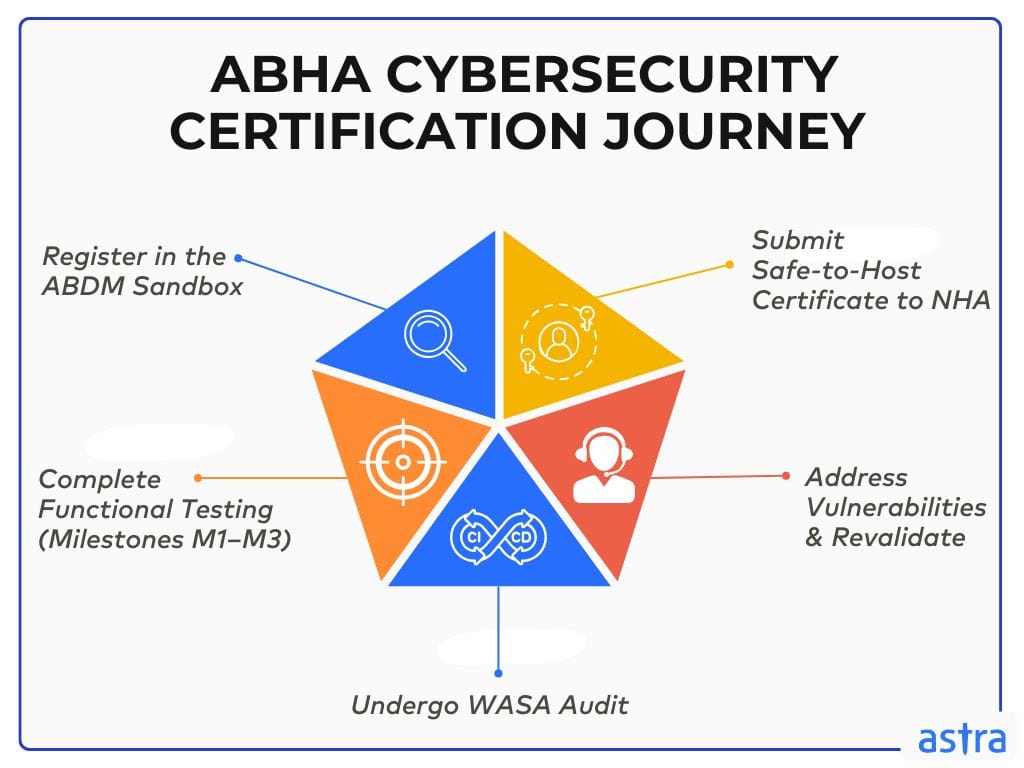
1. Register in the ABDM Sandbox
The journey begins with onboarding your organization onto the ABDM sandbox environment, a controlled testbed hosted by the NHA that mirrors the production ecosystem. This is where your application learns to speak the language of ABDM.
You begin by registering your entity, as a hospital, clinic, pharmacy, or health technology platform via the Health Facility Registry (HFR) or the Health Professional Registry (HPR). Once approved, you receive sandbox credentials and API keys that allow your app to interact with core ABDM services such as:
- ABHA creation and authentication APIs
- Consent Management APIs
- Health information request and retrieval endpoints
- HIP/HIU data exchange modules
Your dev and QA teams will use this environment to build, test, and iterate your ABDM integration logic without touching live health data.
Key Outputs:
- API credentials
- Partner code
- Sandbox access token
2. Complete Functional Testing (Milestones M1–M3)
With sandbox access, the next step in ABHA application security assessment is to demonstrate that your app behaves as ABDM expects. Functional testing is broken into three milestones: M1, M2, and M3, where each milestone tests specific capabilities aligned with your role in the ecosystem:
- M1: Basic API connectivity and ABHA operations (create, login, link)
- M2: Implementation of Consent Manager workflows and generation of consent artefacts
- M3: Demonstration of successful health data transfer as a HIP or retrieval as an HIU
NHA provides a dedicated validation toolkit and test cases for each milestone. Your app must execute these workflows but also log and submit relevant artifacts to the NHA team for review and approval. Each milestone requires approval before you can proceed to the next one, ensuring that your platform aligns with both the functional contract and the user experience principles outlined.
Key Outputs:
- M1–M3 approval reports
- Functional test logs, artefacts, and eligibility to apply for WASA
3. Undergo Web Application Security Audit (WASA)
After clearing functional testing, your application must undergo an ABHA WASA conducted by a CERT-IN empaneled cybersecurity firm. This is a full-spectrum security assessment designed to ensure that your application can operate safely within a national health data infrastructure. The audit includes:
- OWASP Top 10 vulnerability testing (e.g., SQL injection, broken authentication, insecure deserialization)
- API security testing (e.g., token validation, rate limiting, secure headers)
- Role-based access control and session management checks
- Transport layer encryption (TLS) validation
- Storage and handling of PII and PHI, including encryption at rest
- Cloud and infrastructure posture (firewall rules, exposed ports, unpatched services)
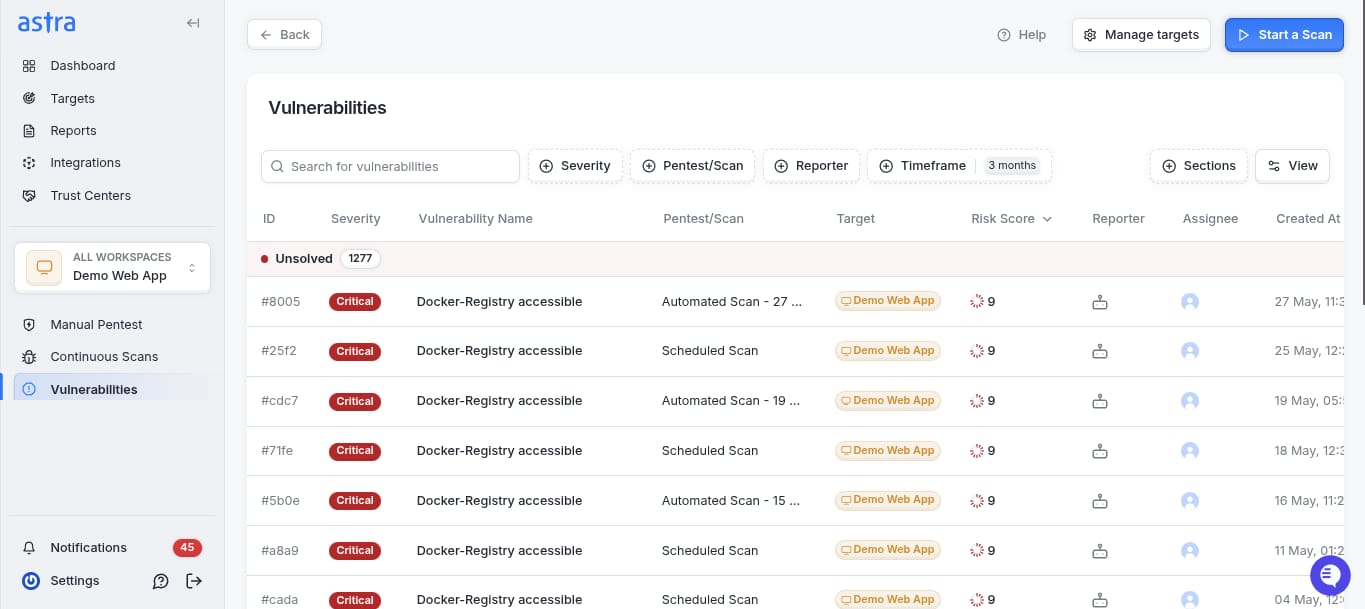
You can expect to undergo both black-box and white-box testing. The audit report will classify findings by severity: Critical, High, Medium, and Low. Only once all Critical and High issues are addressed can your app be considered for certification.
Key Outputs:
- Initial WASA report with a detailed list of vulnerabilities
- Audit agency approval pathway
4. Address Vulnerabilities & Revalidate
Based on the ABHA VAPT requirements and findings, your engineering team must remediate all Critical and High-risk vulnerabilities. This may involve:
- Refactoring code to prevent injection attacks.
- Implementing secure authentication tokens (e.g., JWT with short TTLs).
- Encrypting sensitive fields using AES-256 or equivalent standards.
- Applying proper input sanitization and output encoding.
- Patching infrastructure components or tightening firewall rules.
Once remediation is completed, the audit agency conducts a re-scan to ensure all high-priority threats are closed and updates the report accordingly. Building security into your SDLC and maintaining clean, modular codebases can significantly speed up this phase.
Key Outputs:
- Final WASA report
- Confirmation of zero outstanding critical/high vulnerabilities
- Eligibility for the Safe to Host certificate for ABHA
5. Submit Safe-to-Host Certificate to NHA
Upon successful revalidation, your audit agency issues the ABHA VAPT certification, confirming that your application is compliant with ABDM’s security requirements and is now suitable for production deployment. You must then submit the following to the NHA:
- Final WASA report
- Safe-to-Host certificate
- Functional milestone approvals (M1–M3)
- Deployment details and hosting metadata
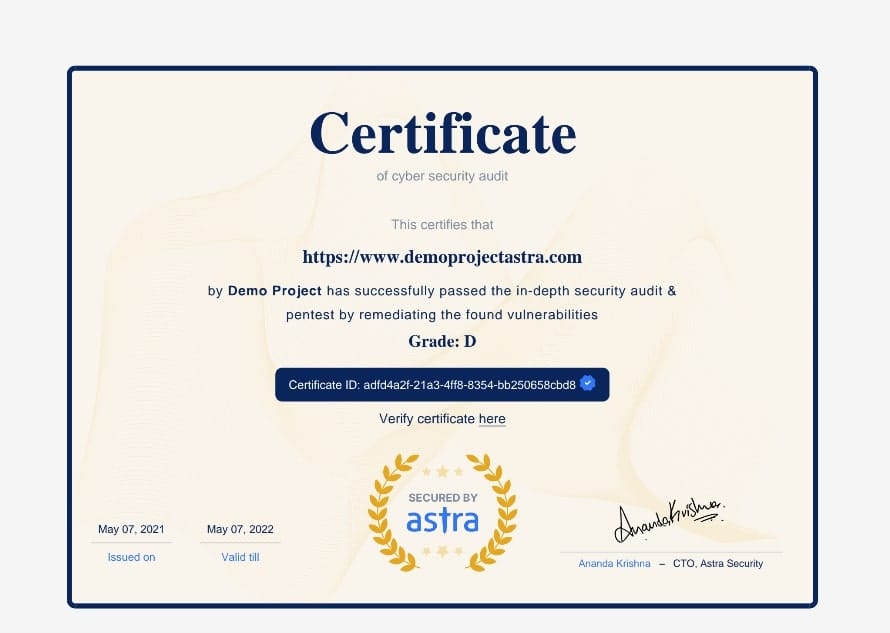
Once approved by the NHA, you receive production access credentials, allowing your app to interact with live ABHA users and real-world health data; however, ongoing monitoring, web application penetration testing, and periodic re-audits will be required to maintain your secure status.
Key Outputs:
- Safe-to-Host approval from NHA
- Production API access
- Official ABDM ecosystem onboarding
It is one small security loophole v/s your entire website or web application.
Get your web app audited with
Astra’s Continuous Pentest Solution.

What are the Common Pitfalls in ABHA VAPT Certification (And How to Avoid Them)
1. Failing OWASP Top 10 (Web & API) Tests
This is the most common blocker during WASA. CERT-IN auditors test your application against both OWASP Top 10 for Web and OWASP Top 10 for APIs, and failing just one critical item can stall your certification. Teams often underestimate the extent to which their ABHA integration flows are exposed. Login endpoints, token issuance, consent URLs, and health information exchange APIs are all under scrutiny.
What gets flagged?
- Weak session handling (e.g., missing token expiry, insecure cookies)
- Inadequate rate limiting on health data endpoints
- Improper validation in callback/webhook payloads
- Leaky error messages that reveal infrastructure details
How to avoid it:
Shift security left. Add SAST/DAST tools to your CI pipeline early. Run API-specific security tests. Assume every endpoint that touches ABHA data will be audited.
2. Missing CERT-IN Empaneled Auditors
Only security audits conducted by CERT-IN empaneled agencies are accepted by the NHA. This seems obvious, yet many teams encounter delays because they either engage the wrong firm or start work before verifying empanelment status.
Some organizations attempt to bypass the process by utilizing internal security teams or third-party vendors not listed on the CERT-IN list, only to discover that their reports won’t be accepted. This creates costly rework and legal delays.
How to avoid it:
Choose your audit partner early. Cross-check their CERT-IN status directly from the CERT-IN empaneled list and confirm they have experience with ABDM-specific audits. Book audit slots in advance; good agencies have wait times.
3. Confusion Between STQC and CERT-IN Roles
This is where many healthtech teams often stumble. STQC (Standardisation Testing and Quality Certification) and CERT-IN are two separate government bodies with different scopes. STQC certifies Aadhaar-related systems. CERT-IN handles cybersecurity and is the only authority recognized for ABHA/ABDM web app security audits.
Some teams mistakenly approach STQC or assume that Aadhaar compliance automatically meets ABDM requirements. It doesn’t. For ABHA integration, only a CERT-IN audit and an ABHA Safe-to-Host certificate are valid.
| Criteria | STQC | CERT-IN | Self-Assessment |
|---|---|---|---|
| Relevance to ABHA Certification | Not applicable | Mandatory and recognized by NHA | Not accepted for certification |
| Primary Use Case | Compliance testing for Aadhaar-enabled biometric hardware | Web Application Security Audit (WASA) for ABHA onboarding | Internal prep, not valid for ABHA cybersecurity certification |
| Who Requires It | Device manufacturers working with UIDAI | Any digital health application integrating with ABDM and handling ABHA-linked data | Teams preparing for formal audits or checking internal posture |
| Scope of Testing | Functional, protocol-level, and biometric device compliance | In-depth testing of web apps and APIs for OWASP Top 10, business logic, session security, etc. | Typically limited; depends on internal maturity and tools used |
| Accepted by NHA for Safe-to-Host Certificate | No | Yes | No |
| Empanelment Requirement | STQC-accredited lab only (not the same as CERT-IN) | Must be a CERT-IN empaneled auditor | No empanelment or recognition |
| Audit Deliverables | STQC device or protocol compliance certificate | WASA report and Security testing certificate for ABHA are required for production access | Internal findings, no regulatory value |
| Common Pitfalls | Mistakenly assumed valid for ABHA | None, if a valid CERT-IN vendor is used | Creates false confidence; teams assume self-assessment is sufficient |
| When to Use | Only for hardware manufacturers working with Aadhaar | During or after functional testing milestones (M1–M3) in the ABDM sandbox | Early in the development cycle, to harden systems ahead of a formal audit |
| Audit Depth | Focused on device standards, not application security | Covers application logic, API security, session/token handling, encryption, and data exposure | Variable; often misses business logic, API-level flaws, and config issues |
How to avoid it:
Understand that Aadhaar and ABDM are separate compliance tracks. Ignore past assumptions. Stick to CERT-IN for ABHA. Confirm this with your NHA onboarding team if needed—many delays happen due to this exact mix-up.
4. Errors in Sandbox Exit Documentation
Even after your app passes all milestones and clears the audit, certification can still get stuck in paperwork. The sandbox exit stage requires you to submit a specific bundle of documents, including milestone approvals (M1-M3), the WASA final report, the Safe-to-Host certificate, deployment details, and additional documents per the ABHA certificate guidelines.
Teams often miss version consistency (e.g., submitting logs from an earlier build than the one being audited), forget to capture environment snapshots, or use outdated templates. These errors send you into a loop of NHA rejections, causing weeks of delay.
How to avoid it:
Treat documentation like code, version everything. Assign the responsibility for sandbox exit to a PM or lead engineer who understands both the technical and regulatory expectations. Use NHA’s latest submission checklist; don’t rely on outdated PDFs floating around.
How to Choose the Right ABHA Security Audit Vendor?
Red Flags to Avoid: “Checkbox” Audits
Some vendors advertise “quick audits” or offer fixed-scope WASA packages that promise a turnaround in 48–72 hours. These are usually surface-level scans that won’t hold up when reviewed by NHA’s onboarding team, or worse, will leave critical vulnerabilities in your system undiscovered.
Common signs of a checkbox audit:
- The same template report is used across clients
- No testing of ABHA-specific flows (login, consent, API gateway)
- No manual testing, just automated tools
- No interaction with your engineering team during testing
- No follow-up guidance or remediation support
Why it’s risky: These audits miss context. They won’t catch deep API flaws, session handling issues, scope misconfiguration, or critical business logic flaws that may lead to logic bypass, all of which are commonly flagged in real WASA reviews.
What to do instead: Look for vendors that blend automated testing with manual, business logic-aware assessments, especially ones familiar with healthcare and API-heavy applications.
Empaneled vs. Unlisted Vendors
This one is non-negotiable. Your audit partner must be CERT-IN empaneled. Only vendors listed on the official CERT-IN website are authorized to conduct the Web Application Security Audit required for ABHA certification.
Why it matters:
- Reports from non-empaneled vendors will be rejected outright
- NHA will ask for proof of empanelment along with the Safe-to-Host certificate
- Empaneled vendors are subject to their quality audits, which adds credibility and accountability
How to verify:
Go directly to the CERT-IN empaneled auditors list and confirm the vendor’s name. Don’t just take their word for it; double-check the empanelment ID, contact details, and recent updates. Additionally, verify if the vendor has experience auditing healthcare or ABDM-specific applications.
Questions to Ask Before You Engage
Even among certified vendors, quality varies. You need to treat this like hiring an ABHA digital health security team, not just signing a contract. Here are the questions that matter:
- Have you audited ABDM or ABHA-integrated platforms before?
If they haven’t, you’ll spend time explaining concepts like HIP, HIU, consent flows, and the ABHA login process, which will slow things down. - Do you cover OWASP API Top 10 in addition to Web vulnerabilities?
ABHA apps are API-heavy. If their focus is only on the frontend, they’ll miss real risks. - What does your WASA methodology include?
Look for a combination of automated scans, manual reviews, business logic tests, and infrastructure posture assessments. - What kind of remediation support do you offer?
Good vendors don’t just dump a report, but they’ll work with your engineering team on how to fix issues. - How long will the end-to-end audit and revalidation process take?
This affects your go-live timeline. Pin them down on re-audit turnaround, especially after critical or high findings. - Can we review a redacted version of a previous audit report (with client consent)?
This gives you a sense of their depth and the quality of their documentation.
How can Astra Help?
As a CERT-IN empaneled vendor, Astra Security brings a deep understanding of healthcare application security and the ABDM integration landscape. Whether you’re building HIP/HIU modules, consent flows, or exposing APIs, our 15,000+ and growing AI-powered test cases and manual pentests cover everything from technical flaws to business logic threats.
Under vetted scans, every vulnerability is validated by our in-house security experts (OSCP, CEH, CCSP, etc.), ensuring zero false positives and effective remediation, ensuring teams get tailored support, developers receive actionable, code-level fixes, while leadership gets customized reports and a CXO-friendly dashboard to track progress.

Our audits seamlessly integrate into your workflows, with native support for Slack, GitHub, GitLab, Jira, and Jenkins, and include two complimentary rescans to help you close the loop quickly.
With unlimited automated scans to stay ahead of emerging CVEs and a public Trust Centre to showcase your security credibility, we also offer dedicated Slack/Teams channels, a Customer Success Manager, and even a 24-hour AI-powered resolution chatbot.
Astra Pentest is built by the team of experts that helped secure Microsoft, Adobe, Facebook, and Buffer

Quick Glossary of Terms
| Term | Meaning / Relevance |
|---|---|
| ABHA | Ayushman Bharat Health Account. A 14-digit digital health ID that lets individuals link and share their health records securely across platforms. |
| ABDM | Ayushman Bharat Digital Mission. India’s national digital health infrastructure enables interoperable health data exchange through open APIs and consent-driven systems. |
| NHA | National Health Authority. The governing body is responsible for ABDM implementation, ABHA issuance, and onboarding approvals. |
| WASA | Web Application Security Audit. A mandatory security audit is required for apps integrating with ABDM. Conducted by CERT-IN empaneled agencies. |
| CERT-In | Indian Computer Emergency Response Team. A government body under MeitY that empanels cybersecurity auditors authorized to perform WASA. |
| OWASP | Open Web Application Security Project. A global framework used to identify and test for common security vulnerabilities in web and API applications. |
| HIP | Health Information Provider. Any system or organization that creates and shares patient health data through ABDM APIs with consent. |
| HIU | Health Information User. Any system or organization that consumes health data from HIPs using consented access via ABHA APIs. |
| Sandbox | A test environment hosted by NHA where platforms integrate, test, and validate their ABHA features before moving to production. |
| PHR App | Personal Health Record App. A consumer-facing application that helps users manage, view, and store their health records using their ABHA ID. |
| Safe-to-Host | A certificate issued after a successful WASA confirming that the application meets the required security standards for production use under ABDM. |
| Aadhaar | India’s national digital identity platform. Used for identity verification but not directly linked to ABHA. Aadhaar audits are handled by STQC, not CERT-IN. |
| STQC | Standardisation Testing and Quality Certification. A MeitY body that certifies Aadhaar and biometric hardware. Not applicable for ABHA-related audits. |
| NABH | National Accreditation Board for Hospitals and Healthcare Providers. Accredits hospitals for quality. While not required for ABHA, NABH-aligned systems often engage with ABDM workflows. |
Final Thoughts
The ABHA Web Application Security Certificate is your entry pass into India’s national digital health ecosystem to confirm your application is secure and aligned with ABDM’s technical and regulatory expectations.
Obtaining certification, therefore, requires a structured approach with functional alignment through the sandbox, thorough security testing by CERT-IN empaneled auditors, and meticulous documentation. Ultimately, teams that prioritize this as an engineering and product priority move faster, avoid rework, and establish long-term credibility in India’s evolving digital health landscape.
FAQs
How to get a VAPT certificate for ABHA?
To get a VAPT certificate for ABHA, your application must undergo a Web Application Security Audit by a CERT-IN empaneled auditor. After resolving all critical and high vulnerabilities, the auditor issues a Safe-to-Host certificate, which you submit to NHA for final approval.
What is the VAPT cost for ABHA integration?
VAPT costs vary depending on app complexity, scope, and vendor, but for ABHA certification, expect pricing to range from ₹80,000 to ₹2,50,000, which typically includes initial testing, reporting, two rescans, and final certification. Larger systems or complex APIs may incur higher costs.
Who can perform the ABHA security audit?
Only CERT-IN empaneled cybersecurity firms are authorized to perform ABHA Web Application Security Audits. NHA does not accept reports from non-empaneled or third-party vendors or even self-assessments, i.e., always verify empanelment status on the official CERT-IN website before engaging a vendor.
How long does the ABHA certification process take?
The ABHA certification audit process typically takes 10-15 business days, including sandbox functional testing, WASA scheduling, and final revalidation. However, delays can occur if significant security gaps or incomplete documentation are identified during the sandbox exit.