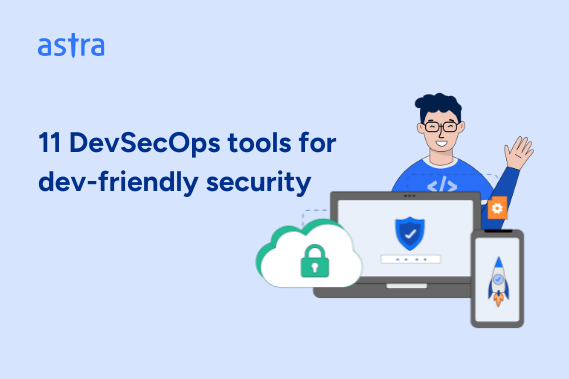
As companies scale, security is no longer just about locking down code, but protecting entire ecosystems across clouds, microservices, and third-party dependencies. The best DevSecOps tools go beyond scanning for bugs and deliver context-aware protection built into both infrastructure and applications, closing gaps traditional tools miss.
Top 11 DevSecOps Tools
- Astra Security
- SonarQube
- CheckMarx
- CodeQL
- Fortify Software
- GitLab
- Burp Suite Enterprise Edition
- Checkov
- Sysdig
- OWASP ZAP
- Codacy
What are DevSecOps Tools?
DevSecOps tools refer to security solutions that integrate seamlessly into modern development pipelines, ensuring security is an enabler rather than a bottleneck, built to detect, remediate, and prevent vulnerabilities across the software development lifecycle without slowing down engineering velocity.
Moving away from the traditional model of security as a final checkpoint, they use a combination of static and dynamic testing to secure code at rest and uncover runtime threats, to provide real-time risk assessments, automate security policies, and embed security into day-to-day operations, allowing teams to ship fast without accumulating security debt.
Moreover, they also offer contextual intelligence, false-positive reduction, and developer-friendly integrations, ensuring security becomes a shared responsibility rather than an afterthought.
Best DevSecOps Tools Compared
| Feature | Astra Security | SonarQube | CheckMarx |
|---|---|---|---|
| DevSecOps Capabilities | Automated & manual pentests for apps, APIs, Cloud, Network, IoT, and code reviews | SAST code analysis | SAST, DAST, IaC security, and SCA |
| False Positives | None with vetted scans | False positives present | False positives present |
| Integrations | GitLab, GitHub, Slack, JIRA, CircleCI, Jenkins | GitHub, GitLab, Azure DevOps, Bitbucket, CircleCI, CodeCatalyst | Eclipse, IntelliJ, Visual Studio |
| Compliance | ISO27001, SOC2, GDPR, HIPAA, PCI-DSS, OWASP, and more | OWASP Top 10, ISO 27002, ASVS 4.0, CWE Top 25 | FISMA, PCI DSS, HIPAA |
| Expert Support | Yes | Only for enterprise plans | Yes, at an additional cost |
| Pricing | Starts at $199/m | Starts at $500/yr | Quote on request |
| G2 Rating | 4.6 / 5 | 4.4 / 5 | 4.2 / 5 |

Top 11 DevSecOps Tools
1. Astra Security [Get Started]
Key Features:
- DevSecOps Capabilities: Automated and manual pentests for apps, API, Cloud, Network, IOT devices, and code reviews
- False Positives: None with vetted scans
- Integrations: GitLab, GitHub, Slack, JIRA, CircleCI, and Jenkins
- Compliance: ISO27001, SOC2, GDPR, HIPAA, PCI-DSS, OWASP and more
- Expert Support: Yes
- Pricing: Starts at $199/m
- G2 Rating: 4.6 out of 5

As one of the best tools for DevSecOps automation, Astra Security integrates seamlessly into development workflows, offering real-time security across web apps, APIs, cloud infrastructure, and IoT devices. With 13,000+ automated test cases and AI-enhanced manual pentesting, we ensure comprehensive vulnerability management without compromising development speed.
Our integrations with various CI/CD and tracking platforms help embed security directly into the SDLC, reducing friction while aligning security with engineering needs. Meanwhile, our vetted scans ensure zero false positives, and customizable reports keep technical teams and leadership in sync, providing actionable insights tailored to every stakeholder.
Lastly, with continuous scanning for emerging CVEs and expert support from certified professionals, Astra helps businesses stay ahead of evolving threats. Our CXO-friendly PTaaS platform combines manual and automated testing, making security proactive, simplifying risk management, and enabling organizations to maintain agility while protecting critical assets.
Pros:
- Offers security testing in staging and production environments
- Provides audit-ready compliance reports for various standards
- Helps make scalable continuous security accessible for all
- Security professionals with various certifications to their name, such as OSCP, CEH, eJPT, eWPTXv2, and CCSP (AWS)
- Active contributor to OWASP as well as PCI ASV and CREST-certified
Limitations:
- 1-week trial available at $7
2. SonarQube
Key Features:
- DevSecOps Capabilities: SAST code analysis
- False Positives: False positives present
- Integrations: GitHub, GitLab, Azure DevOps, Bitbucket, CircleCI, and CodeCatalyst
- Compliance: OWASP Top 10, ISO 27002, ASVS 4.0, and CWE Top 25
- Expert Support: Only available for enterprise plans
- Pricing: Starts at $500/yr
- G2 Rating: 4.4 out 5
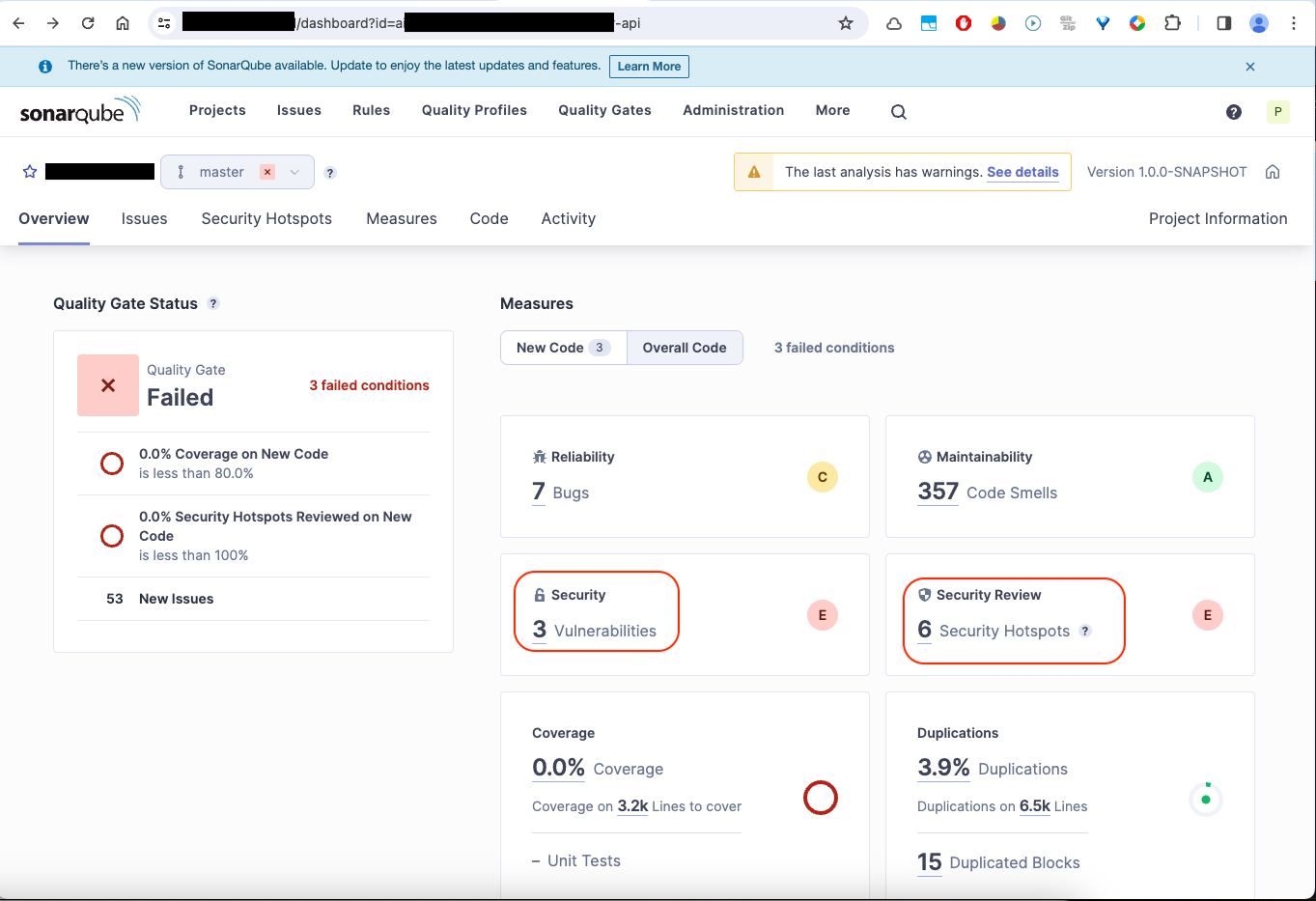
Home to tools like SonarQube Server, SonarQube Cloud, and SonarQube for IDE, the SAST DevSecOps tools platform enables a clean-as-you-code approach, detecting issues early to ensure only secure code reaches production.
Supporting 30+ languages and 5,000+ rules helps set up quality gates and project-based custom profiles while offering open-source trials and detailed remediation guidance, enabling developers to fix vulnerabilities without disrupting their workflow.
Pros:
- Analyzes security issues across 35+ programming languages
- Offers easy rule customization options
Limitations:
- Scans can be time-consuming
- Can be difficult to configure
3. CheckMarx
Key Features:
- DevSecOps Capabilities: SAST, DAST, IaC security, and SCA
- False Positives: False positives present
- Integrations: Eclipse, IntelliJ, and Visual Studio
- Compliance: FISMA, PCI DSS, and HIPAA
- Expert Support: Yes, at an additional cost
- Pricing: Quote on request
- G2 Rating: 4.2 out of 5
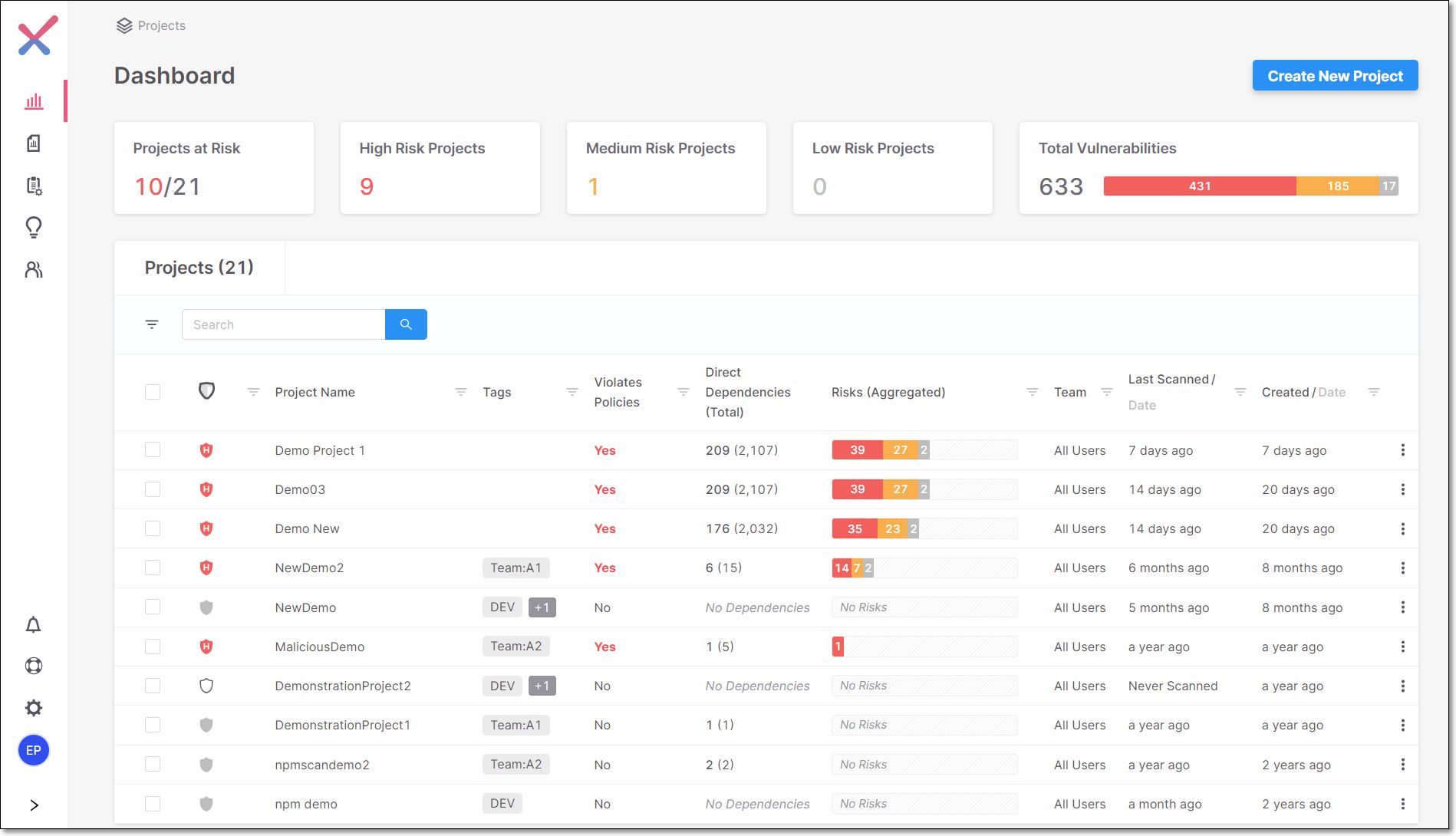
Known for its next-generation SAST engine, Checkmarx offers a unified DevSecOps automation tools platform with services spanning SAST, DAST, and IaC security, covering the entire SDLC—from code to cloud.
With seamless integrations across IDEs, feedback loops, SCM, and CI/CD clusters, along with AI-powered features like guided remediation, it streamlines DevSecOps processes, minimizing risk while maximizing developer productivity.
Pros:
- Delivers comprehensive security reports
- Offers a helpful online community
Limitations:
- Navigation can have a learning curve
- Accuracy and false positives can be improved
4. CodeQL
Key Features:
- DevSecOps Capabilities: Code analysis engine
- False Positives: False positives present
- Integrations: GitHub, Snyk, AWS, Atlassian, Microsoft and more
- Compliance: –
- Expert Support: No
- Pricing: Open-source
- G2 Rating: 4.7 out of 5
CodeQL is a DevSecOps tool known for enhancing security through semantic code analysis, i.e., it allows code to be queried as data, facilitating the detection of issues like SQL injection and XSS.
Supporting multiple languages, including C/C++, Java, JavaScript, and Python, it offers an extensive library of pre-built queries, along with the ability to write custom ones, empowering teams to address security concerns and proactively ensure robust and secure code deployments.
Pros:
- Supports multiple programming languages
- Helps automate code reviews
Limitations:
- No expert support is available
5. Fortify Software
Key Features:
- DevSecOps Capabilities: SAST, DAST, RASP, and SCA
- False Positives: False positives present
- Integrations: Jenkins, GitHub, GitLab, Eclipse, JIRA, and more
- Compliance: PCI DSS, DISA STIG, NIST, ISO, OWASP, and HIPAA.
- Expert Support: Available for an additional payment
- Pricing: Quote on request
- G2 Rating: 4.5 out of 5
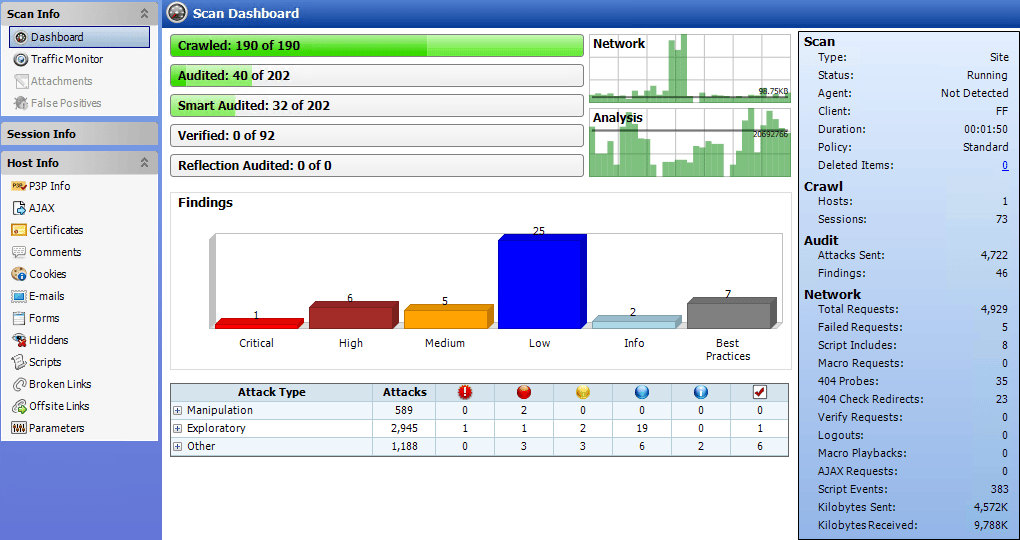
Developed by OpenText, Fortify is one of the leading DevSecOps pipeline tools that houses various security solutions to identify and remediate vulnerabilities from the ground up without compromising the shipping speed.
Its extensive integration ecosystem and ease of navigation allow for automated security testing within existing development pipelines, promoting continuous monitoring and compliance
Pros:
- Supports 30+ programming languages
- Easy to use
Limitations:
- Native false positives issue
6. GitLab
Key Features:
- DevSecOps Capabilities: SAST, DAST, IaC, and API security testing
- False Positives: False positives present
- Integrations: Jenkins, Slack, Bugzilla, JIRA, and Amazon Q
- Compliance: ISO 27001, SOC 2, GDPR, HIPAA, and more
- Expert Support: Available for paid plans
- Pricing: Paid plans start at $29/ user/ month
- G2 Rating: 4.5 out of 5
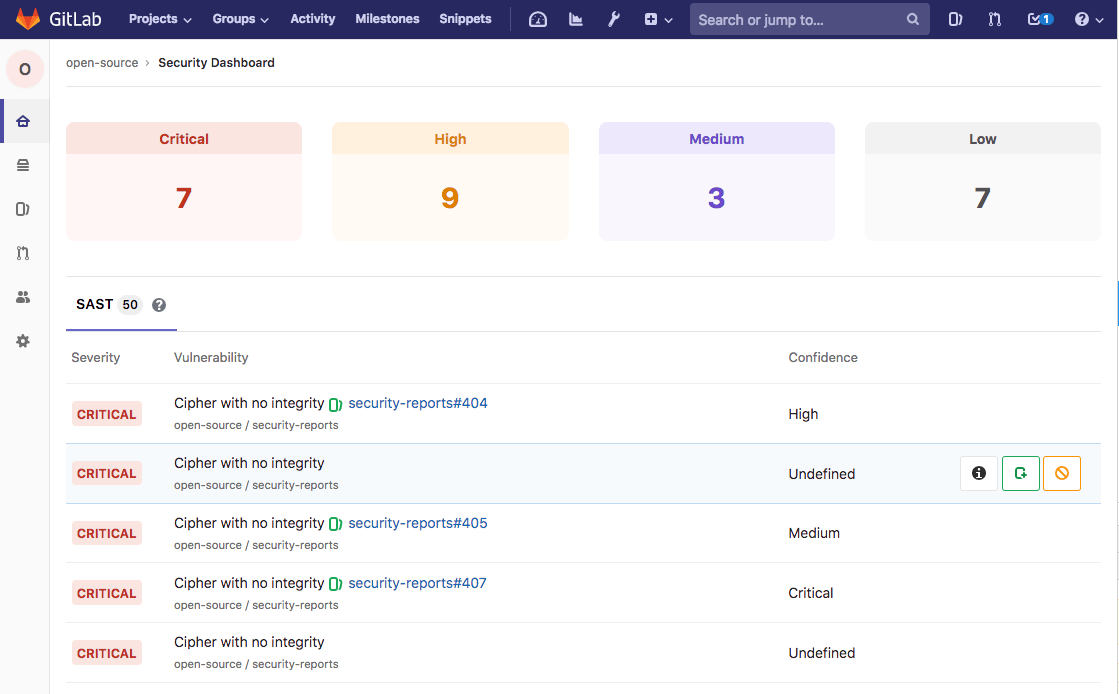
GitLab is a leading DevSecOps automation tool that offers integrated security capabilities such as SAST, DAST, container scanning, and API security testing, enabling proactive vulnerability detection and remediation.
Using its built-in continuous integration and deployment pipelines, it helps automate testing and deployment processes, facilitating rapid and secure code delivery, while AI-powered features, such as code suggestions, further streamline development workflows and enhance quality.
Pros:
- Comprehensive open-source version
- Offers a seamless bug tracking experience
Limitations:
- Configurations can have a learning curve
- Slower source code push/pull speeds
7. Burp Suite Enterprise Edition
Key Features:
- DevSecOps Capabilities: Automated DAST scanner
- False Positives: False positives present
- Integrations: Jira, GitLab, and Trello,
- Compliance: PCI DSS and OWASP Top 10
- Expert Support: Yes
- Pricing: Quote on request
- G2 Rating: 4.8 out of 5
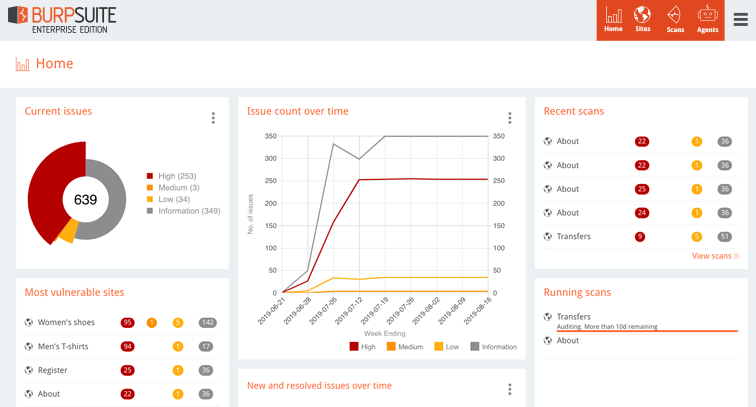
As a leading DevSecOps tool, the Burp Suite Enterprise edition goes beyond its automated DAST scanning portfolio to help build security into the SDLC process. Offering a range of integrations, the platform provides quick, easy, and tailored feedback on any CVEs discovered in your web portfolio.
Characterized by multiple types of scans and bulk actions, its multiple set-up options, scan behind logins, along with RBAC and custom reporting, make it a perfect fit for any scaling organization.
Pros:
- Allows users to intercept and modify packets
- Helps automate scanning
Limitations:
- Userface can be simplified further
8. Checkov
Key Features:
- DevSecOps Capabilities: Policy as code for various cloud infrastructures
- False Positives: False positives present
- Integrations: Jenkins, Bitbucket Cloud Pipelines, GitHub Actions, and GitLab CI
- Compliance: –
- Expert Support: No
- Pricing: Open-source
- G2 Rating: –
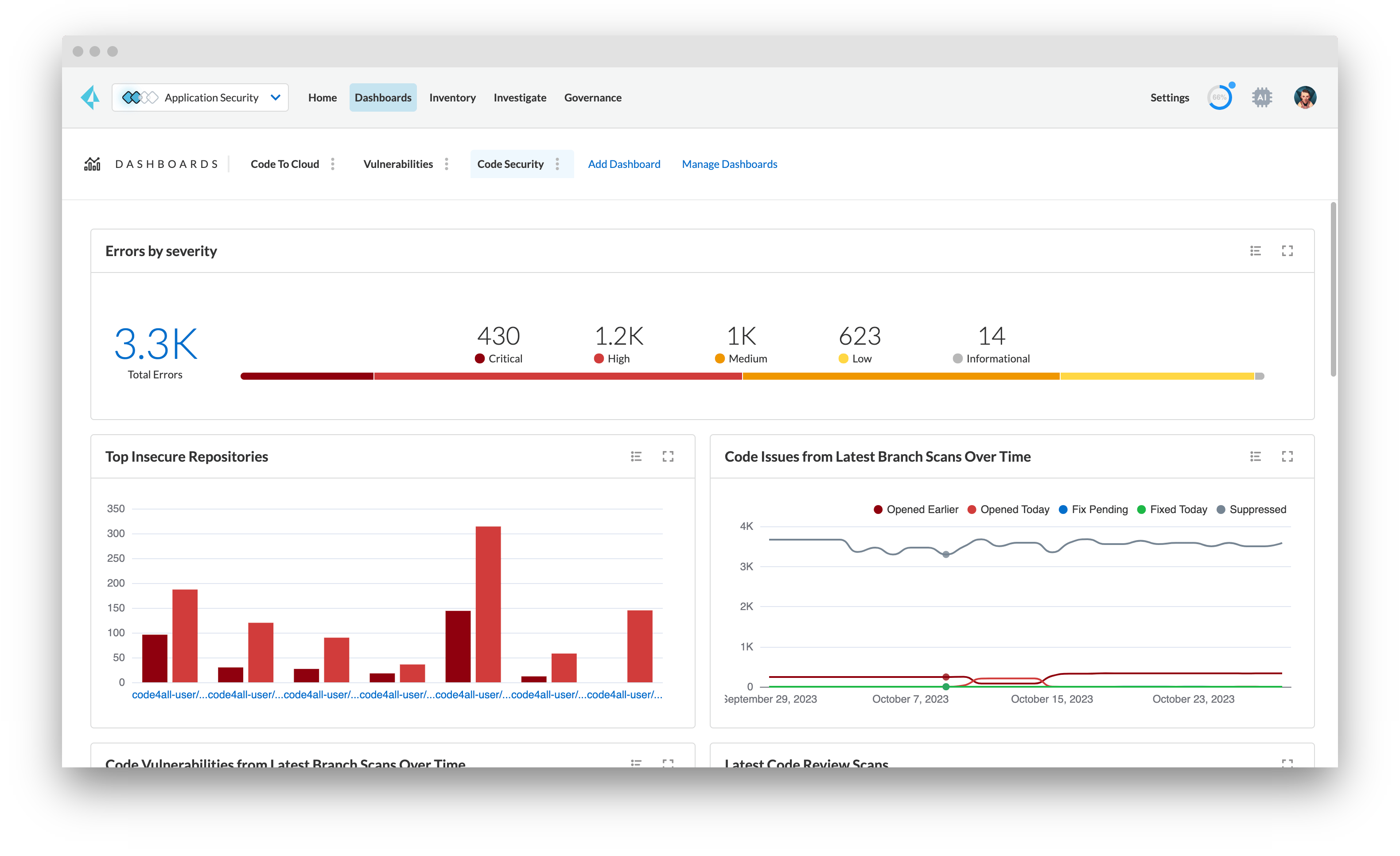
Developed by Prism Cloud, Checkov is one of the leading open source DevSecOps tools designed to enhance best practices by identifying security and compliance misconfigurations within IaC frameworks using static code analysis.
With over 1,000 built-in policies, Checkov supports various IaC tools such as Terraform, CloudFormation, Kubernetes, Helm, and more to help conduct comprehensive scans across AWS, Azure, and Google Cloud environments with real-time feedback to facilitate early detection.
Pros:
- Simplifies security misconfiguration detection
- Accessible to all as an open-source tool
Limitations:
- Can have functionality errors
9. Sysdig
Key Features:
- DevSecOps Capabilities: Cloud-native application protection
- False Positives: False positives present
- Integrations: Cloud Accounts, Git integrations, ServiceNow, Jenkins, and JIRA.
- Compliance: NIST, FedRAMP, DISA, CIS, HIPAA, PCI DSS, and more
- Expert Support: Yes
- Pricing: Quote on request
- G2 Rating: 4.8 out of 5
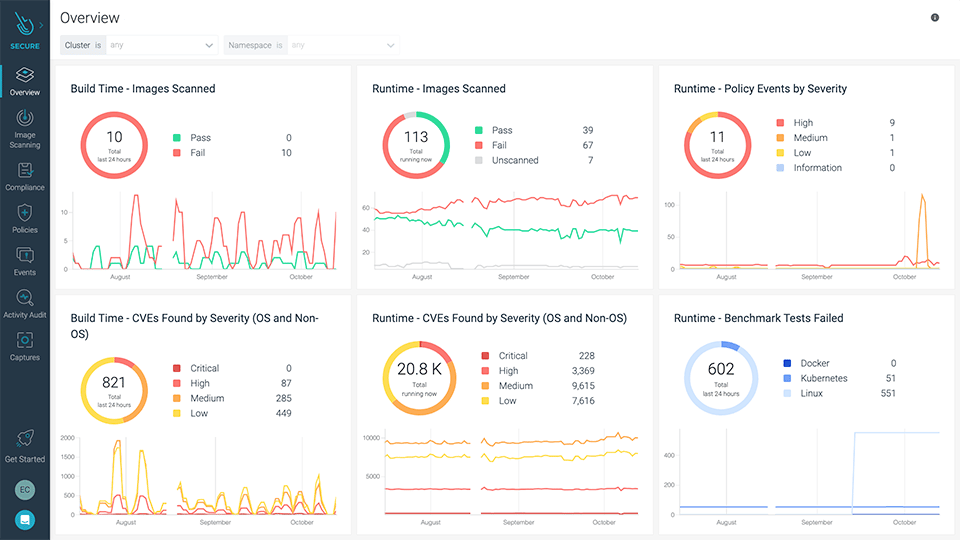
From cloud-native application protection to detection and response, Sysdig offers end-to-end vulnerability management services with automation and manual pentesting models available.
Designed to focus on critical performance areas using the risk spotlight, the Azure DevSecOps compliance tools help uncover hidden risks and focus on the most critical risks while simplifying operations with seamless automation and integrations.
Pros:
- Provide a clear image of security per various benchmarks
- Offers advanced runtime threat detection and prevention
Limitations:
- Agent updates can be a bit challenging to automate
- Can be expensive for SMBs
10. OWASP ZAP
Key Features:
- DevSecOps Capabilities: DAST
- False Positives: False positives present
- Integrations: GitLab, Selenium, and Jenkins
- Compliance: OWASP
- Expert Support: –
- Pricing: Open source
- G2 Rating: 4.7 out of 5
As an open-source DAST tool for DevSecOps, OWASP ZAP (Zed Attack Proxy) helps pinpoint vulnerabilities in web applications, making it perfect for pre-production checks. It integrates with DevOps workflows to perform automated scans and detect common security flaws such as SQL injection and XSS.
Delivering comprehensive reports to help developers act early in the development cycle, its API support and automation-friendly features help make security continuous and scalable across applications.
Pros:
- Supports automated and manual security testing.
- Integrates well with CI/CD pipelines.
Limitations:
- Can have several false positives.
11. Codacy
Key Features:
- DevSecOps Capabilities: DAST, SAST, IaC, SCA, and secrets
- False Positives: False positives present
- Integrations: GitHub, Bitbucket, Slack, GitLab and more
- Compliance: SOC 2
- Expert Support: Available in selective plans
- Pricing: Starts at $18/dev/month
- G2 Rating: 4.6 out of 5

With seamless integrations across 49 ecosystems and platforms, Codacy was built to help smoothen the delivery of clean, secure code. It offers a centralized dashboard to track all progress and vulnerabilities from DAST, SAST, and penetration testing scheduled per each stage of SDLC.
Trained to find OWASP Top 10, hard-coded secrets, IAC issues, and more, the CI/CD DevSecOps tool allows your developers to pinpoint security risks inside their IDE and Pull Requests.
Pros:
- Open-source plan is available
- Allows for custom code analysis rules
Limitations:
- Slower code analysis on large databases
How to Choose DevSecOps Tools?
Go Beyond Automation
Choose DevSecOps security tools that combine static and dynamic analysis, runtime protection, and real-time risk assessment. Avoid tools that scan for known vulnerabilities but overlook logical flaws or misconfigurations, as this can create a false sense of security; automation should enhance security, not replace it.
Look for Developer-Friendly Security
Instead of slowing development, generating noisy alerts, or requiring constant manual intervention, look for solutions that embed security into existing workflows, provide instant and actionable feedback, and automate fixes wherever possible. Security should accelerate development, not block it.
Ensure Effortless CI/CD Integration
In place of a security tool that takes weeks to configure, disrupts deployment speed, or requires constant maintenance, choose DevSecOps software with plug-and-play integrations, API extensibility, and minimal setup. This way, security scales with development, not against it.
Choose Full-Stack Security
We differentiate between targets; attackers don’t. Look for DevSecOps solutions that secure everything, from source code and third-party libraries to containerized workloads and the network and infrastructure, because attackers don’t just target your application, but your entire ecosystem.
Scale with your Business
Select tools for DevSecOps that offer multi-repo support, role-based access controls, and adaptive scanning, enabling them to handle growing teams, multi-cloud environments, and evolving architectures without slowing down.
Prioritize Precision over Noise
Look for secure DevOps automation software that prioritizes high-fidelity findings, reduces noise with contextual intelligence, and continuously refines accuracy to ensure security teams focus on real threats rather than irrelevant alerts.
DevSecOps Lifecycle Phases
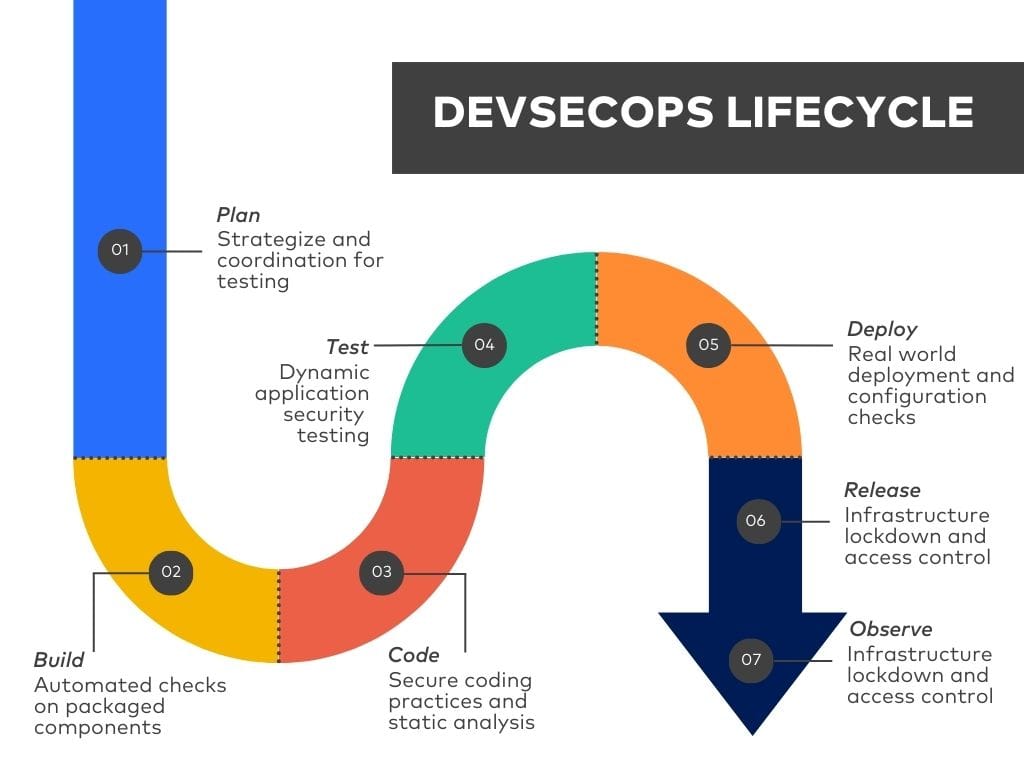
Plan
This is the most hands-on part of DevSecOps, where teams figure out what to test, where to test it, and how often. It’s all about strategy and coordination, utilizing tools like Astra Security to help with threat modeling, and Jira & Slack to keep the workflow tight.
Build
The build phase runs automated checks on what’s being packaged, focusing on bad dependencies, insecure libraries, and broken code as key areas of concern. Scan everything to catch issues early before they become real problems.
Code
This is about writing clean, secure code from the start using static analysis, pre-commit hooks, and code reviews. Security tools integrate with Git workflows, ensuring that every commit is scanned.
Test
Once you have a build to work with, it’s time to break it, run dynamic application security tests (DAST) simulating real attacks, such as SQL injections, broken authentication, and API abuse. Prioritize quick failures to save time.
Deploy
You’re pushing to production. This is where real-world stuff can go wrong. Config drift, expired certificates, and weak TLS setups: catch them now. Tools like Falco and Osquery monitor the live system in real-time. Want to test resilience? Run chaos experiments with tools like Chaos Monkey.
Release
Lock down your infrastructure. Apply least privilege, i.e., nobody gets more access than they need. Audit access tokens, firewall rules, and secrets. Infrastructure should be version-controlled and immutable. Use Terraform, Ansible, or Docker to keep it tight. Follow standards like CIS or NIST.
Observe
App’s live. Eyes on everything. Monitor for attacks, leaks, and weird behavior. Tools like RASP block threats in real-time. Add pen testing or bug bounty programs to catch what automation misses. Keep an eye on sensitive endpoints. If something looks off, investigate fast.
Types of DevSecOps Tools and Their Use Cases
| Tool Type | Primary Use Case | Example Tools |
|---|---|---|
| Planning & Collaboration | Align teams on security priorities, perform threat modeling, manage workflows | IriusRisk, Jira, Slack |
| Code Analysis | Scan source code for vulnerabilities, enforce coding standards | SpotBugs, CheckStyle, PMD, Find Security Bugs |
| Build & Dependency Scanning | Detect insecure libraries and dependencies during build | Snyk, OWASP Dependency-Check, SonarQube, Retire.js |
| Testing & Vulnerability Assessment | Simulate real-world attacks, uncover exploitable weaknesses in staging or pre-production | Astra Security, OWASP ZAP, IBM AppScan, Boofuzz |
| Deployment & Configuration Management | Secure runtime configurations, enforce least privilege, maintain consistency | Terraform, Ansible, Chef, Docker |
| Monitoring & Runtime Protection | Detect, block, and respond to threats in production environments, plus continuous vulnerability scanning | Astra Security, Falco, Imperva RASP, Alert Logic, Tripwire |
1. Shift Security Left… and Keep It Right
For advanced teams, shifting security left is just the starting point. True resilience means carrying those checks through deployment and beyond. Early SAST and SCA catch issues at commit, while post-deployment DAST and runtime monitoring protect against new threats and configuration drift.
Action: Bake security checks into pull requests, then schedule continuous scans on deployed environments to catch emerging vulnerabilities.
2. Treat Security as Code
Security controls should be defined, versioned, and tested like any other code. This ensures consistency, makes changes traceable, and allows automated enforcement in CI/CD. With security-as-code, guardrails evolve as fast as your software, without relying on manual oversight.
Action: Use policy-as-code frameworks (e.g., OPA, Sentinel) to enforce guardrails. Fail builds automatically when policies are violated.
3. Embrace GitOps for Security Controls
GitOps ensures that the state of production exactly matches what’s in your repository. By storing IAM roles, firewall rules, and secrets configurations in Git, you get reviewable history, reproducibility, and rollback capabilities for security changes.
Action: Mandate signed commits and peer review for any change affecting security posture.
4. Make Governance Scale With You
As organizations grow, governance must adapt to accommodate more teams, services, and technology stacks. Rigid manual processes won’t keep pace; automation is key to enforcing policies across varied environments without slowing delivery.
Action: Build adaptable rule sets and integrate compliance scanning into every environment.
5. Share Responsibility Without Losing Accountability
Security works best when ownership is distributed, but it still needs clear boundaries. Everyone, from developers to SREs, should own part of the defense, backed by defined escalation paths for critical incidents.
Action: Assign explicit security responsibilities in backlog items and pair developers with security engineers for high-risk work.
6. Validate Through Chaos and Attack Simulation
Controls mean little if they fail under pressure. Security chaos engineering tests how systems and teams react to real-world threats, helping reveal blind spots in detection and response.
Action: Simulate credential leaks, expired certs, and misconfigurations. Track detection and response times, then refine processes.
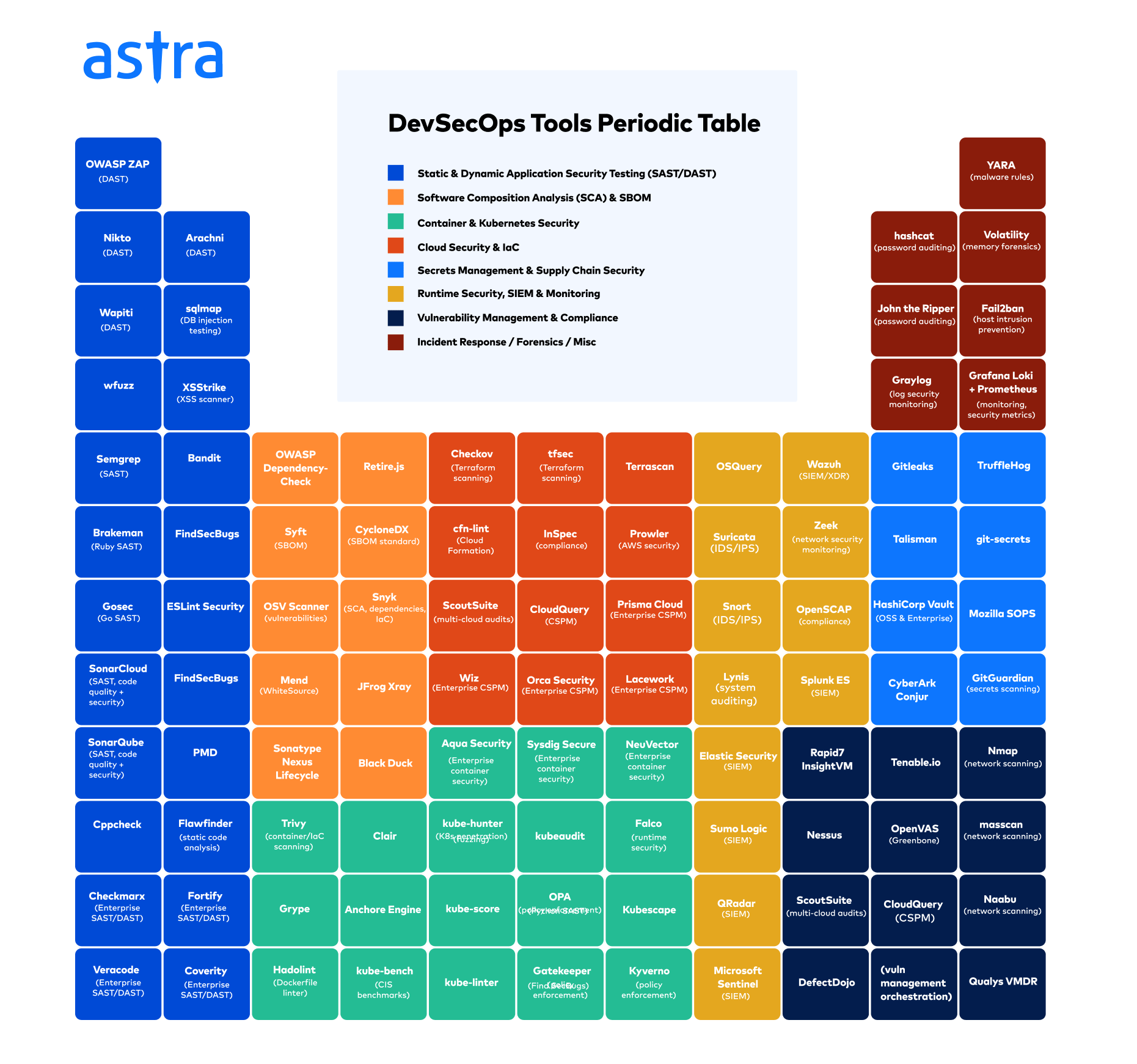
DevSecOps Tools Matrix
Final Thoughts
Simply put, choosing the right DevSecOps tool is more than just evaluating features – it’s about aligning the DevSecOps tools with your team’s culture and goals. Solutions like GitLab, known for its strong CI/CD integrations, excel when automation is central to your development process.
But beyond automation, your tool must evolve with your team. For instance, Astra Security’s automated pentesting scales seamlessly as your infrastructure grows, offering proactive security without interrupting development speed.
The ideal tool doesn’t just tick boxes on a feature list, rather, it complements your existing workflows, allowing your team to move fast without compromising security. Tools like CheckMarx go beyond code, securing your infrastructure alongside your applications, which is critical for teams aiming to prevent vulnerabilities at every level. Choose an enabler, not an obstacle.
FAQs
What are DevSecOps tools?
DevSecOps tools are software solutions that integrate security into every stage of the development and operations pipeline. They automate code scanning, vulnerability detection, compliance checks, and runtime monitoring, enabling teams to build, deploy, and maintain secure applications without compromising delivery speed.
What are SAST and DAST tools?
SAST (Static Application Security Testing) analyzes source code for vulnerabilities without executing it, enabling early detection. DAST (Dynamic Application Security Testing) tests running applications, identifying runtime flaws. Both enhance security by detecting threats at different software development stages.
What is DevSecOps vs DevOps?
DevOps focuses on collaboration between development and operations for faster software delivery, while DevSecOps integrates security throughout the development lifecycle. DevSecOps ensures continuous security testing, compliance, and risk mitigation, making security a shared responsibility.
What are the three pillars of DevSecOps?
The three pillars of DevSecOps—people, processes, and technology—ensure security is integrated into development. Skilled teams drive security culture, automated processes enforce compliance, and robust tools detect vulnerabilities early. Together, they create a resilient, scalable, and continuously improving security framework.