
Key Takeaways
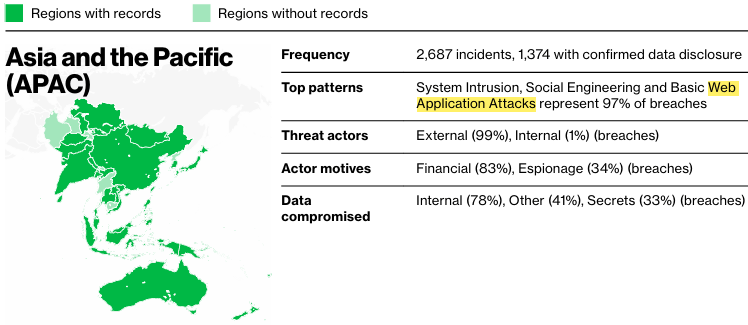
- Web applications remain one of the most targeted entry points for breaches, alongside system intrusion and social engineering attacks.
- Exploitation now begins within minutes of vulnerability disclosure, making one-time patching ineffective without continuous scanning.
- Web application scanning (DAST) tests live applications from the outside, uncovering exploitable runtime vulnerabilities static analysis often misses.
- Automated scanning enables continuous, compliance-aligned security across large web and API environments without slowing development.
- Scanners effectively detect OWASP Top 10 issues but struggle with business logic flaws, complex authentication, and modern application workflows.
- A balanced security strategy combines continuous DAST coverage with periodic expert-led pentesting for depth and accuracy.
- Modern platforms unify automation, validated findings, and human expertise to reduce false positives and accelerate remediation.
As per Verizon’s 2025 DBIR, system intrusion, social engineering, and web application attacks form:
- 74% of breaches in the Financial & Insurance sector
- 85% of breaches in the manufacturing sector
- 93% of breaches in the retail sector
- 78% of breaches in the public sector
This makes web applications one of the most common and important egress points into your business systems and customer data, and that’s why even a single undetected vulnerability here can cascade into revenue-devouring breaches, hefty compliance violations, and reputational damage that may as well take years to repair.
Modern-day web applications have a host of frameworks, APIs, and 3rd party integrations driving them; it’s almost an ecosystem in itself where each element can act as a potential attack vector that threat actors salivate for. A stat supporting this assertion is that there was a 34% increase in attackers exploiting vulnerabilities to gain initial access and cause breaches as compared to 2024.
What is Web Application Scanning?
Web application scanning, often referred to as Dynamic Application Security Testing (DAST), involves examining your running applications from the outside, as an attacker would, to uncover security weaknesses before they are exploited. Unlike static code analysis that just reads source code and doesn’t run it, web application scanners operate on applications as they run in their environment, helping you detect actual vulnerabilities, hacker-style.
Why Does it Matter?
The threat landscape in 2025 painted an alarmingly intense picture.
Just Cloudflare, on average, blocked 209 billion cyber threats each day in Q1 2024, a 86.6% y-o-y increase. CVE reports have also risen by over 15%, from 113 per day in 2024 to 131 in 2025. Moreover, attackers are seeking instant gratification, as exploitation attempts were observed just 22 minutes after the proof-of-concept code became available.
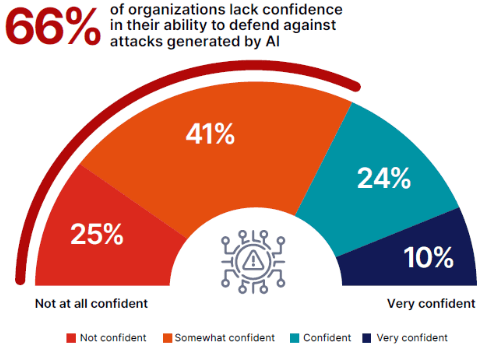
The impact? 56% of organizations experienced a breach in the last 12 months, with 21% unsure whether they’ve had one, highlighting critical visibility gaps. Secondly, the advent of AI has left over 2/3 of companies either unconfident or only partially confident in their AI security capabilities. (Source: Cybersecurity Insiders)
Tighter Compliance Requirements
Two recent examples of the same are:
- Europe’s Digital Operational Resilience Act (DORA), that requires financial entities to report serious ICT incidents within 4 hours.
- Revised HIPAA regulations require agile, robust encryption and access-control measures.
Web application scanning, thus, isn’t just about finding vulnerabilities. It’s now become a crucial survival element in an environment where attackers exploit weaknesses within minutes, and regulatory violations can bring your business to its knees.
What are the Benefits of Web Application Scanning?

Web app scanning is a crucial step toward achieving complete, continuous visibility over all your internet-facing assets. Instead of learning about your vulnerabilities from freaked-out stakeholders and irate customers, web application scanning helps you detect common issues such as injection flaws, broken access control, and exposed APIs early in the lifecycle.
Secondly, automated web app scanning means you can cover your entire tech stack, hundreds of applications and APIs on the current cadence, without heavily loading up your security team. Automated scans also align with frameworks such as PCI‑DSS, SOC 2, and GDPR, which require you to run regular VAPTs and demonstrate your remediation readiness and dexterity.
Thirdly, these continuous scans, and thus the identified and fixed vulnerabilities, act as a treasure trove of what-not-to-dos. Feedback is tied to specific endpoints and parameters, facilitating issue resolution during sprints rather than firefighting in production.
What are the Challenges Associated with Web Application Scanning?
Now you can’t expect any web application scanner to be a silver bullet; they often fall prey to false positives (complex applications with heavy customization), miss business logic flaws, chained attack paths, and other issues that require deep knowledge of workflow or domain rules. They may be improving each day, with AI/ML further empowering them, but there are still areas where manual penetration testing and assessment capabilities are required.
On the operational side, configuring authentication, handling CAPTCHA, and safely scanning production environments without hindering performance are key areas for improvement. Some crawlers struggle to fully explore legacy apps or highly interactive SPAs, leading to partial coverage.
Without a clear remediation process and ownership model, instead of getting fixed, your scan reports are most likely to pile up in your dashboards, turning “continuous scanning” into continuous noise, void of improvement.
What is the Difference Between Web App Scanning & Web App Pentesting?
| Aspect | Web Application Scanning (DAST) | Penetration Testing (Manual + Expert) |
|---|---|---|
| Approach | Automated, systematic testing using predefined attack patterns and payloads | Manual, human-driven approach with creative exploitation techniques and business logic analysis |
| Scope | Focuses on known, commonly detected vulnerabilities (OWASP Top 10, CVEs) | Comprehensive assessment including unknown vulnerabilities, chained exploits, business logic flaws, and zero-days |
| Frequency | Continuous or daily; easily integrated into CI/CD pipelines for ongoing monitoring | Quarterly to annually; labor-intensive and resource-dependent |
| Time Required | Minutes to hours per scan; rapid turnaround | 1–3 weeks per engagement; slower due to manual deep-dive analysis |
| Cost | $5,000–$15,000/year for tool licensing; minimal per-scan operational costs; unlimited scans once deployed | $5,000–$30,000 per assessment (average $12,500); $2,000–$10,000/month for continuous PTaaS |
| Detection | Pattern and signature-based; identifies known vulnerabilities through automated probing | Context-aware and adaptive; discovers business logic flaws, authentication bypasses, chained vulnerabilities |
| Coverage | ~60–70% of vulnerabilities; limited to publicly accessible and testable components | ~95%+ coverage; includes runtime behavior, integration flaws, and creative attack chains |
| Best For | Organizations needing continuous, scalable monitoring of web applications; DevOps/agile teams requiring rapid feedback; broad coverage across many assets; compliance baseline checks |
When Should You Use Each?
| Use Case | Recommended Approach | Rationale |
|---|---|---|
| Continuous security monitoring in CI/CD | DAST (Web App Scanning) | Fast feedback loop, automation-friendly, cost-effective per scan |
| Pre-deployment quality gate | DAST + Manual Review | Catch common issues automatically, then manual testers verify critical findings |
| Annual compliance audit (PCI-DSS, HIPAA, SOC 2) | Penetration Testing | Auditors expect expert-led, comprehensive assessment with chained exploit validation |
| Rapid vulnerability detection at scale | DAST | Scan hundreds of applications daily; perfect for large portfolios |
| Complex, business-critical application | Penetration Testing (PTaaS) | Manual testers understand your business logic and can uncover sophisticated attack paths |
| Startup with limited budget | DAST (free/open-source tools) | Start with OWASP ZAP or similar; add manual testing for high-risk modules |
| Enterprise with both speed and depth needs | Hybrid: DAST + Quarterly/Annual Pentesting | DAST handles continuous baseline; pentesting validates and uncovers edge cases |
[CTA] – Turn testing into outcomes, not just reports. Combine continuous web app scanning with expert-led pentesting to get both speed and depth in your security program.
Real World Example
In 2024, security researchers discovered a SQL injection vulnerability in FlyCASS, a third-party web-based service used by airlines to manage the Known Crewmember (KCM) program and the Cockpit Access Security System (CASS). The researchers stated that “anyone with basic knowledge of SQL injection could log in to this site and add anyone they wanted to KCM and CASS, allowing themselves to both skip security screening and then access the cockpits of commercial airliners”.
Here’s what a vulnerable flight search endpoint might look like:
# Vulnerable flight search API endpoint
@app.route('/api/search-flights')
def search_flights():
    departure = request.args.get('departure')
    destination = request.args.get('destination')

    # VULNERABLE: Direct string concatenation in SQL query
    query = f"""
        SELECT flight_number, departure_time, available_seats, price
        FROM flights
        WHERE departure_airport = '{departure}'
        AND destination_airport = '{destination}'
    """

    results = database.execute(query)
    return jsonify(results)
A scanner would detect this vulnerability by injecting malicious payloads:
# Scanner's test payload
test_payload = "' OR '1'='1' UNION SELECT employee_id, name, ssn, salary FROM crew_members --"

# Request that scanner sends
response = requests.get(
    'https://airline.com/api/search-flights',
    params={
        'departure': 'JFK',
        'destination': test_payload
    }
)

# If the response contains crew member data instead of flight info,
# the scanner confirms SQL injection vulnerability exists
The secure implementation uses parameterized queries:
# SECURE: Using parameterized queries
@app.route('/api/search-flights')
def search_flights():
    departure = request.args.get('departure')
    destination = request.args.get('destination')

    # Parameterized query prevents SQL injection
    query = """
        SELECT flight_number, departure_time, available_seats, price
        FROM flights
        WHERE departure_airport = ?
        AND destination_airport = ?
    """

    results = database.execute(query, (departure, destination))
    return jsonify(results)
How Web Application Scanning Works?
Understanding how web application scanning works helps you maximize its effectiveness and best define and implement your web application security roadmap. Below, we discuss, in brief, some of its most important elements.
1. Discovery and Crawling
The web app scanner first crawls your web application, detailing all possible paths a user could take and how their journey would be affected by links and other navigational transitions. For this, it uses a powerful browser-based crawler to scan Single Page Applications (SPAs) and JavaScript-heavy websites, capturing API endpoints and automated OpenAPI fuzzing.
However, crawler-based tools have certain limitations as well. Firstly, since traditional crawlers only capture the initial HTML, they often cannot render most REACT apps and modern front-end frameworks, which dynamically generate content via JavaScript.
Moreover, the heavy reliance of modern apps on user interactions such as clicks, scrolls, and form submissions (which trigger content rendering) makes it difficult for automated crawlers to discover all application states and hidden endpoints, since they must execute complex interaction sequences, which reduces their efficiency as vulnerability detectors.
2. Vulnerability Detection
Once the scanner maps your application, it begins active testing. The scanner collects all input vectors, identifies potential injection points, and executes attack payloads against target applications to test for the most prevalent web application security vulnerabilities. This includes testing for SQL injection, XSS, CSRF, authentication flaws, and dozens of other vulnerability types.
3. Validation
Most scanners use out-of-band detection to minimize false positives and collect proof along the way. They capture payload execution results and gather evidence, including HTTP request/response pairs with highlighted proof, screenshots, and extracted sensitive data. A scanner should be able to confidently tag identified incidents as vulnerabilities to reduce manual burden and flag cases it’s doubtful about.
4. Reporting
Scanners today are capable of delivering clear vulnerability details that showcase impact along with a technical narrative on how the flaw was detected and remediation advice. Reports typically categorize findings by risk and severity, confirmed vulnerability, potential vulnerability, and information gathered, which helps teams best plan and execute remediation efforts.
5. Rescanning and Verification
Post-patching, rescanning verifies your fixes worked correctly and haven’t introduced new issues. Schedule regular scans to catch newly discovered vulnerabilities or issues introduced by code changes.
What Vulnerabilities Can Web Application Scanning Detect?
Web application scanners identify known vulnerabilities outlined in industry standards like OWASP Top 10, SANS 25, and NIST guidelines. Understanding what scanners detect helps you appreciate their value in protecting your applications. The OWASP Top 10 represents the most critical security risks that modern web applications face.
OWASP Top 10 Vulnerabilities
| Vulnerability | Definition | Impact |
|---|---|---|
| A01:2021 - Broken Access Control | Users gain access to resources they shouldn't due to improper access restrictions enforcement | View, modify, or delete unauthorized data, access other users' accounts, or perform administrative actions without proper authorization. |
| A02:2021 - Cryptographic Failures | Failures that expose sensitive data due to weak encryption, missing encryption, or improper key management | Exposes sensitive information like passwords, credit card numbers, health records, and personal data to unauthorized parties, leading to identity theft and compliance violations. |
| A03:2021 - Injection Attacks | Unauthorized user input is sent to an interpreter as part of a command or query, allowing execution of malicious commands or access unauthorized data | Enables attackers to bypass authentication, steal data, modify or delete databases, execute arbitrary commands, and potentially take complete control of systems. |
| A04:2021 - Insecure Design | Security weaknesses in the app architecture, focusing on design flaws rather than implementation bugs | Fundamental security gaps that cannot be fixed through patching alone. Require architectural changes |
| A05:2021 - Security Misconfiguration | Poorly defined, implemented or maintained security settings—using default configurations or displaying overly verbose errors | Unauthorized access, sensitive information through error messages, leveraging unpatched systems and features. |
| A06:2021 - Vulnerable and Outdated Components | Using libraries, frameworks, or modules with known vulnerabilities or that lack security updates | Exploit vulnerabilities to orchestrate attacks, leaving thousands of sites vulnerable—in case a popular component is compromised. |
| A07:2021 - Authentication and Session Management Failures | Weaknesses in authentication systems and session handling that allow for compromised passwords, keys, or session tokens | Access to user accounts, compromise entire systems using admin accounts, enable data theft, fraud, and system takeover. |
| A08:2021 - Software and Data Integrity Failures | Failures to verify the integrity of software updates, critical data, and CI/CD pipelines, allowing malicious code injection | Introduce backdoors, malware, or compromised dependencies that can lead to supply chain attacks and widespread system compromise. |
| A09:2021 - Security Logging and Monitoring Failures | Insufficient logging, detection, monitoring, and incident response capabilities | Attackers exploit this gap to maintain persistence, move laterally, and extract data without detection—increasing breach impact and recovery time. |
| A10:2021 - Server-Side Request Forgery x(SSRF) | When an API fetches a remote resource without validating the user-supplied URI, enabling attackers to coerce the application to send requests to unexpected destinations | Allows attackers to bypass firewalls, access internal systems, retrieve sensitive data from cloud metadata services, or scan internal networks from trusted servers. |
Additional Critical Vulnerabilities
Beyond the OWASP Top 10, recent research has shed light on escalating threats. Claranet’s 2024 research found 2,570 instances of Cross-Site Scripting (XSS) across its tested applications, making it one of the most common vulnerabilities in the last half a decade. It also discovered 1,032 instances of outdated JavaScript libraries that could enable large-scale XSS, Denial-of-Service attacks, and the leakage of sensitive and trust-jeopardizing information.
The AI Threat Landscape
With the advent and assimilation of AI into every budding tech stack, attackers have also learnt to use this technology to their advantage. They deploy AI to generate sophisticated injection payloads that adapt to specific LLM responses and create dynamic attack sequences that traditional defenses just can’t intercept, let alone remediate.
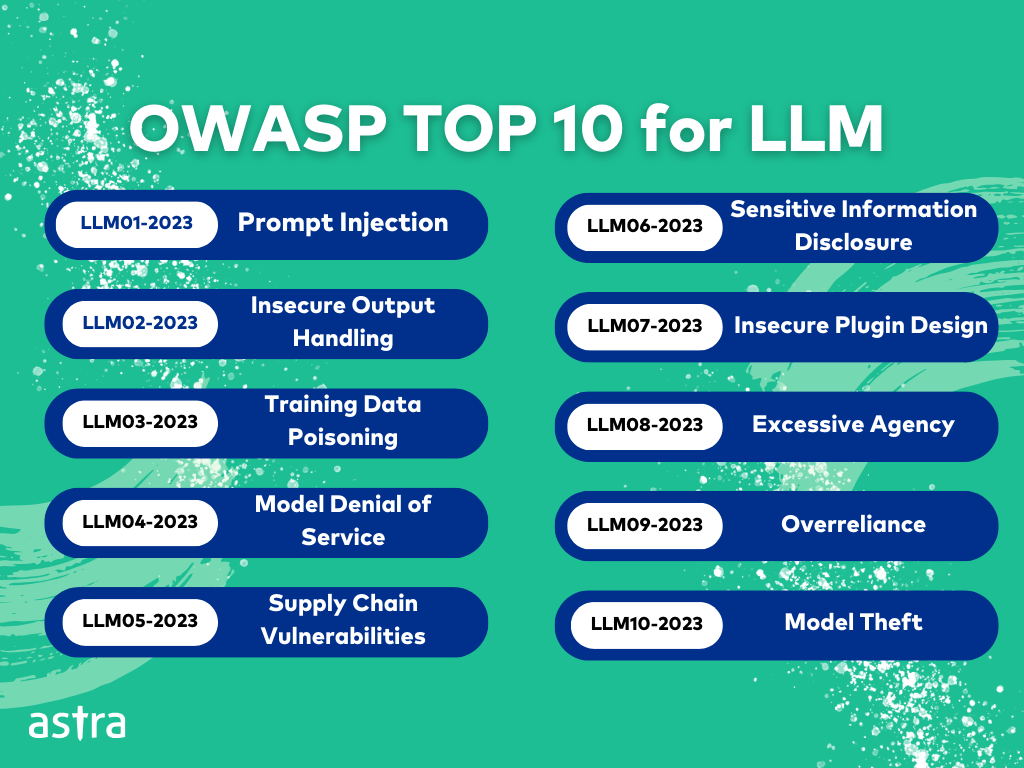
Besides the above, AI-powered applications have thus introduced a new diaspora of vulnerabilities. The OWASP Top 10 for Large Language Model Applications identifies the most impactful of these critical risks, such as prompt injection attacks, in which crafted inputs manipulate LLM behavior, data poisoning, which impairs model accuracy, and unauthorized model theft.
As organizations revel in the integration of AI capabilities into their web applications, scanners also need to evolve so as to detect these emerging AI-specific vulnerabilities beyond the traditional web application risks.
Top 7 Web Application Scanning Tools in 2026
1. Astra Security
G2: 4/6/5 (161 reviews)
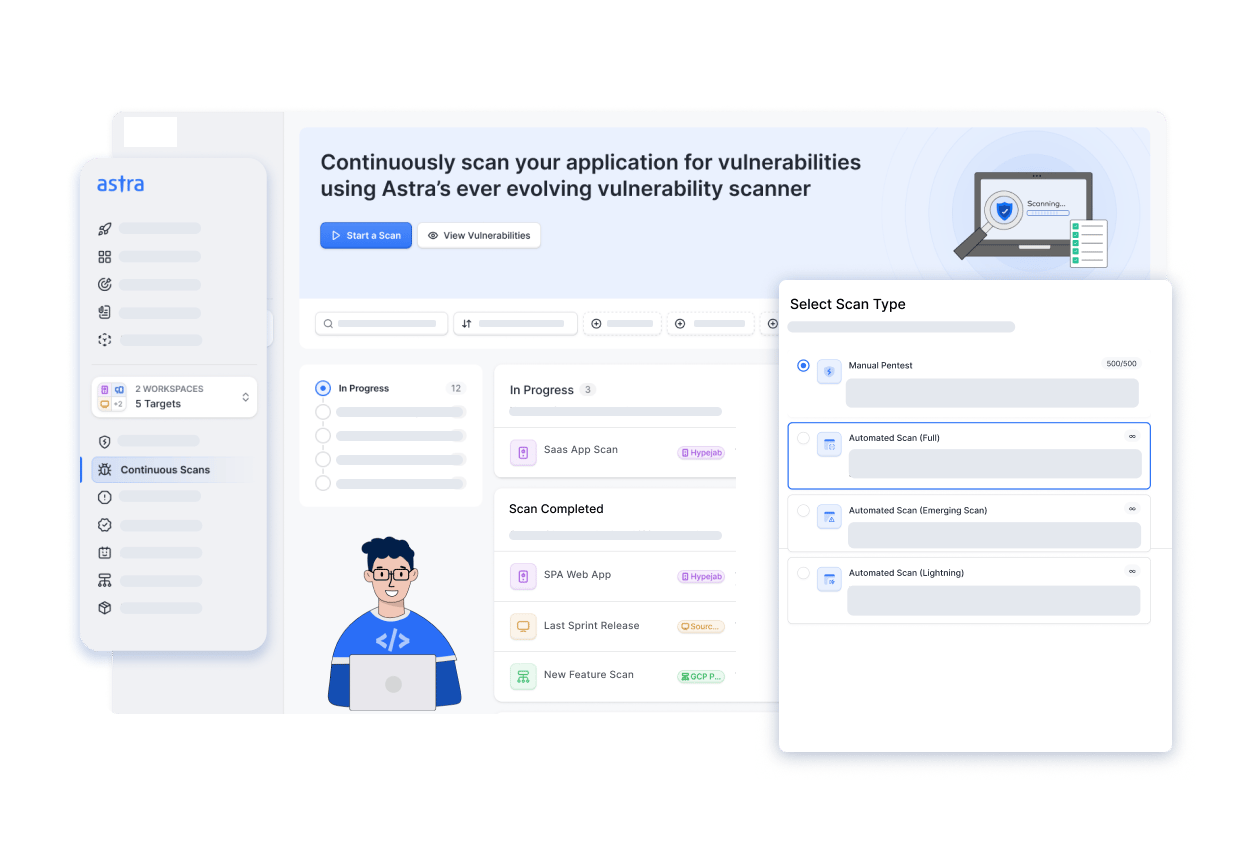
We’ve built our pentest and DAST platforms around industry standards like OWASP, NIST, and the SANS25 to run over 9300 tests and pinpoint new, emerging, and existing vulnerabilities.
Updated every fortnight, our tool also scans the API integrations and calls your application relies on to ensure complete safety against open ports and subdomain takeover attacks.
We guarantee <1% false positives via vetted scans, CXO-friendly dashboards, our multiple certified experts and an AI-powered pentest engine. Below we outline some of our key features for your perusal:
- Scanner Capacity: Run 10,000+ tests on web applications and API
- Accuracy: <1% False Positives Assured (Vetted Scans)
- Vulnerability Management: Custom detailed reports with remediation assistance and PoC videos
- Continuous Monitoring: Yes
- Compliance: GDPR, PCI-DSS, HIPAA, ISO27001, and SOC2
- Integrations: GitHub, GitLab, Jenkins, JIRA, and Slack
- Price: Plans start at $199/month
Pros
- Seamlessly integrates with your CI/CD pipeline.
- Quick turnaround with GPT-powered chatbot
- Generate custom executive and developer-friendly reports
- Offers manual penetration testing and tailored expert consultation
Cons
- Only 1-week free trial is available
2. Burp Suite Professional
G2: 4.8/5 (124 reviews)
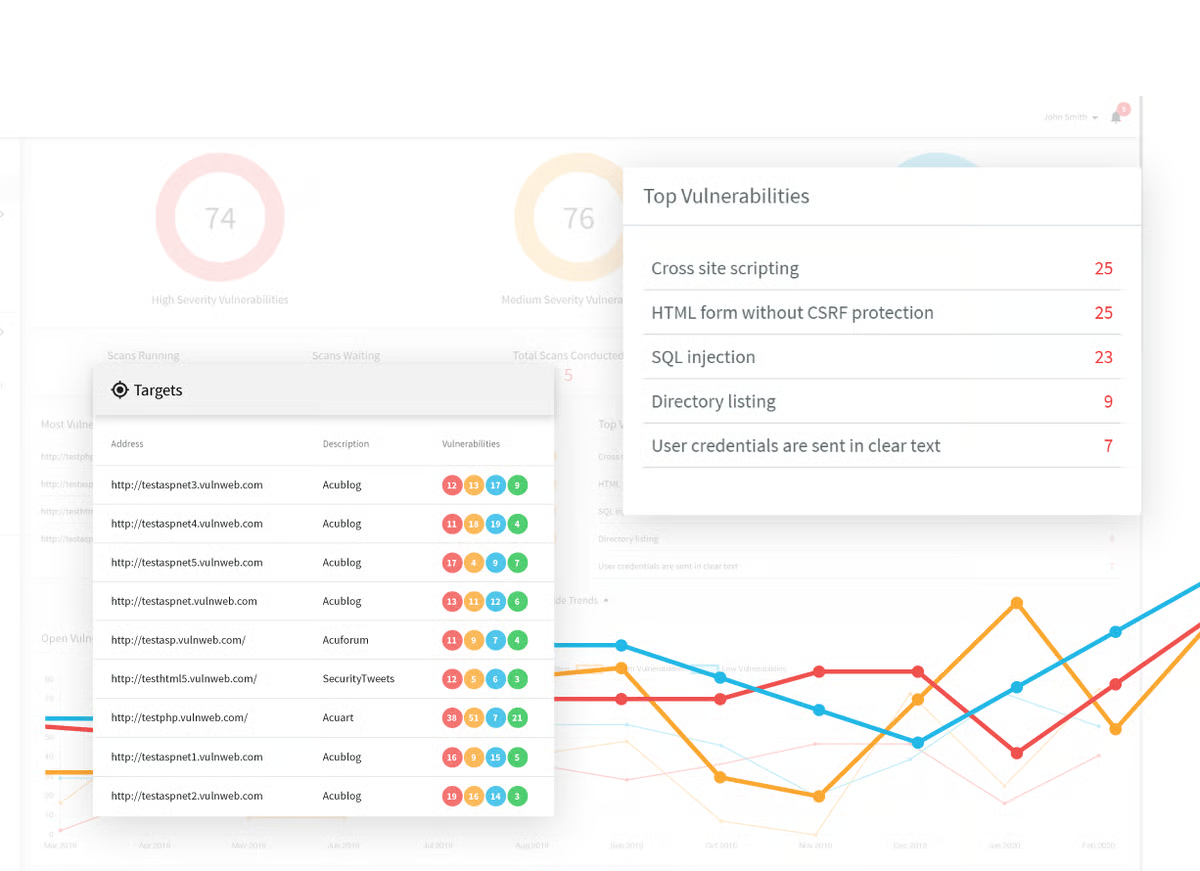
Burp Suite is the industry-standard web application security testing platform that combines automated scanning with powerful manual testing capabilities via intercepting proxy, Intruder, and Repeater tools.
Pros:
- Best-in-class manual testing features; high accuracy with contextual scanning
- Extensive API security testing support; strong community and BApp Store ecosystem
- Offers flexibility for custom exploit scenarios and advanced level testing
Cons:
- Steep learning curve; requires significant expertise to maximize effectiveness
- Expensive ($399–$5,000/year); not ideal for organizations seeking turnkey automation
- Primarily manual-focused; automation is secondary to interactive testing
3. Invicti (Netsparker)
G2: 4.6/5 (68 reviews)
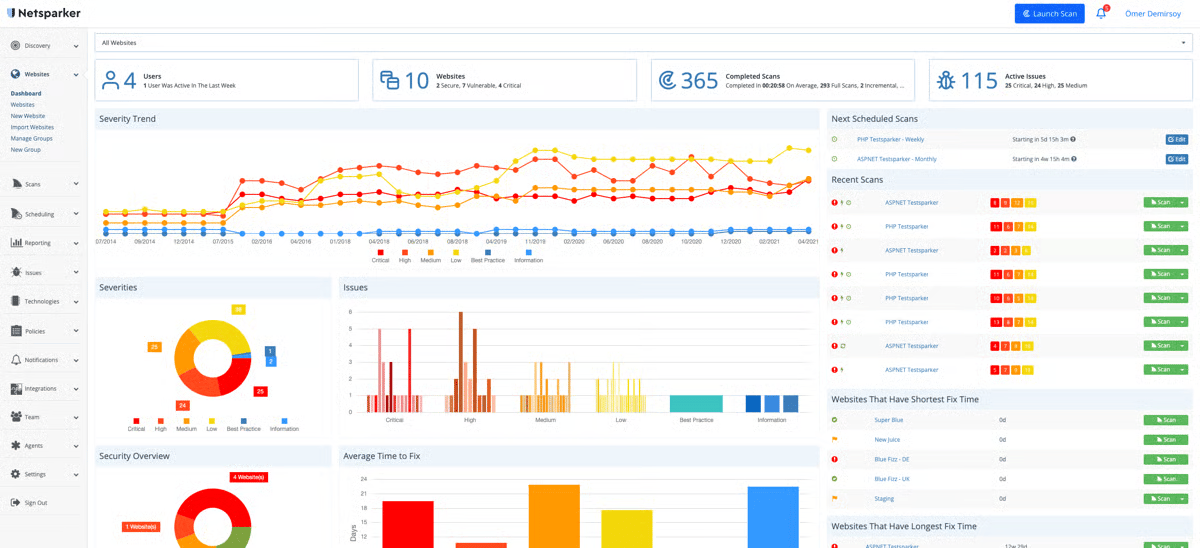
Invicti has by and by pioneered the technique of proof-based scanning that automatically validates vulnerabilities through exploitation to minimize false positives and deliver actionable findings.
Pros:
- Proof-based validation reduces false positives to <0.02%; industry-leading accuracy
- Strong automation and continuous scanning capability; minimal configuration required
- Excellent for DevSecOps; integrates seamlessly into CI/CD pipelines
Cons:
- Higher cost ($5,000–$30,000/year); requires budget commitment
- Less flexible for advanced manual testing compared to Burp Suite
- Still requires in-house expertise or services to interpret complex findings
4. ZAP by CheckMarx
G2: 4.7/5 (12 reviews)
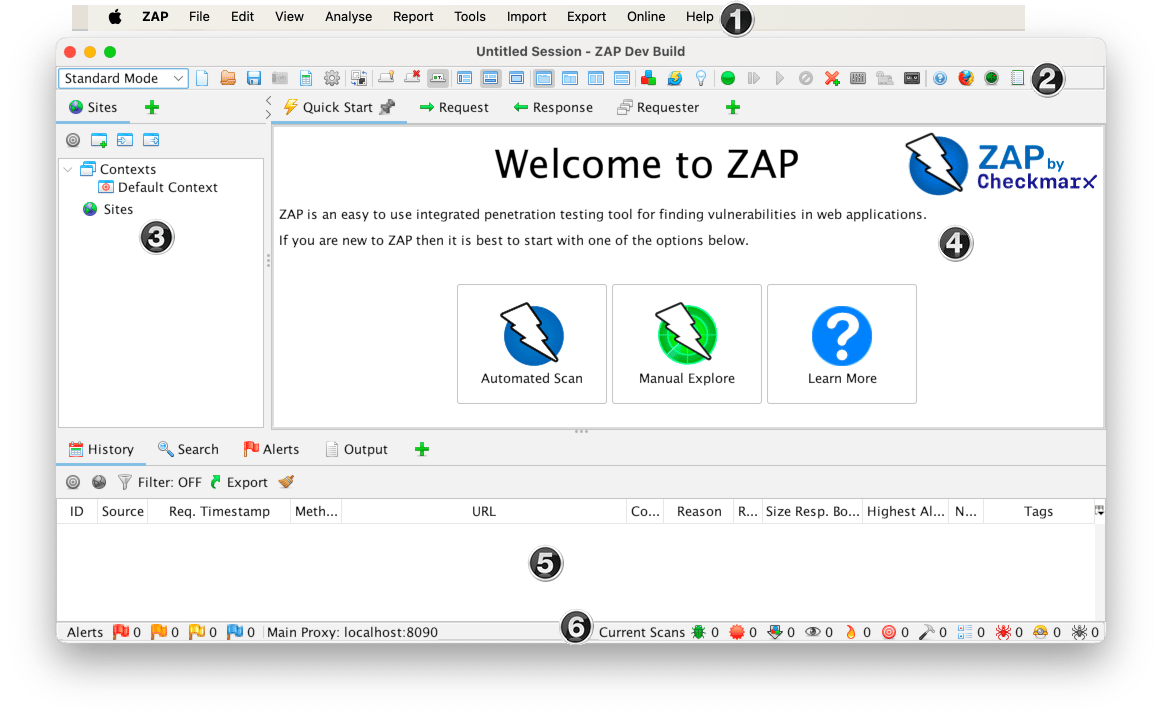
ZAP is a free, open-source DAST scanner with both passive and active scanning modes along with scriptable automation, and a robust community that drives its development.
Pros:
- Completely free; no licensing costs; perfect for budget-conscious teams
- Strong automation via YAML-based scripting; excellent CI/CD integration
- Active community support; extensive documentation and plugins
Cons:
- Higher false positive rates than commercial tools
- Steeper learning curve for non-security teams; less user-friendly than other commercial alternatives
- Limited advanced pentesting features compared to the Burp Suite
5. Acunetix
G2: 4.1/5 (105 reviews)
Acunetix is a fully automated DAST scanner with advanced crawling capabilities, particularly strong for JavaScript-heavy SPAs and API security testing.
Pros:
- Excellent for complex, modern web applications with heavy JavaScript rendering
- Comprehensive API vulnerability detection; strong GraphQL support
- Fast scan times with good coverage of OWASP Top 10
Cons:
- Moderate false positive rates; still requires manual validation
- Cost: $2,500–$15,000/year; mid-range pricing
- Less flexible than Burp Suite for custom attack scenarios
6. Qualys Web App Scanning (WAS)
G2: 4.5/5 (20 reviews)
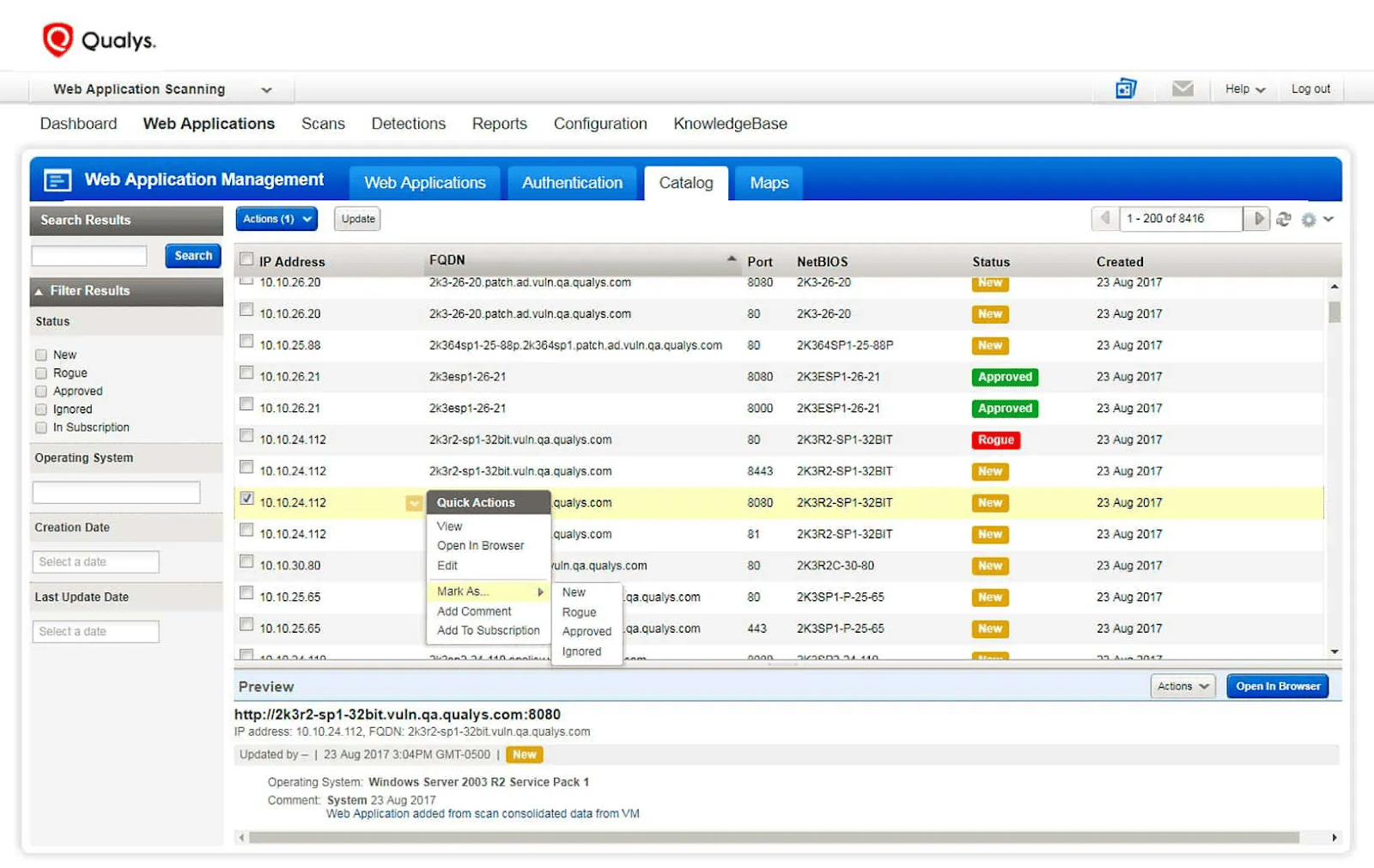
Qualys WAS is a cloud-based, enterprise-grade scanning platform providing continuous monitoring across hundreds of applications with centralized reporting and compliance mapping.cloudeagle
Pros:
- Cloud-native; scales easily across large application portfolios
- Excellent compliance reporting (PCI-DSS, HIPAA, SOC 2); built-in audit trails
- Managed service model; minimal on-premises infrastructure required
Cons:
- Enterprise pricing; typically $10,000+/year; best suited for large organizations
- Less transparent about detection methodology; vendor-dependent approach
- Requires strong network connectivity for cloud-based scanning
Comparison Of Top 3 Tools
| Aspect | Burp Suite Professional | Invicti | Astra Security (PTaaS+ DAST) |
|---|---|---|---|
| Type | Manual + Automated Testing | Automated DAST + Proof-Based | Managed PTaaS (Scanner + Expert) |
| False Positive Rate | Medium (15-20% with tuning) | <0.02% (Proof-Based) | <1% (Proof-Based + Expert Review) |
| Coverage | ~75% (manual + automated) | ~70% (automated) | ~95%+ (automated + expert validation) |
| Thousands of Security Test Cases | ✓ Limited to standard checks | ✓ Comprehensive DAST coverage | ✓✓ Thousands + custom scenarios |
| Seamless CI/CD Integration | ✓ Requires manual scripting | ✓ Strong native integration | ✓✓ Native integration + intelligent scheduling |
| API Security Excellence | ✓ Good (with extensions) | ✓ Strong API scanning | ✓✓ API-focused design + expert validation |
| Executive-Friendly Dashboards | ✗ Technical-focused; requires interpretation | ✓ Good reporting | ✓✓ Business-context reporting; risk prioritization |
| AI-Powered Remediation Assistant | ✗ No | ✓ Emerging | ✓✓ AI-driven fix guidance + expert recommendations |
| Intelligent Scan Scheduling | ✗ Manual scheduling | ✓ Basic automation | ✓✓ Risk-based + deployment-aware scheduling |
| Compliance Made Simple | ✓ Reports available; manual mapping | ✓ Good compliance mapping | ✓✓ Automated compliance reporting; audit-ready evidence |
| Cost | $399–$5,000/year | $5,000–$30,000/year | Plans start at $199 |
| Best For | Security experts; manual testing | DevSecOps; automation focus | Organizations wanting outcomes, not just scan data |
| Validation Model | Manual verification (high effort) | Automated proof-based | Automated proof + expert human review |
| Mean Time-to-Remediation | 2–4 weeks (due to false positives) | 1–2 weeks | 3–5 days (verified findings only) |
Final Thoughts
The end goal is thus not to collect more vulnerability reports but to reduce real risk faster. That entails choosing an approach, and often a partner, that combines automated discovery, proof‑based validation, human insight, and compliance‑ready reporting into a single, precise, and accurate workflow.
If your current tool/s leave developers drowning in false positives or your security team guessing what to fix first, you need to rethink your strategy. The need of the hour is to bring together continuous web app scanning, expert validation, and AI-infused pentesting to turn testing from a checkbox into a measurable engine that creates a resilient, agile security posture that scales with your business.
End your read with action, not just awareness. Turn continuous web app scanning and expert validation into a measurable and repeatable reduction in real-world breach risk. Schedule your demo now.
FAQs
1. How often should I perform web application scans?
a. Development/staging: Daily via CI/CD integration.
b. Pre-production: Weekly. Production: At least monthly, ideally weekly.
Besides that, conduct immediate scans before major releases and post-incidents. This ensures real-time vulnerability visibility as your code evolves.
2. What’s the difference between web application scanning and penetration testing?
Scanning is mostly automated, continuous, and focuses on known vulnerabilities (such as OWASP, covering approx. 60–70%) while pentesting has manual elements, is comparatively slower, conducted periodically and catches unknown risks, business logic flaws, etc. (95%+ coverage).
3. Can web application scanners detect all security vulnerabilities?
No. Scanners primarily catch OWASP Top 10 issues (60-70%). They are unable to detect business logic flaws, context-specific authorization bypasses, complex attack chains, and AI-specific threats. For this, you need manual pentesting and expert guidance.
4. Will scanning impact my production application’s performance?
Aggressive scanning at times impacts performance. So, try to schedule your scans during off-peak hours, use rate limiting, configure the intensity of your scans, and test in staging first. Modern tools let you adjust the request frequency and timing so as to minimize its impact on your production.
5. What should I look for when choosing a web application scanner?
Evaluate based on:
a. False positive rate (proof-based preferred)
b. Coverage of OWASP Top 10 + APIs
c. CI/CD integration eased.
d. Compliance support (GDPR, PCI-DSS, HIPAA)
e. Reporting quality
f. Cost vs. scale
Consider a hybrid: automated scanning + expert validation